
Inspiring
January 16, 2024
Question

New Dimension tool Bug

  • January 16, 2024
  • 1 reply
  • 1338 views

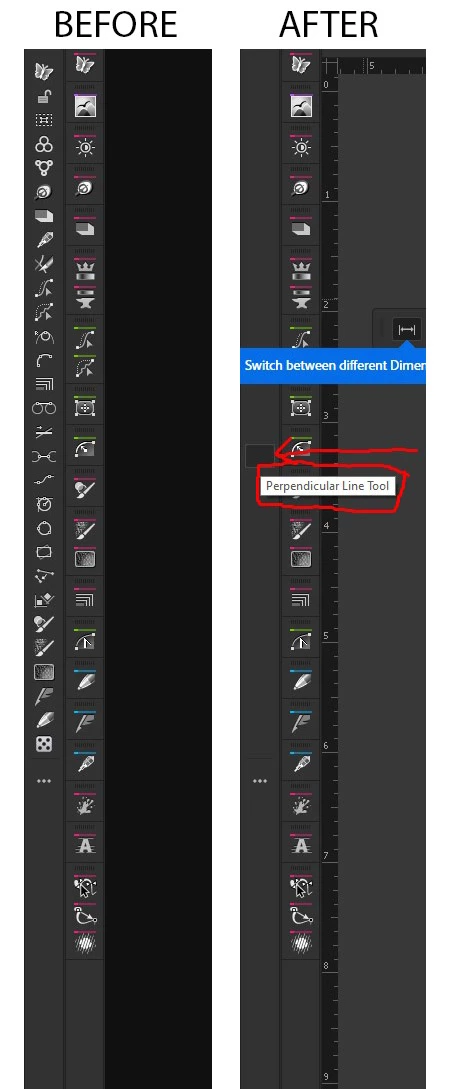
I have a custom toolbar.  If I select this new dimension tool, it instantly wipes out that custom toolbar.  It appears that all the tools are actually still there, but invisible. If I hover over the toolbar, I get a ghost image of where a tool was/is.  Resetting the workspace does not fix it.  Switching to a different workspace doesn't work either.  I dragged the dimension tool into the drawer and the same thing happened.  It wiped out my custom tool bar.  I force quit Illustrator and restarted.  This time, finally the dimension tool is gone from my toolbox.  This is my 2nd attempt at using 28.1 but was met with bugs both times. I'm finding so, so many bugs in Illustrator nowadays.


This topic has been closed for replies.

1 reply

Monika Gause
Community Expert
Community Expert
January 16, 2024

That is a bug between Illustrator and Astute Graphics tools. And the restart seems to work. But of course not a permanent solution

KuttyjoeAuthor
Inspiring
January 16, 2024

The problem is Adobe's blue, pop up mandatory explainer about the tool. After it to break the toolbar, then clicking though the mandatory explainer, then rebuilding the toolbar and saving it, the problem is solved. So the problem is not the dimension tool, it's the blue box explainer that pops up right on top of the custom toolbar.

Anshul_Saini
Community Manager
Community Manager
January 16, 2024

Hello @Kuttyjoe,


We are sorry for the trouble. This bug is known, and the Illustrator team is actively working on a solution. What happens is when you open Illustrator 28.1 for the first time and select the Dimension tool in the toolbar, the third-party plugin icons appear blank throughout that session.


The workaround is to Select Illustrator > Quit Illustrator (macOS) or File > Exit (Windows) and then reopen Illustrator.


Feel free to let me know if you have any more questions or if there's anything else I can assist you with!


Best,

Anshul Saini