
Alvaro_L_G
Participant
October 18, 2018
Answered

New feature "Edit toolbar" greyed out

  • October 18, 2018
  • 2 replies
  • 15893 views

Hi,

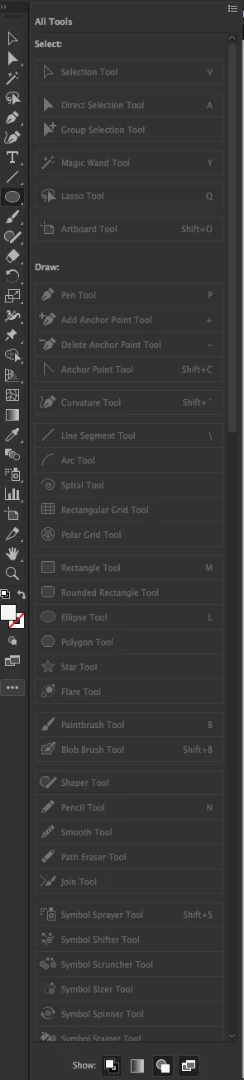
I can't use the new "Edit toolbar..." feature since all tools in the pop up are disabled. I couldn't find anything about this issue anywhere.

- MacOs High Sierra

- Illustrator 23.0

Thanks for your help!

Alvaro
This topic has been closed for replies.
Correct answer Doug A Roberts

It's not that the tools are disabled, it's that they're already in the default toolbar. They're greyed out since you can't add them, as they're already there.

if you want to make a custom toolbar, click on the menu button at the top of the panel and select 'New Toolbar'.

Or drag some tools out of the default toolbar to remove them. Or drag them around to rearrange them.

2 replies

Participant
March 22, 2020

The reason you can't see it is because you are in the "basic toolbar". You need to switch to "advanced toolbar".  To do this, click on the 3 elipse dots on the bottom of the toolbar (this is the edit toolbar menu), then, at the top right corner of the fly out window, click the 3 bars and this will give you the option to change to "advanced toolbar". This should resolve it.

Participant
January 2, 2022

Thank you! That's what did it for me!

Doug A Roberts
Community Expert
Doug A RobertsCommunity ExpertCorrect answer
Community Expert
October 18, 2018

It's not that the tools are disabled, it's that they're already in the default toolbar. They're greyed out since you can't add them, as they're already there.

if you want to make a custom toolbar, click on the menu button at the top of the panel and select 'New Toolbar'.

Or drag some tools out of the default toolbar to remove them. Or drag them around to rearrange them.

loumizhu
Participant
January 23, 2020

Hi Doug


Thanks for your reply, 

But I need to post this to the person who made this feature : 

- Why gray these out in the first place ? if someone want a new toolbar and arrange it as he please, let him do it.  He can have duplicate buttons everywhere in his screen.

Adobe never fails to disappoints


Doug A Roberts
Community Expert
Community Expert
January 23, 2020

I don't know. It seems logical to me. You wouldn't really want to add the same tool twice, so why allow it? It shows you what's already there and what isn't.