
Alvaro_L_G
Participant
October 18, 2018
Answered

New feature "Edit toolbar" greyed out

  • October 18, 2018
  • 2 replies
  • 15893 views

Hi,

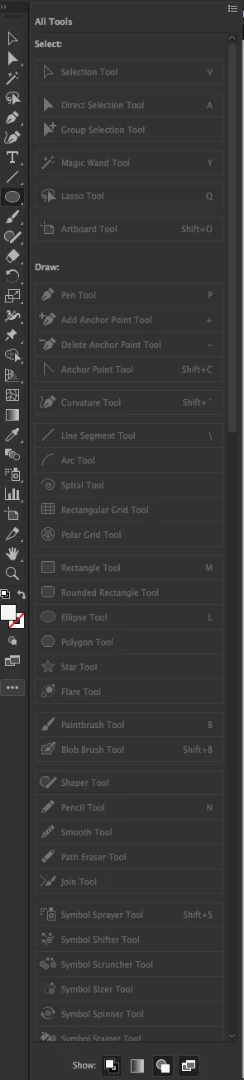
I can't use the new "Edit toolbar..." feature since all tools in the pop up are disabled. I couldn't find anything about this issue anywhere.

- MacOs High Sierra

- Illustrator 23.0

Thanks for your help!

Alvaro
This topic has been closed for replies.
Correct answer Doug A Roberts

It's not that the tools are disabled, it's that they're already in the default toolbar. They're greyed out since you can't add them, as they're already there.

if you want to make a custom toolbar, click on the menu button at the top of the panel and select 'New Toolbar'.

Or drag some tools out of the default toolbar to remove them. Or drag them around to rearrange them.

2 replies

Participant
March 22, 2020

The reason you can't see it is because you are in the "basic toolbar". You need to switch to "advanced toolbar".  To do this, click on the 3 elipse dots on the bottom of the toolbar (this is the edit toolbar menu), then, at the top right corner of the fly out window, click the 3 bars and this will give you the option to change to "advanced toolbar". This should resolve it.

Participant
January 2, 2022

Thank you! That's what did it for me!

Doug A Roberts
Community Expert
Doug A RobertsCommunity ExpertCorrect answer
Community Expert
October 18, 2018

It's not that the tools are disabled, it's that they're already in the default toolbar. They're greyed out since you can't add them, as they're already there.

if you want to make a custom toolbar, click on the menu button at the top of the panel and select 'New Toolbar'.

Or drag some tools out of the default toolbar to remove them. Or drag them around to rearrange them.

Alvaro_L_G
Participant
October 18, 2018

Thanks Doug!

That's right. I was expecting a different behaviour.  I.E. I wanted to take the shape tools (ellipse and rectangle) out of their group and have them available at a top level. I can do this by, as you suggest, creating a custom toolbar and adding it below the main one.

Thanks again for your quick answer.