
Whispering_Lark98A4
Participating Frequently
August 20, 2024
Question

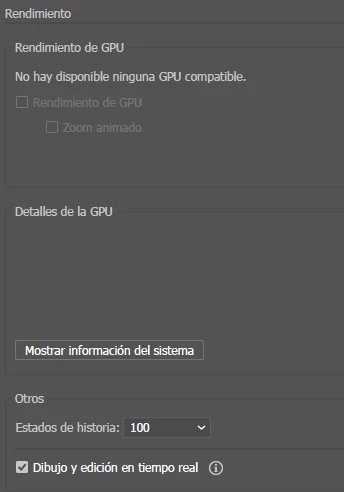
No hay disponible ninguna GPU compatible

  • August 20, 2024
  • 1 reply
  • 777 views

Tengo una Nvidia RTX 3060, he usado esta misma tarjeta en illustrator sin problemas durante mucho tiempo, el viernes mismo, use Illustrator sin problema. Al abrilo hoy no reconoce la tarjeta GPU.  En los detalles ni siquiea aparece la información de la tarjeta gráfica. He probado a actulizar los drives, he probado con drivers anteriores y con diferentes versiones de illustrator y también con las soluciones que aparecen en el foro. No consigo solucionar el problema. No puedo usar el Zoom animado y estoy demasiado acostumbrado a usarlo. Por favor, necesito una solución.
 

This topic has been closed for replies.

1 reply

Anubhav M
Community Manager
Community Manager
August 20, 2024

Hello @Whispering_Lark98A4,

We understand that encountering technical issues can be frustrating. We will need some more information to be able to help you with this scenario:


For macOS computers:


1) AISniffer file

- Close all Adobe applications

- Navigate to the Illustrator Preferences folder and copy the AiSniffer file to the desktop from this location: Users/YOUR USERNAME/Library/Preferences/Adobe Illustrator #(version Number)Settings > AISniffer


2) System Report

- You can generate it from the Apple icon > About This Mac > System Report > Save to the desktop.


For Windows computers:


1. AiSniffer file:

- Close all Adobe applications.

- Navigate to the Illustrator Preferences folder and copy the AiSniffer file to the desktop from this location: 

C:\Users\%USERPROFILE%\AppData\Roaming\Adobe\Adobe Illustrator 27 Settings\en_US\x64


2. For the System Report, kindly follow these steps:

- Please press Windows Key + the letter "R" on your keyboard to bring up the Run command window

- Type "msinfo32" in the Open field and left-click OK

- While viewing the Microsoft System Information summary, go to File, then choose Save (Please do not use Export)

- Save your MSINFO32 report as "msinfo32.nfo" on your desktop to easily locate it after. It can take up to a minute to generate a report.


Kindly upload the files to Google Drive/Dropbox/etc. and share a public link here or via DM so that we can investigate this further.


Looking forward to hearing from you.


Thanks,

Anubhav

Whispering_Lark98A4
Participating Frequently
August 20, 2024

Hi Anubhav,

Thank you for your prompt response and the detailed instructions. I have generated the requested files and am sharing the link below:

[Google Drive link]

Please let me know if you need anything else or if there are any issues with the files.

Thanks again for your help.

Best regards,
Víctor

Anubhav M
Community Manager
Community Manager
August 20, 2024

Hello @Whispering_Lark98A4,

Thanks for sharing the information. Kindly allow me some time while I check this with the team. Feel free to reach out if you have more questions or need assistance. We'd be happy to help.


Thanks,
Anubhav