Exit
  • Global community
    • Language:
      • Deutsch
      • English
      • Español
      • Français
      • Português
  • 日本語コミュニティ
  • 한국 커뮤니티
0

No puedo crear contornos

New Here ,
Feb 16, 2023 Feb 16, 2023

Buenas a todos y todas,

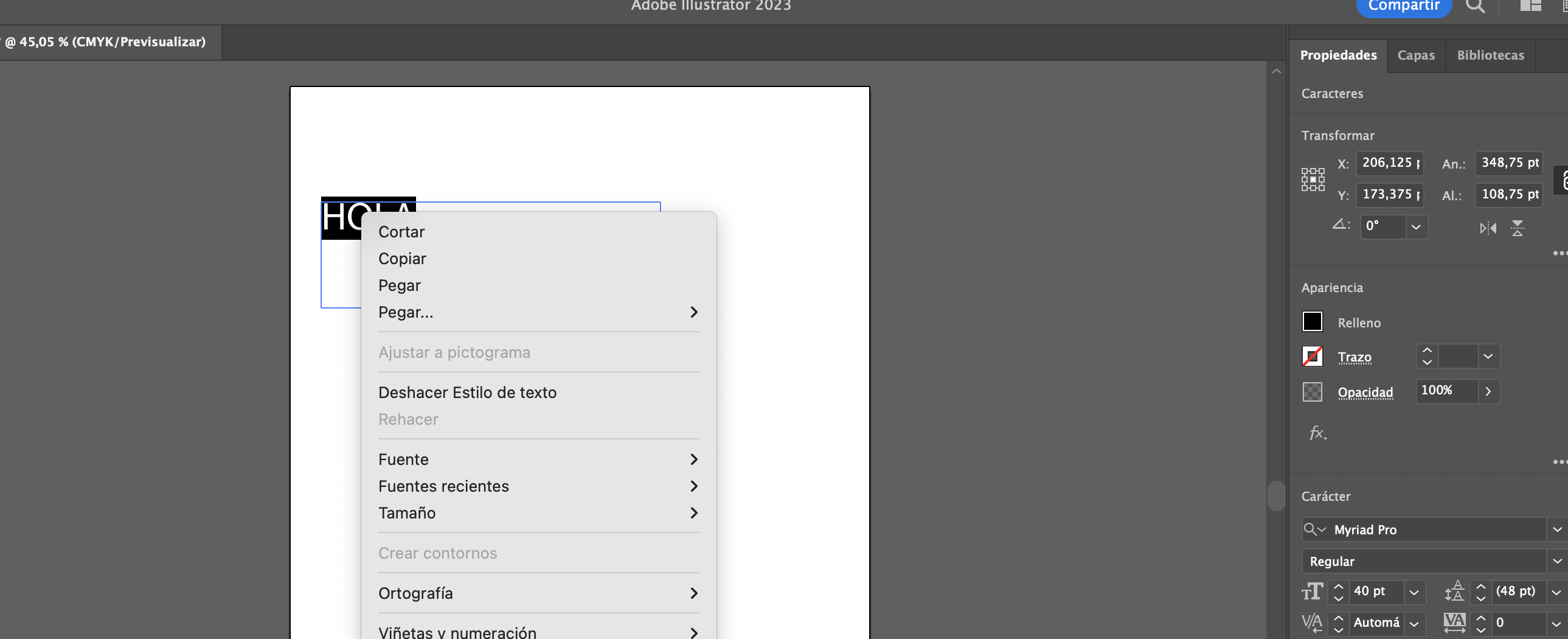
He creado una caja de texto, y como normalmente hago, he querido crear contorno pero esta vez me aparece en gris (no me deja seleccionarlo).

He probado a cambiar de carácter, he utilizado algunos de los que anteriormente había creado contornos, he abierto un nuevo archivo y probado ahí con caracteres diferentes, he cerrado del todo Illustrator y lo he vuelto a abrir... nada ha funcionado.

Hasta el día de hoy nunca había tenido problemas, nunca me había sucedido que no me dejase crear contorno.

Estoy creando un logo y necesito hacer la parte de texto contorno lo antes posible, así que os agradecería vuestra ayuda.


Adjunto una captura de imagen como ejemplo.


Un saludo y muchas gracias,


Lucía.

TOPICS
Bug , Tools , Type
10.9K
Translate
Report
Community guidelines
Be kind and respectful, give credit to the original source of content, and search for duplicates before posting. Learn more
community guidelines

correct answers 1 Correct answer

Community Expert , Feb 16, 2023 Feb 16, 2023

Looks like you still have live text selected. Deselect the text box and just select with your selection tool and then create outlines, either by selecting fromt he menu or by hitting Ctrl+Shift+O

Translate
Adobe
Community Expert ,
Feb 16, 2023 Feb 16, 2023

Looks like you still have live text selected. Deselect the text box and just select with your selection tool and then create outlines, either by selecting fromt he menu or by hitting Ctrl+Shift+O

Translate
Report
Community guidelines
Be kind and respectful, give credit to the original source of content, and search for duplicates before posting. Learn more
community guidelines
New Here ,
Feb 16, 2023 Feb 16, 2023

OMG! Thank you so much!! I feel so stupid... it's been hell of a morning and I was going crazy since I had to meet a deadline... Thank you again! Have a great day!!

Translate
Report
Community guidelines
Be kind and respectful, give credit to the original source of content, and search for duplicates before posting. Learn more
community guidelines
Community Expert ,
Feb 16, 2023 Feb 16, 2023

No worries, it happens to the best of us 😊

Translate
Report
Community guidelines
Be kind and respectful, give credit to the original source of content, and search for duplicates before posting. Learn more
community guidelines
New Here ,
Mar 26, 2025 Mar 26, 2025

Good Morning SisHamIAGD, i tryed this, but the error is there. ¿Is there another option?

Translate
Report
Community guidelines
Be kind and respectful, give credit to the original source of content, and search for duplicates before posting. Learn more
community guidelines
Community Expert ,
Mar 26, 2025 Mar 26, 2025
quote

Good Morning SisHamIAGD, i tryed this, but the error is there. ¿Is there another option?


By @luciaineszurita


What error?

Translate
Report
Community guidelines
Be kind and respectful, give credit to the original source of content, and search for duplicates before posting. Learn more
community guidelines
New Here ,
Mar 26, 2025 Mar 26, 2025
LATEST

Hello, the error message I encountered was “Text outlines cannot be
created.”

After contacting Adobe Support, I learned that the issue was caused by a
group containing both text and lines. I resolved it by ungrouping that
section, which allowed me to outline the entire design successfully.
Thanks!


*-Lucía Inés Zurita*
Diseñadora en Comunicación Visual

[personal info removed by moderator]

Translate
Report
Community guidelines
Be kind and respectful, give credit to the original source of content, and search for duplicates before posting. Learn more
community guidelines
New Here ,
Oct 02, 2024 Oct 02, 2024

nICE

Translate
Report
Community guidelines
Be kind and respectful, give credit to the original source of content, and search for duplicates before posting. Learn more
community guidelines