
Known Participant
July 6, 2018
Answered

No unity between application keyboard shortcuts?

  • July 6, 2018
  • 4 replies
  • 539 views

I've been using Photoshop for AGES, and I use keyboard shortcuts all the time. 

I'm now diving into Illustrator, and it baffles me how the two applications are so different.  Why?

Artboards don't function the same.  Layers are totally different.  Selection methods are totally different.  And the keyboard shortcuts!

Some changes I can understand.  Workflows for some applications might need to be specific to the type of work that is being done.  Elements like layers and groups in Illustrator are likely tailored to vector illustration work.  Fine.

But other differences make no sense.  Why, in Photoshop, can I press Shift+U to cycle through shape types (rectangle, rounded rectangle, ellipse, etc...) but in Illustrator, that entire paradigm doesn't work.  Some menu items only have a single item that is accessible with a keyboard shortcut, while the other items require a mouse click.  Why?

Why can I right-click on layers to get a context menu in Photoshop but in Illustratord I have to left-click on a special button after left clicking the layer I want to modify or duplicate.  WHY?

These programs are 20 years old.  And some of these discrepancies make it seem like the two product teams have never met each other.

Are there any tips or tricks from experts out there that would help me close some of these gaps?
This topic has been closed for replies.
Correct answer Katie Houghton

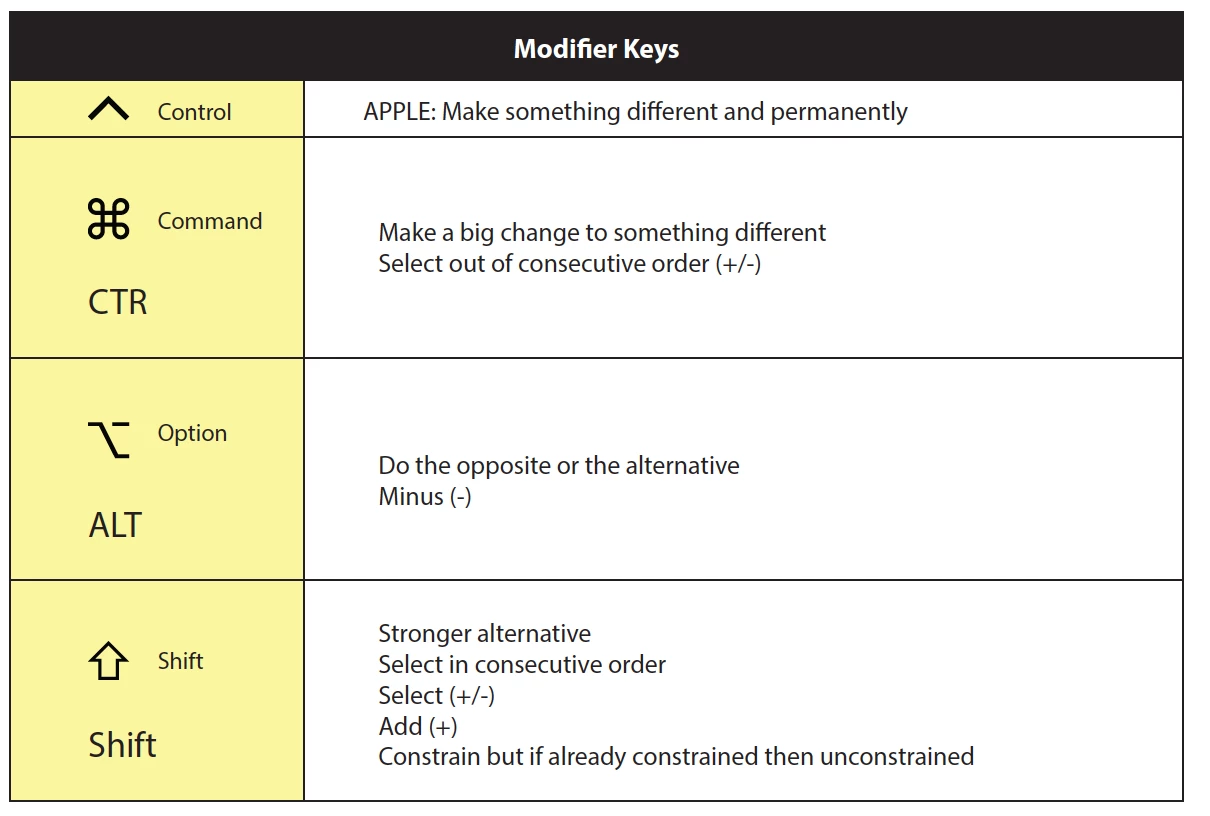
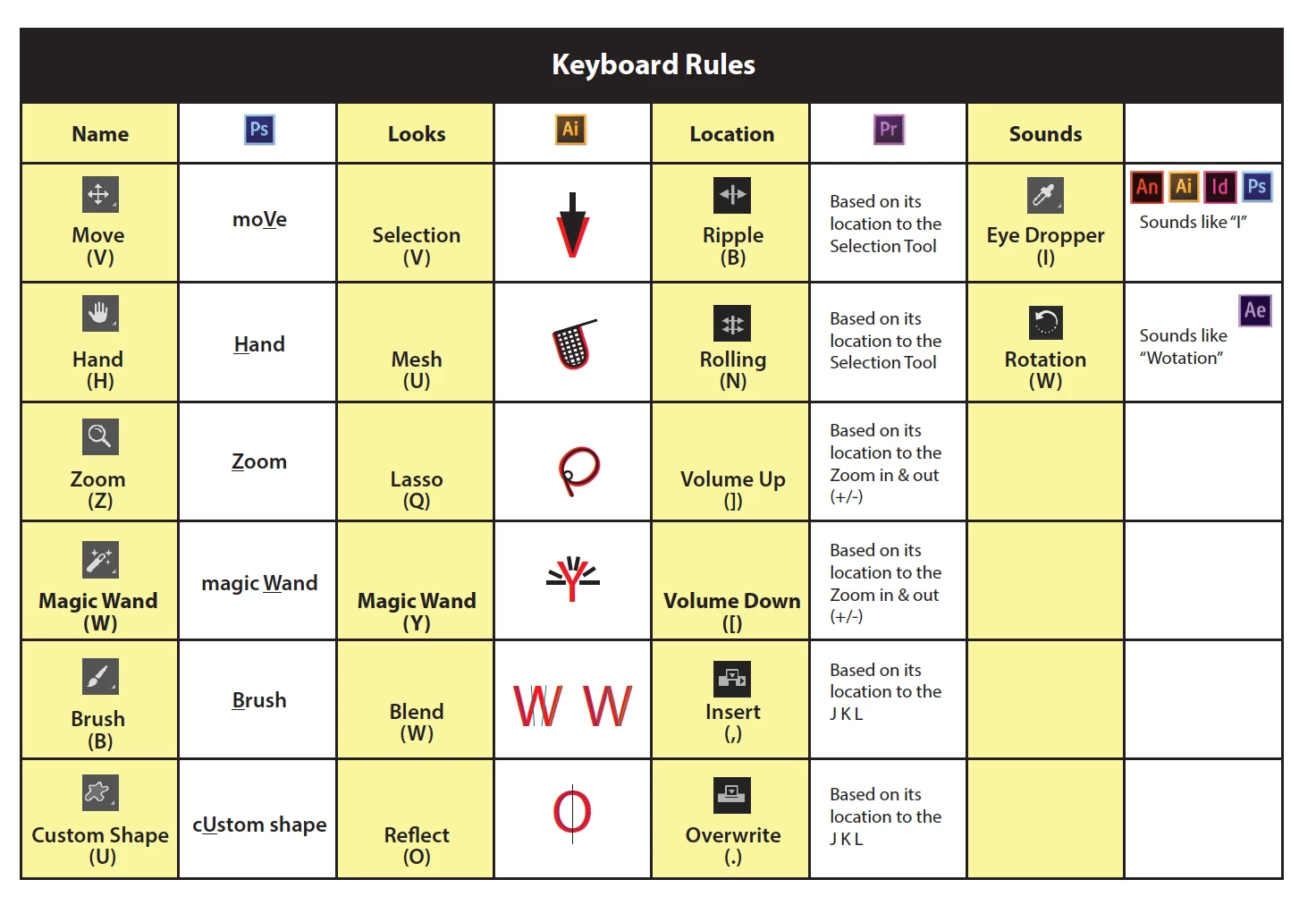
Illustrator and Photoshop are a little alike but have a lot of differences. Adobe gets keyboard shortcuts from: The name of the tool, what it looks like, Location and how it sounds. Photoshop primarily picks up from how it is spelled when Illustrator primarily picks up the tool on how it looks. Illustrator keeps each tool with a different unique identifier where Photoshop keeps all the tools in the set with the same keyboard shortcut or with a Shift an the same letter (this is changed in the preferences.) You can change the keyboard shortcuts via Edit> Keyboard Shortcuts...

Hope that helps!

4 replies

KShinabery212
Community Expert
Community Expert
July 7, 2018

I get it.  And I completely understand. 

I think we have to think about things and how the programs originated and what their original intended uses were.  Granted all over Adobe's software has kind of become linked and you can bring in elements created in other programs to other programs.  Example you can record a voice in Audition and bring it over to Character Animator.

The cool thing is I am now using Wacom devices so I can program shortcuts into my device directly. Makes a difference.  As not all shortcuts are necessary for my workflow.

I think when it comes to the two programs you just gotta learn some of the different tools.  And the cool thing is when I learn a new tool that I never felt like using.... I end up loving it and being WOWed!

Let's connect on LinkedIn. https://www.linkedin.com/in/kshinabery/
jane-e
Community Expert
Community Expert
July 7, 2018

craigm66759995  wrote

I'm now diving into Illustrator, and it baffles me how the two applications are so different.  Why?

And some of these discrepancies make it seem like the two product teams have never met each other.

Are there any tips or tricks from experts out there that would help me close some of these gaps?
Why? Because when they were developed, they were shipped at separate times and were developed by different teams. When the first version of CS came out, they began shipping them together and changed the interface and shortcuts a little to match the other a little. "Cmd + 1 is the shortcut for the Red Channel — you can't change it to 100% View!" Photoshop users (including me) screamed. Many but not all keyboard shortcuts changed to be consistent across the applications.

Why is "V" the shortcut for "Selection tool" in Illustrator? Because it makes sense in Photoshop. Why is "A" the shortcut for the Direct Selection tool? Because it's a minor tool in Photoshop and so it gets a nonsense shortcut in Illustrator.

Twenty years? These wonderful programs are both close to 30 years old.

Tips and tricks to close the gap? Take a course in Illustrator and / or watch videos at lynda.com to learn how Illustrator does work so you aren't fighting it. And ask here when you get stuck, of course!

Monika Gause
Community Expert
Community Expert
July 7, 2018

craigm66759995  schrieb

But other differences make no sense.  Why, in Photoshop, can I press Shift+U to cycle through shape types (rectangle, rounded rectangle, ellipse, etc...) but in Illustrator, that entire paradigm doesn't work.  Some menu items only have a single item that is accessible with a keyboard shortcut, while the other items require a mouse click.  Why?

You can assign your own shortcuts to menu items: Edit > Edit shortcuts

As for the layers panel: please add your vote: Contextual menu with Layers palette – same as Photoshop – Adobe Illustrator Feedback

Katie HoughtonCorrect answer
Inspiring
July 7, 2018

Illustrator and Photoshop are a little alike but have a lot of differences. Adobe gets keyboard shortcuts from: The name of the tool, what it looks like, Location and how it sounds. Photoshop primarily picks up from how it is spelled when Illustrator primarily picks up the tool on how it looks. Illustrator keeps each tool with a different unique identifier where Photoshop keeps all the tools in the set with the same keyboard shortcut or with a Shift an the same letter (this is changed in the preferences.) You can change the keyboard shortcuts via Edit> Keyboard Shortcuts...

Hope that helps!