
craigh46466222
Participant
December 14, 2023
Question

Numbered nodes in Illustrator

  • December 14, 2023
  • 1 reply
  • 335 views

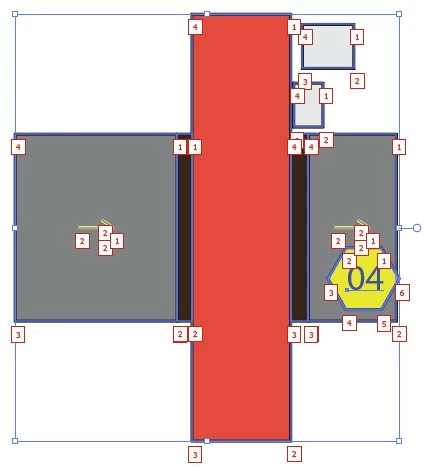
My boss somehow pushed a wrong keyboard command or something, and now all of his Illustrator files are showing up with small numbers inside of a sqare next to every single node in every shape. I'm trying to help him get rid of those without having to re-install.


Has anyone ever seen this phenomenon and know how to turn it off?
This topic has been closed for replies.

1 reply

Monika Gause
Community Expert
Community Expert
December 14, 2023

Do you have any third party plugins installed?

These do not look like artboard numbers and neither slices.

craigh46466222
Participant
December 14, 2023

Yes, he has CAD Modules installed.

craigh46466222
Participant
December 15, 2023

That's kind of a cool feature. Applications that run routing tables will let users define the #1 entry point for a tool bit to start cutting a shape as well as the in/out directions for the tool bit to take. Some applications will even number the anchor points (as shown above). Not everyone needs such capability, but it is good for cutting materials like aluminum, acrylic, etc.


Good to hear, but do you know how to turn it off?