Exit
  • Global community
    • Language:
      • Deutsch
      • English
      • Español
      • Français
      • Português
  • 日本語コミュニティ
  • 한국 커뮤니티
0

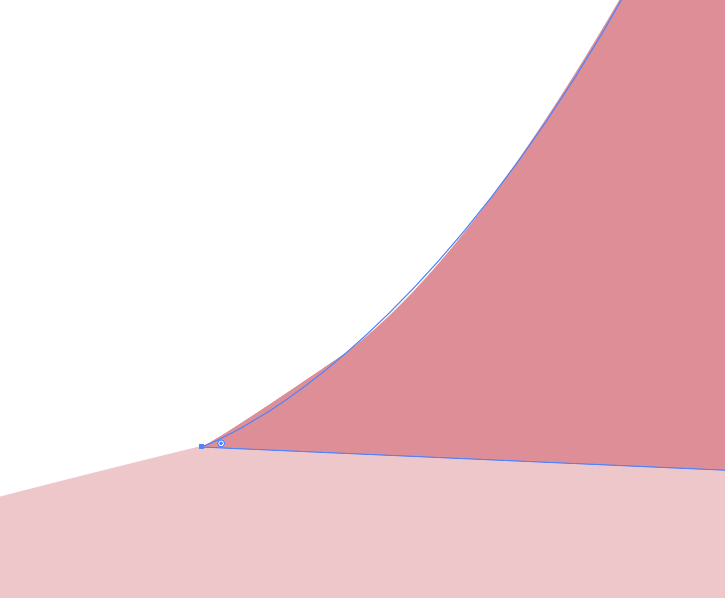
Object fill does not match the object line

New Here ,
Mar 27, 2017 Mar 27, 2017

Why does the curve of my fill not match the curve of the object line?

Screen Shot 2017-03-27 at 4.21.37 PM.png

505
Translate
Report
Community guidelines
Be kind and respectful, give credit to the original source of content, and search for duplicates before posting. Learn more
community guidelines

correct answers 1 Correct answer

Community Expert , Mar 28, 2017 Mar 28, 2017

csc,

My guess is the GPU mentioned by Ton. You may try to Ctrl/Cmd+E to toggle between GPU and CPU and see.

This is what GPU is about:

https://helpx.adobe.com/illustrator/kb/gpu-performance-preview-improvements.html

Translate
Adobe
Community Expert ,
Mar 27, 2017 Mar 27, 2017

Can you give some more info?

What Illustrator version, OS, zoom percentage, GPU / CPU preview...

Translate
Report
Community guidelines
Be kind and respectful, give credit to the original source of content, and search for duplicates before posting. Learn more
community guidelines
Engaged ,
Mar 27, 2017 Mar 27, 2017

what is the Zoom percentage you zoomed in?

Translate
Report
Community guidelines
Be kind and respectful, give credit to the original source of content, and search for duplicates before posting. Learn more
community guidelines
Guide ,
Mar 28, 2017 Mar 28, 2017

If you are using pathfinder, sometimes changing the precision  from the default 0.028 pt helps a little  when you are zoomed in so much

Translate
Report
Community guidelines
Be kind and respectful, give credit to the original source of content, and search for duplicates before posting. Learn more
community guidelines
Advocate ,
Mar 28, 2017 Mar 28, 2017

Probably it's monitor problem/grapchic card issue.

Or, you add some effects only to fill or stroke?

Pawel

Translate
Report
Community guidelines
Be kind and respectful, give credit to the original source of content, and search for duplicates before posting. Learn more
community guidelines
Community Expert ,
Mar 28, 2017 Mar 28, 2017
LATEST

csc,

My guess is the GPU mentioned by Ton. You may try to Ctrl/Cmd+E to toggle between GPU and CPU and see.

This is what GPU is about:

https://helpx.adobe.com/illustrator/kb/gpu-performance-preview-improvements.html

Translate
Report
Community guidelines
Be kind and respectful, give credit to the original source of content, and search for duplicates before posting. Learn more
community guidelines