
Participating Frequently
July 3, 2017
Answered

One Point Perspective Distorted Grid

  • July 3, 2017
  • 4 replies
  • 4427 views

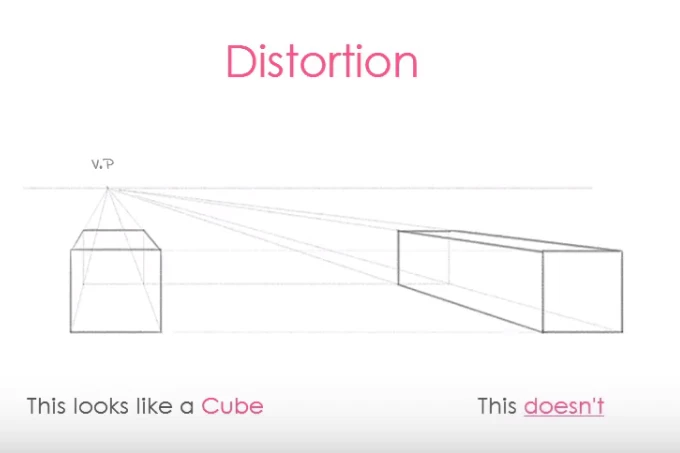
In the one-point perspective grid, the grid squares seem distorted. Instead of looking like squares in perspective, they look like rectangles, longer in the direction of the perspective lines. If anything, the perspective should be making them contract in that direction, not stretch. As a test, I tried creating a perfect square and then attaching it to a plane. Sure enough, it no longer looked square, but stretched. Is there a way to correct this?
This topic has been closed for replies.
Correct answer Ray Yorkshire

That type of distortion just happens its not a shortcoming of Illustrator.

Here is a video showing the same on an art program, Clip Studio Paint .

One Point Perspective - Perspective Drawing - YouTube

Subtitles available..

4 replies

Ray Yorkshire
Ray YorkshireCorrect answer
Participating Frequently
July 6, 2017

That type of distortion just happens its not a shortcoming of Illustrator.

Here is a video showing the same on an art program, Clip Studio Paint .

One Point Perspective - Perspective Drawing - YouTube

Subtitles available..

mpronto
Inspiring
March 19, 2019

Foreshortening in perspective causes the dimension to become "less" not extended.
Perspective doesn't turn a cube into a coffin! It gets "shorter" (ie foreshortening).
The 1 point perspective grid is out to lunch. Completely.

Doug A Roberts
Community Expert
Community Expert
March 19, 2019

Can you demonstrate one-point perspective that doesn't do what Ray's example does?

Jacob Bugge
Community Expert
Community Expert
July 4, 2017

John,

It may sound too far out, but what happens if you try toggling between GPU and CPU with Ctrl/Cmd+E?

Jeff Witchel, ACI
Community Expert
Community Expert
July 3, 2017

I get the feeling that the "distortion" your referring to is actually the foreshortening you would expect in a perspective drawing.

Participating Frequently
July 5, 2017

Here is a screenshot. Foreshortening would cause B to be shorter than A, but in this case it is longer.

Participant
July 5, 2017

I believe that what you're looking at IS foreshortening. Sure foreshortening happens on the grid as you go back in space. But it also happens as you move up or down from the horizon line AND to the left and right of the vanishing point.

Using the Perspective Grid tool (Shift+P), click on the node at the bottom of the left side grid and move the grid in toward the center and back out and you'll see the grid lines are more square as you move inwards until they become elongated as you get closer to the center. Now click on the nodes to the left or right of the horizon line and drag up and down. You'll notice as the horizon line moves up, the bottom grid rectangles look more square.

Foreshortening becomes exaggerated as you look further away from your point of view.

Jeff Witchel, ACI
Community Expert
Community Expert
July 3, 2017

Can you post a screenshot?

The grid squares look perfect to me.