Brad4TheAnimals
Known Participant
April 26, 2018
Answered

Opening Ai file from version 1.1 in Ai CC?

  • April 26, 2018
  • 6 replies
  • 2276 views

Howdy, Folks!

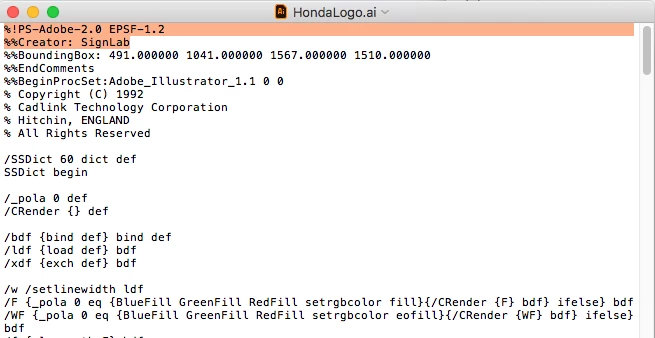
I recently started a new position and was given files created way back in 1992. The files are in .ai format but when I attempt to open them, I get "the operation cannot complete because of an unknown error". Is there any way to open these files with the latest software version? These are company design files, ie. logos, etc, that I will need moving forward. I wouldn't even know where to begin to find software from 1992 let alone a machine to run it. Thanks for any help what so ever. I opened the file in "textedit" and the first few lines are as follows:

%!PS-Adobe-2.0 EPSF-1.2

%%Creator: SignLab

%%BoundingBox: 491.000000 1041.000000 1567.000000 1510.000000

%%EndComments

%%BeginProcSet:Adobe_Illustrator_1.1 0 0

% Copyright (C) 1992

% Cadlink Technology Corporation

% Hitchin, ENGLAND

% All Rights Reserved

Thanks again!

Brad
    This topic has been closed for replies.
    Correct answer Mario Arizmendi

    With the file you uploaded I did this and it worked

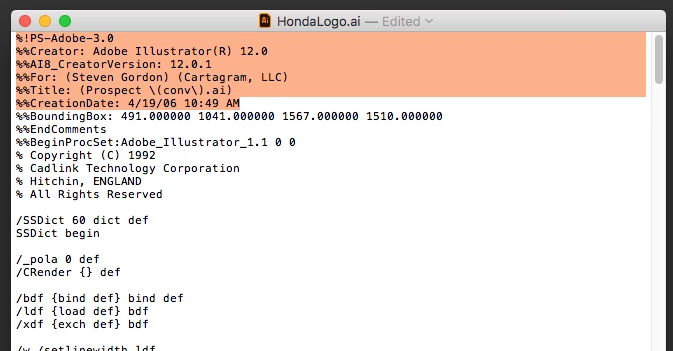
    1. Open the file in text editor and select the two first lines of code (wich corresponds to to the header of and ol Illustrator 1.1)

    2. Copy  the following code (which corresponds to the header of and Illustrator CS2 file) and replace the original two lines of code

    %!PS-Adobe-3.0

    %%Creator: Adobe Illustrator(R) 12.0

    %%AI8_CreatorVersion: 12.0.1

    %%For: (Steven Gordon) (Cartagram, LLC)

    %%Title: (Prospect \(conv\).ai)

    %%CreationDate: 4/19/06 10:49 AM

    3. Save the file

    4. Open the file with Illustrator

    Here is what I got, completly editable

    6 replies

    Mario Arizmendi
    Mario ArizmendiCorrect answer
    Legend
    April 27, 2018

    With the file you uploaded I did this and it worked

    1. Open the file in text editor and select the two first lines of code (wich corresponds to to the header of and ol Illustrator 1.1)

    2. Copy  the following code (which corresponds to the header of and Illustrator CS2 file) and replace the original two lines of code

    %!PS-Adobe-3.0

    %%Creator: Adobe Illustrator(R) 12.0

    %%AI8_CreatorVersion: 12.0.1

    %%For: (Steven Gordon) (Cartagram, LLC)

    %%Title: (Prospect \(conv\).ai)

    %%CreationDate: 4/19/06 10:49 AM

    3. Save the file

    4. Open the file with Illustrator

    Here is what I got, completly editable

    Brad4TheAnimals
    Known Participant
    April 28, 2018

    I cannot thank you enough! I ended up with a slightly different canvas but I am sure I can fix it from here. I sort of lost hope when I left work yesterday but faith in humanity has been restored! Thanks again, I really really appreciate it!

    Mario Arizmendi
    Legend
    April 30, 2018

    You're welcome...!

    Myra Ferguson
    Community Expert
    Community Expert
    April 27, 2018

    I found an older thread with a similar issue How can I open very old illustrator files in Illustrator CC? where Monika suggested the file might have been compressed with DiskDoubler. The thread goes on to say that it might be equally difficult to find DiskDoubler that works on a modern machine, so try https://theunarchiver.com/

    Bill Silbert
    Community Expert
    Community Expert
    April 27, 2018

    What happens if you replace the .ai suffix with .eps? I suggest this because in 1992 just about everybody was saving Illustrator as .eps and it occurs to me that since you inherited these files somebody may have, with all good intentions, added .ai as a suffix in an earlier attempt to open these files without realizing what the files might actually not be .ai files at all.

    Brad4TheAnimals
    Known Participant
    April 27, 2018

    I appreciate the suggestion! I tried changing to .eps and I got the same error code then Ai CC crashed out.

    Inspiring
    April 27, 2018

    Can you Dropbox the file so we can see it. it could be corrupted. I have opened files from way back prior to the CS line with no trouble.

    Brad4TheAnimals
    Known Participant
    April 27, 2018
    Bill Silbert
    Community Expert
    Community Expert
    April 27, 2018

    Every format that I tried to use to open this came up with it being a damaged or incomplete file. InDesign identified it as an .eps file when I tried to place it there.

    Mario Arizmendi
    Legend
    April 26, 2018

    I can remember, in those days the files didn't have the .ai extension at least in old MACS,

    the files you are talking about have the extension .ai?

    if not, you can add the extension .ai manually in the file name and try to opening

    Another way could be opening the file in a whatever text editor then saved again beeing sure the file name has the .ai extension

    Brad4TheAnimals
    Known Participant
    April 26, 2018

    The file did/does have the .ai extension which is what I find strange as to why it isn't working. Thanks!

    Mario Arizmendi
    Legend
    April 26, 2018

    Can you share the problematic file with us to try in our computers some way to open it?

    Larry G. Schneider
    Community Expert
    Community Expert
    April 26, 2018

    Do the files have an extension added? Have you tried adding a .ai to the file name and then tried to open the file?

    Brad4TheAnimals
    Known Participant
    April 26, 2018

    The file does have the .ai extension which is what I find strange as to why it isn't working. Thanks!