
Participant
April 19, 2023
Answered

Opening Illustrator files duplicates linked images

  • April 19, 2023
  • 18 replies
  • 8638 views

Hi All, when opening multiple illustrator files with large linked images, Illustrator seems to replicate and position (and scaled) images from within the file, sometimes even duplicating existing links. Each link in the file is accompanied by an extra image which Illustrator prompts to be relinked upon opening the file. This has only started occuring after updating Illustrator to 27.4.1.


Wondering if any one else has this issue and hoping this bug gets fixed.


Thanks
This topic has been closed for replies.
Correct answer Lu2

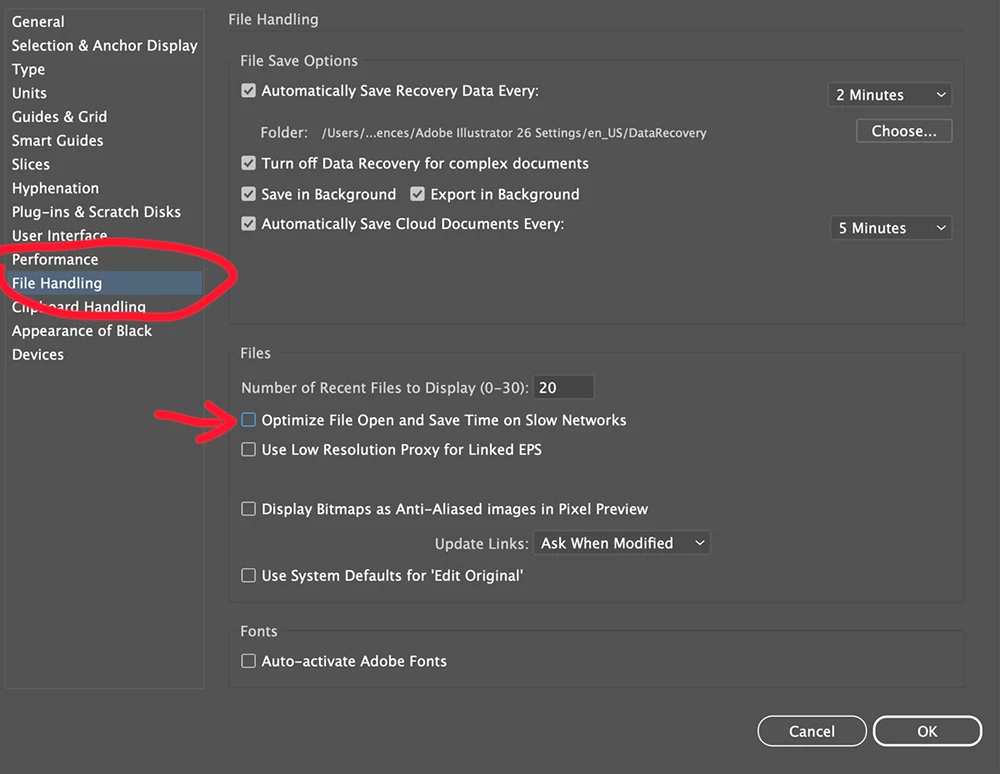
Try changing this setting, it solved it for my colleague.

18 replies

Participant
August 23, 2023

Hi everyone, I have the same issue as well. Very annoying and time-consuming. I found out recently that I only have this problem when I have multiple AI files open at the same time, but if I open the file without any AI files open, it will open without this issue. Hope Adobe fixes this soon.

Monika Gause
Community Expert
Community Expert
August 23, 2023

Did you already tryresetting the preferences?

Participating Frequently
August 23, 2023
Safe to say both I, and Adobe support, have tried everything - to no avail.
Several reinstalls, preference resets, three Illustrator updates, and still the only work around I have is to just have one AI file open at a time.
Which massively impacts my productivity.


Sent from Outlook for iOS<>
sunstreet
Participant
August 21, 2023

I jave the same issue. Just been on a chat with Adobe and they just ‘fobbed me off’ with various other explanations. The only work around they seemd to offer was to work on files from your desktop????

slide_lewy
Participating Frequently
July 5, 2023

Having the same issue also, I also get this error message. Hope they fix it soon. 

Participant
July 3, 2023

I am having the same problem, everytime I have extra files opening, the images are unlinked and duplicated... It is soo time consuming when you need to relink everything, or close and open files repeatedly.

Participating Frequently
July 3, 2023

Several updates since this bug first materialised and it's still not fixed!

Participant
June 5, 2023

I’m having exactly the same issue. Unfortunately Adobe don’t seem to be offering a fix or even recognising this is an issue. I work on multiple packaging files and it adds additional images and also imports additional images that are greatly scaled up on my designs.

Absolutely infuriating as I cannot keep removing these duplicates every time as theres just so many.

Participating Frequently
June 5, 2023

I'm sorry to hear that. I spent over an hour with Adobe Support taking over my Mac to try and resolve the issue. They couldn't. Only work around is to only have one Ai file open at a time. Ridiculous. Hopefully they will fix it with the next update. If I still have a job by then!

Participating Frequently
April 26, 2023

At least I now know I'm not alone! It's like try to drive and someone keeps graping the steering wheel! 

Participant
July 3, 2023

Yes, it is sooo frustrating, slowing down my work by half...

Monika Gause
Community Expert
Community Expert
April 21, 2023

Never seen this or seen it mentioned in this forum.


Did you already do the obvious? Reboot the computer, reset the preferences (which will erase your settings)?

Where are the files located, where are the images located?