
New Participant
April 19, 2023
Answered

Opening Illustrator files duplicates linked images

  • April 19, 2023
  • 18 replies
  • 8533 views

Hi All, when opening multiple illustrator files with large linked images, Illustrator seems to replicate and position (and scaled) images from within the file, sometimes even duplicating existing links. Each link in the file is accompanied by an extra image which Illustrator prompts to be relinked upon opening the file. This has only started occuring after updating Illustrator to 27.4.1.


Wondering if any one else has this issue and hoping this bug gets fixed.


Thanks
This topic has been closed for replies.
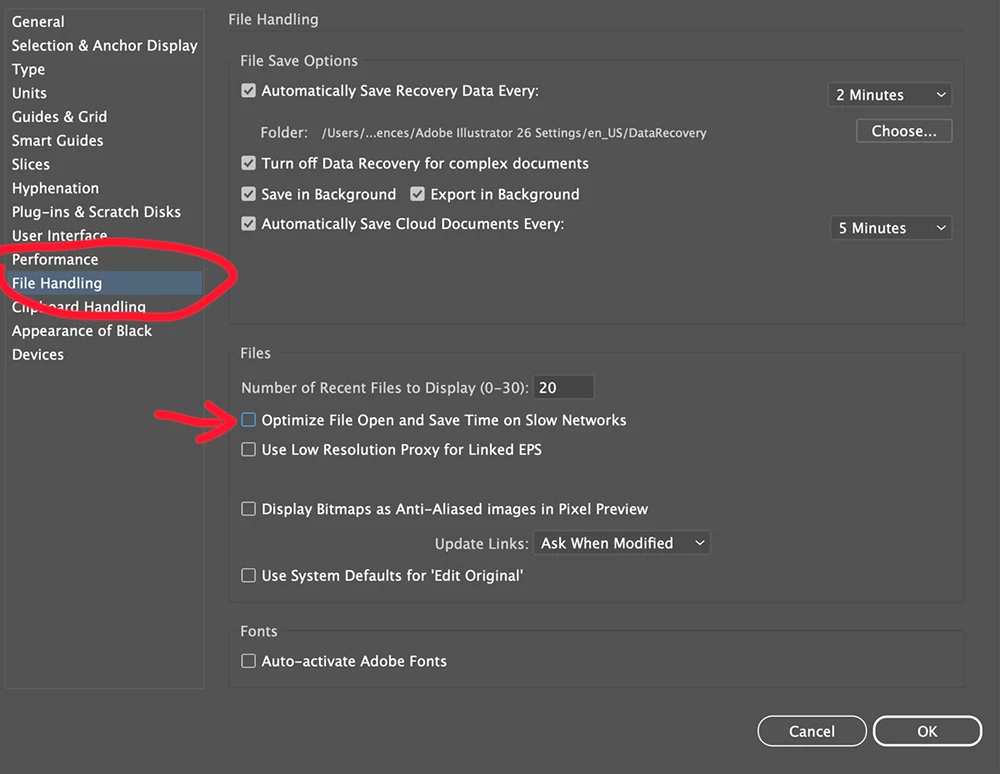
Correct answer Lu2

Try changing this setting, it solved it for my colleague.

18 replies

New Participant
May 28, 2024

Opening Illustrator files with linked images can sometimes result in duplicate instances of those images within the document. This duplication occurs because Illustrator automatically embeds linked images into the file upon opening, rather than simply referencing the original linked files. This behavior can lead to larger file sizes and potential confusion when managing assets.

To address this issue, users can adjust their Illustrator settings to prevent automatic embedding of linked images or manually remove duplicate instances after opening the file. Additionally, practicing efficient file management techniques, such as organizing linked assets in a centralized folder and updating links as needed, can help streamline the workflow and minimize duplication.

Meanwhile, individuals searching for a villa for rent in Ajman have numerous options available, with the city offering a range of properties to suit various preferences and budgets. Ajman's vibrant real estate market presents opportunities for renters to find their ideal villa, whether they seek waterfront views, spacious interiors, or convenient access to amenities.

New Participant
May 21, 2024

Have never had an issue like this until now working with illustrator as a packaging designer in the industry for over 15 years. Feels like Adobes products are pushing looking backwards. 1 file open at a time? Locally stored images? Cmon. What are you doing Adobe? Fix it! Your products should be MORE intutive and streamlined, not archaic and cumbersome. Waiting with anticipation for a competitive software to arrive... 

mattt64986283
New Participant
May 21, 2024

Out of interest, have you recently installed or started using Monotype Server? Only because a few people on this thread have mentioned it. 

Participating Frequently
May 21, 2024

We've switched to Monotype Fonts, but I've not been able to do testing to isolate it as a variable.

New Participant
May 8, 2024

Are you running Monotype desktop font app? Someone else thought that this might be partly responsibly for the issue we are seeing. 

adrian capps
New Participant
May 8, 2024

I work in packaging design and therefore need to a number of .ai files open at once. I have been having the same problem mentioned here and it does not seem to make any difference where the files are located, server or desktop. However the one place this is not a problem is if your .ai are saved to your Adobe Cloud Drive, the linked files can remain on your desktop. As this is not the way most of us work this is not really a solution.

Participating Frequently
May 21, 2024

If I'm following your workflow correctly, you might be using CC File Sync, which is being removed, so Cloud Drive isn't really a linking option anymore anyways.

Inspiring
March 27, 2024

I just had this happen for the first time, all files were downloaded and in a local folder. Closing other open files first solved the issue. I do have the Monotype app, but I did not look into that. Disabling file open preference did not help.  

New Participant
March 26, 2024

Come on, Adobe — fix this please. Still an issue. What's the solution?

New Participant
January 24, 2024

Hello, i'm seeing this happen with several people and to a lot of files at the moment. It seems to have got worse with the latest release of Illustrator v 28.1. This is all macOS users on any of Monterey, Ventura or Sonoma.

Question here - are any of the people being affected also on macos and using the Monotype desktop app?

New Participant
February 15, 2024

My whole agency has been having this issue for around a year now. We switched to Monotype last summer around the same time it started happening so not sure if it was a coincidence but interesting that you raised it.

This issue alone is accountable to a lot of people's late finishes atm

slide_lewy
Participating Frequently
February 15, 2024

hmm, that's interesting, we installed the Monotype app a while ago to test using their system, I can't remember exactly if this issue on my machine cropped up then, but I've deleted Monotype a while ago, and probably since then the issue hasn't cropped again, so it could be the Monotype app somehow. 

New Participant
January 16, 2024

Hi all - I just wanted to add that in January 2024, this issue still exists. The solution that has been "marked as resolved" did not work for me. The only working solution has been to use 2021 Illustrator, which I thankfully still have installed. I realize this is not a solution available to many others. Adobe really needs to sort this out, as the solution to "only have 1 file open at a time" is not a viable solution for the type of work that my company does.

adrian capps
New Participant
May 8, 2024

I work in packaging design and therefore need to a number of .ai files open at once. I have been having the same problem mentioned here and it does not seem to make any difference where the files are located, server or desktop. However the one place this is not a problem is if your .ai are saved to your Adobe Cloud Drive, the linked files can remain on your desktop. As this is not the way most of us work this is not really a solution.

Mike_Gondek10189183
Community Expert
August 28, 2023

I see this is happening to a few people in this thread. Questions I have:

  1. Are you linking to images locally on your hard drive, or on a network drive that is different and what OS that network drive is formatted with, or Adobe Cloud images
  2. What OS version & AI version are you all using? Make sure your application and OS are compatible with each other.

    Illustrator system requirements | earlier releases


    ba.bro.2.psd
New Participant
August 28, 2023

In our case, we are running MacOS, latest version of OS and Illustrator. The data is on a Synology file server, connected through 1GBit local network over smb protocol.

Lu2Correct answer
New Participant
August 28, 2023

Try changing this setting, it solved it for my colleague.

Gabrielle23045253fafu
New Participant
August 28, 2023

Yes this works! So far so good... will report back.

THANK YOU!

Gabrielle23045253fafu
New Participant
August 26, 2023

This happens to me EVERYTIME I open an illustrator file. It happens even when I have no other files open (as some people have stated might be a workaround). It's so frustrating hving to spend 10+ mintues cleaning up the file and relinking before I can even do any work on it.


It seems that all the links get placed multiple times and enlarged over my artboards. I always get the same error message. And then my accurately placed links become pixelated and have several duplicates sitting on top of each of them. See attached screengrabs.


Thank you for posting this– it's the first time I'm seeing someone with the same issue on here and I've been dealing with this for about a year now. Multiple people in my company are also having the same issue, with no resolution. In the past, uninstalling and reinstalling Illustator used to work for a bit but it's recently gotten so much worse. Hoping someone can finally find a fix!!

New Participant
August 2, 2024

The exact same thing is happening to me! Unchecking the "Optimize File Open and Save..." mentioned above unfortunately doesn't work for me either. Please Adobe, help us! 🙂

Ton Frederiks
Community Expert
August 2, 2024

According to your other post, you suspect a Monotype plugin causing this.

Maybe others in this post can check if they have that plugin installed.

https://community.adobe.com/t5/illustrator-discussions/monotype-plugin-extension-causing-duplicated-image-links-and-pixelated-linked-imagery/m-p/14776783#M415065