
David Yeiser
Participant
October 11, 2019
Question

Opentype Stylistic Alternates option has disappeared

  • October 11, 2019
  • 2 replies
  • 699 views

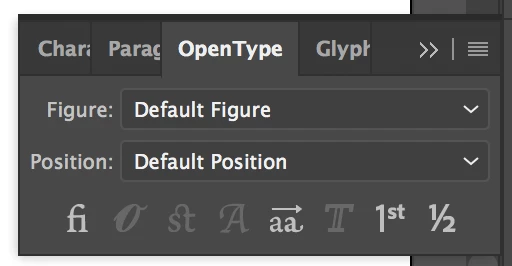
The option to enable/disable stylistic alternates has disappeared from my OpenType panel (see screenshot below). And to make matters worse it's stuck on SS01 so my type is wonky as well!


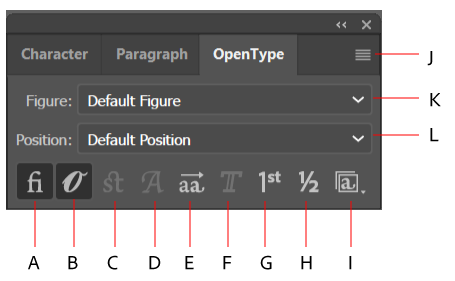
See the icon "I" in this image for what should be there:
 

Has this happened to anyone else? Any ideas on a fix?


Thanks!

-David

    This topic has been closed for replies.

    2 replies

    David Yeiser
    Participant
    October 11, 2019

    I upgraded to the latest version and that fixed the problem.

    Monika Gause
    Community Expert
    Community Expert
    October 11, 2019

    The panel only shows the options that are present in the selected font.

    David Yeiser
    Participant
    October 11, 2019
    That's my problem, I know they're there, but the option to turn them on and off is not showing. I can view the sets in the Glyphs panel, but the icon in the OpenType panel is not there. It's like this for all my fonts.
    Monika Gause
    Community Expert
    Community Expert
    October 11, 2019
    Which fonts are they?