
Participating Frequently
May 26, 2017
Answered

Optimum settings for bright true colours from Illustrator and Acrobat.

  • May 26, 2017
  • 3 replies
  • 6127 views

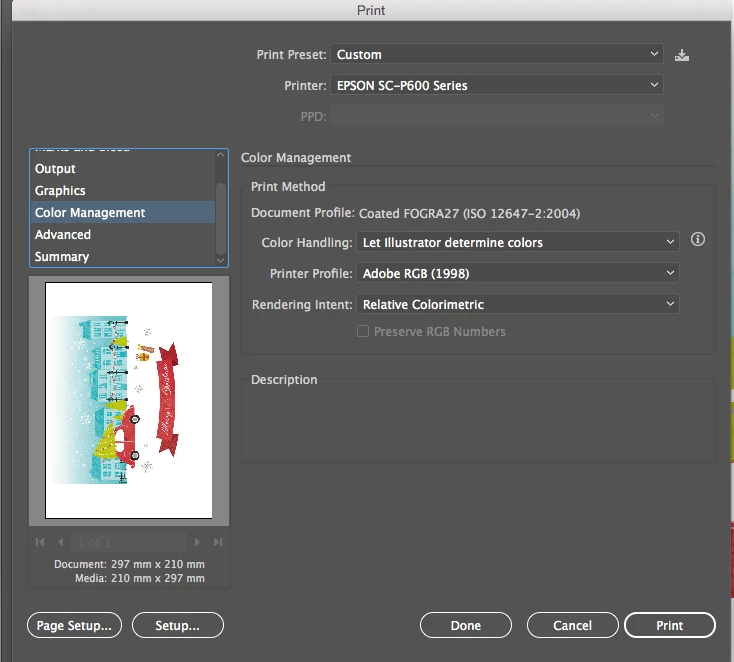
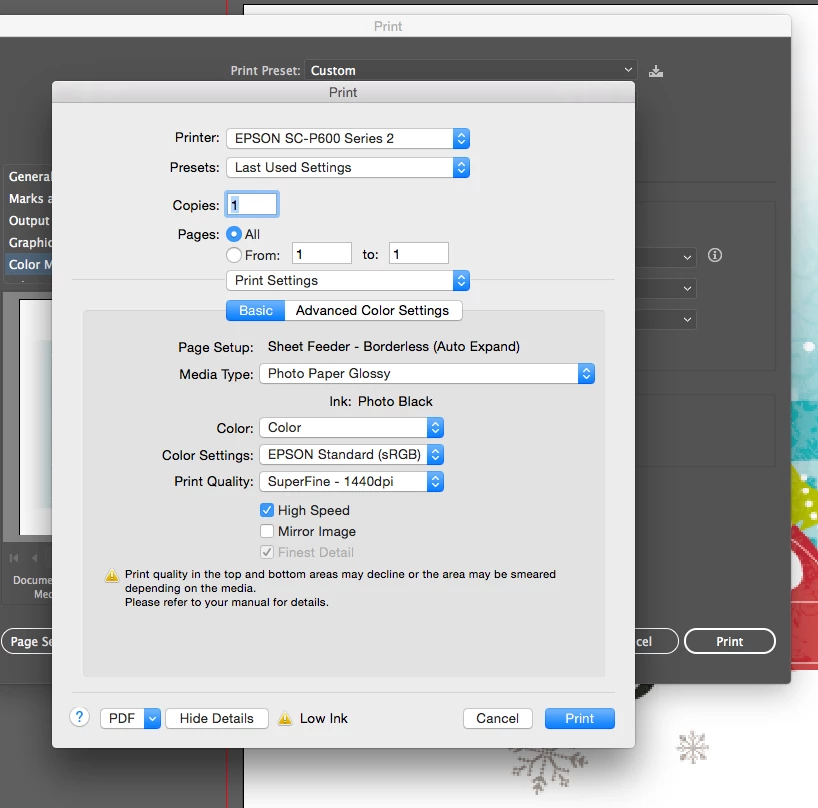
Hiya. I've been having real problems getting nice bright colours on my printer on a variety of media. I have an Epson Surecolour p600 and have been onto tech support with Epson who have demonstrated that when printing from their own software, the colours are lovely. Then printing the same file from illustrator, the colours are just so dull. I need help with the settings in my print dialogue box to get the best out of my prints. Is anyone able to help? I've attached a screenshot if this helps.
This topic has been closed for replies.
Correct answer Mike_Gondek10189183

I've found it but dont have the Accu photo hd option


I would  delete your printer in Apple >> System Prefs >. Print & Scanners.

Then install the drivers from here.

Epson SureColor P600 | SureColor Series | Single Function Inkjet Printers | Printers | Support | Epson US

3 replies

Mike_Gondek10189183
Community Expert
Community Expert
May 26, 2017

What operating system?

Try letting the printer determine the color

What does your advanced look like? Are you using a glossy paper, then coating will make color shine more.

mikeg_kale
Inspiring
May 26, 2017

What operating system?

Try letting the printer determine the color

What does your advanced look like? Are you using a glossy paper, then coating will make color shine more.

Participating Frequently
May 26, 2017

Hiya. Im using Mac OS X 10.10.5

It wont let me tick 'let postscript printer determine colours' it's greyed out. See screenshot.

Mike_Gondek10189183
Community Expert
Community Expert
May 26, 2017

Hmmm... The only reason I know that would be greyed out is if you were not in composite mode.

Maybe lets try to find find where your Print Mode settings are so we can confirm you have AccuPhoto HD, as that might help with using the 9 colors in that HD printer of yours. I got that screenshot for the pdf manual for you printer, and that should be on Mac.

For my printer the special settings are after you click setup then switch layout to printer features

Mylenium
Legend
May 26, 2017

All home printers are based around the assumption that RGB images will be processed based on the settings in the driver itself. You are shooting yoursellf in the foot by using a CMYK document and meddling around with color profiles. Simply turn that stuff off and rely on the driver's own conversion.

Mylenium