


Option for Paragraph Direction missing in latest Version of Illustrator (Arabic)
I am working on a multi-language manual (22 languages), one language is Arabic. In order to get Arabic to work in the document, I followed the Adobe Help page (Link: https://helpx.adobe.com/illustrator/using/arabic-hebrew.html). This is what I have done:
1.) Installed ME Version of Illustrator
2.) Checked "Show Indic Options" in Preferences (Edit>Preferences>Type).
3.) Selected "Adobe Arabic" font.
4.) Created a paragrah style with "Middle Eastern & South Asian Composer" selected
4.) Copied Word Text with mixed content (english number and date with Arabic). re-applied style,
The result was always the same. Instead of copying the arabic text with the english numbers included, the numbers automatically get switched to Arabic. Which is something I do not want. In effect, this mean I cannot get mixed text working.
According to Adobe Help Pages, this should work automatically but it doesn't.
Also, Adobe mentions the option to select the paragraph direction from the Paragraph pane. It also mentions, that this is possible on character level. Which is important if you need to manually set direction with the paragraph. This option is simply not there anymore. It's GONE! There are many forum entries across the web, people mentioning this. But no solutions. For some reason this feature disappeared. I am not sure if this is just missing with some people or simple gone by design.
My question: How can I get mixed paragraph (Arabic / English) working in Illustrator? How can I set text direction on a character level manually in Illustrator. How can I get my mixed text copied over to Illustrator?
As pulished on the Adobe Help Page, text direction should appear but does not (see image below):
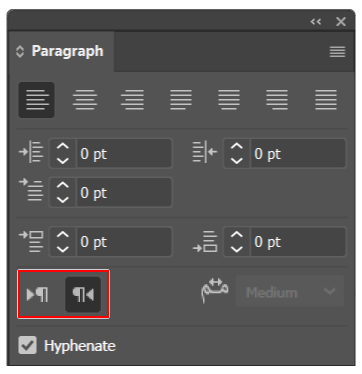
Its missing in my (latest) version of illustrater. Also missing in the ME Version.
Any help appreciated!

 AdChoices