
Origin (0, 0) moved but vertical gridlines not aligning to origin (horizontal are ok).
I was provided a two layer photoshop file, one with a satellite image of a land has and a second layer on top with gridlines super imposted as pixel lines to indicate 0.25 interval gridlines (NS and EW).
I've open in Illustrator so I can scale artwork to some easy multiple of the image gridlines so objects marking city locations can be entered as AI co-ordinates to locate exactly. It would mean transforming the latitude longitude coordinates with a translation say +(16.0, -122.0) and then multiply result by 10 to convert to mm or pixel dimension set up in AI File. (yes GIS or a CAD plugin with scaling tools would be easier but I'm working with what I have).
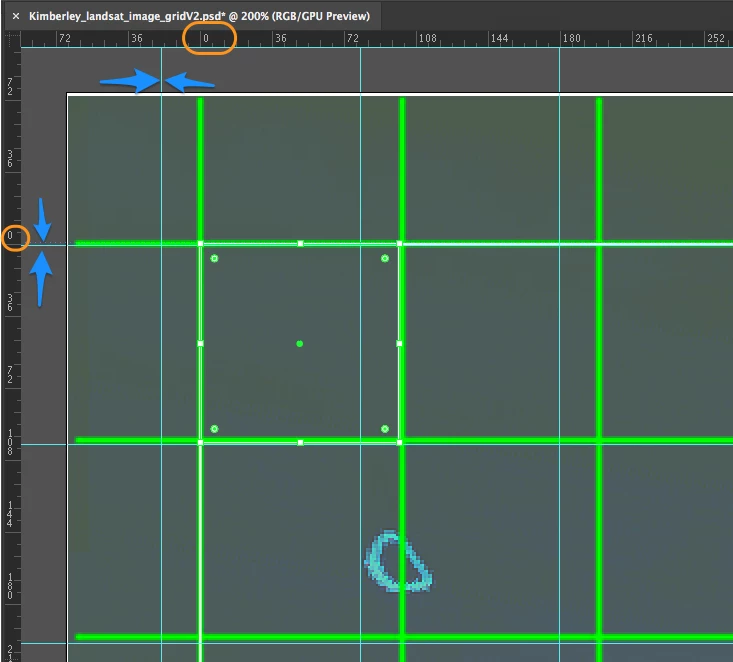
Anyhow the point of this forum post is that even if I just use the layer of pixel art gridlines (green lines in image) to align my grid to match (just eyeballing a match) I need to be able to shift the grid origin and have my AI gridlines follow it (normal behaviour in my experience).
Having moved the origin the horizontal grid lines moved to the correct position but the vertical ones refuse to move. Not sure why*. See image, the origin has clearly moved (orange highlight rectangles around zero lines) but the vertical grid lines are not in the correct position (blue arrows).
Any ideas?
| Station Name | Latitude | Longitude |
|---|---|---|
| Location A | -16.444417 | 123.041374 |
| Location B | -16.716157 | 128.40308 |
| Location C | -16.9939 | 122.658509 |
* except for that Adobe products seem more buggy to me now than ever before — in 30 years of using since AI 3.0 and PS 1.
 AdChoices