Known Participant
September 8, 2011
Answered

Other angles while holding shift

  • September 8, 2011
  • 5 replies
  • 47493 views

Can the contrain angles for moving objects when holding shift be adjusted?

Instead of angles of 45°, i need to constrain them to 90, 30 and -30 for an isometric drawing.

Sorry if this has been asked before, but i could find only old topics of pre CS versions of illustrator.

    This topic has been closed for replies.
    Correct answer Ray Yorkshire

    Same, for years. I'm so tired of going back to preferences and having them not work. I do it about once a year just hoping in vain.


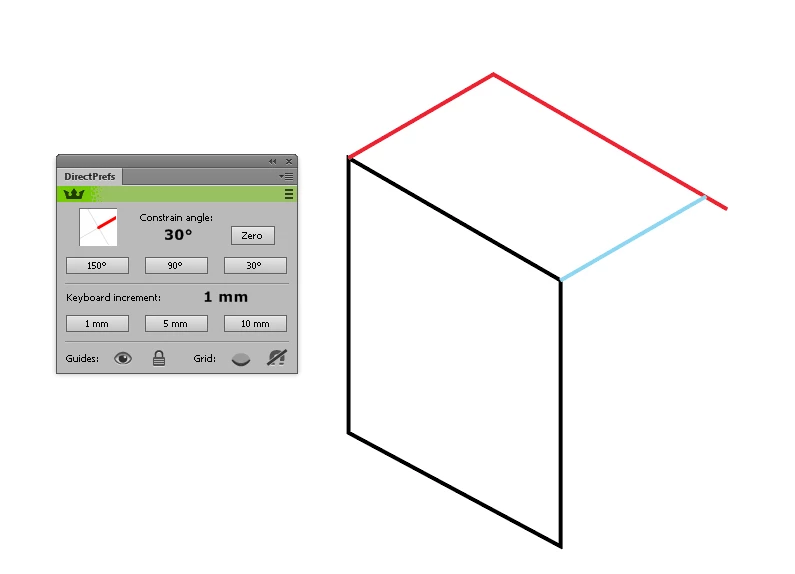
    I use this free astute graphics plugin

    DirectPrefs - Astute Graphics

    You have to make a free account, download their unified installer and select DirectPrefs,

    ( perhaps best to deselect the paid plugins and trial them later one at at time later)

    Basically its just a little window that allows quick change of the constrain angle without visiting the buried preferences every few seconds.

    But the  illustrator constrain angle seems to work with the pen tool +Shift  but not the Line segment tool, which only loves  0  45  90 etc.

    Also I added the red line to the black,  but had to overshoot and later drag the anchor point back, after the blue line was drawn, as the smart guides don't always help find the meeting point, inference point or whatever its called.

    5 replies

    Jeffery.Wright
    Inspiring
    May 1, 2023

    So, here it is, the year 2023 and Adobe still doesn't have this ability for Illustrator? No wonder the Adobe stock price is still in the crapper, what do their software engineers do all day? Do they even use the software? 

    Participant
    May 30, 2023

    I know right... bonkers this still isnt a thing 😞

    dmtetardAuthor
    Known Participant
    September 12, 2011

    Thanks for the suggestions!

    I used the constrain angle option in the general preferences, which works perfectly but i have to change the angle all the time to 0, 30 or 60 for what direction i want to move an object to.

    I don't know what the angles do with the smart guides. I filled in the correct values, and activated smart guides, but when moving objects it doesn't constrain to any of these angles

    EDIT: i see now, it snaps to the desired angles for constructing objects, not for moving (transforming) objects

    Participant
    December 22, 2011

    I have Preferences | General | Constrain angle set at 30, but I never saw any effect. 

    I can still only draw a line/path at 0-45-90-180-315 while holding shift. 

    I've been plotting 30-60 lines manually for a long time since I've never been able to find a way to change this, and assumed this is not an included  feature until I came across this thread which is giving me some hope.

    Illustrator 15.0.2 OSX

    Any help would be appreciated.

    Kevin

    Larry G. Schneider
    Community Expert
    Community Expert
    December 22, 2011

    Does this apply?

    JETalmage
    Inspiring
    September 9, 2011

    Set SmartGuides to the 30 degree angles preset. Then turn on Smart Guides.

    JET

    dmtetardAuthor
    Known Participant
    September 8, 2011

    Thanks for that tool!

    Unfortunately i can't use illustrator's 3D filter then, that's why i just want to move the objects arround while constraining to the isometric angles.

    Mark, i found the prefs where i can put these angles, but i don't know what it does exactly... The shift+move angle stays at 45-90.

    Mike_Gondek10189183
    Community Expert
    Community Expert
    September 8, 2011

    You woudl have to change thsi back when done, but built into illustrator is:

    Illustrator  >> Prefs >> General >> Constrain Angle >> 30°

    scorpio_zx
    Participant
    September 23, 2015

    this is exactly what i been looking for thanks man

    Inspiring
    September 8, 2011

    Well what you can do is download a free plug in that adds a tool to te tool panel that only draws isometric lines 30 60 180 and 90.

    Down load from here.

    Called Isometric Line Tool

    http://rj-graffix.com/software/plugins.html#IsoLineTool

    Inspiring
    September 8, 2011

    It does this for you no shift key needed. You can assign a keyboard shortcut to access the tool. It's free!

    Inspiring
    September 8, 2011

    Illustrator's… Guides n Slices prefs does have some options available…