
Participant
October 24, 2020
Question

Outline issues

  • October 24, 2020
  • 4 replies
  • 375 views

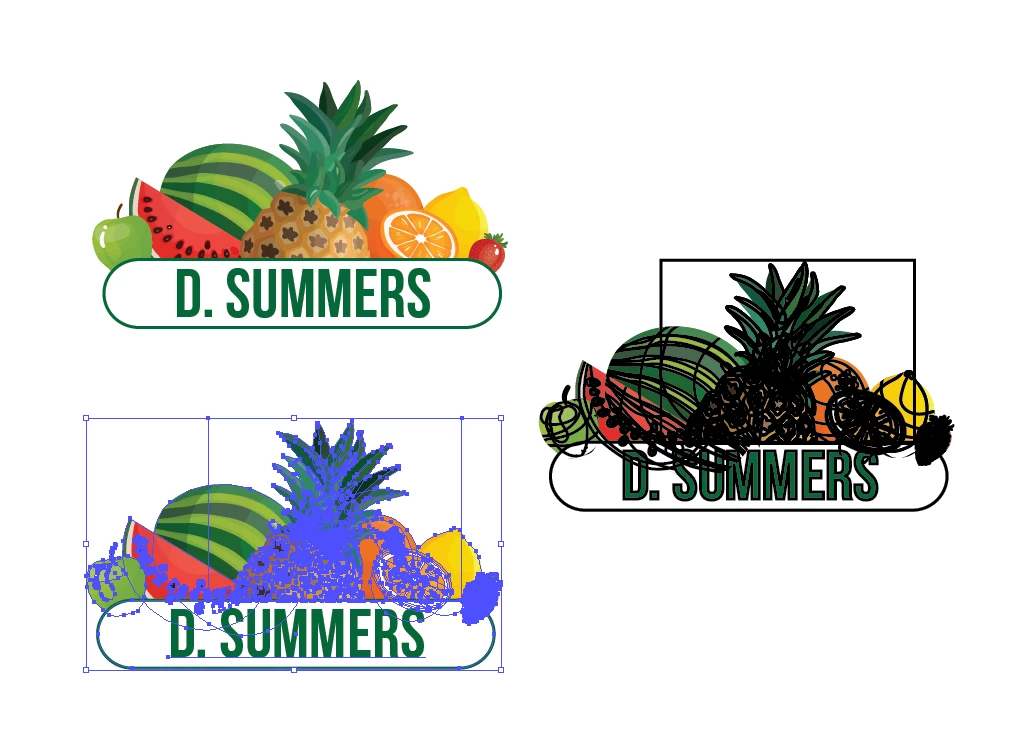
Whats the best way to unite all of these objects and outline as a whole?   When grouping and using the stroke option, it comes out as shown in the right image. I have tried to duplicate and unite to get a blank version but it keeps the sqaure which can be see in the stroked right picture. Any help would be great, thanks.
 

This topic has been closed for replies.

4 replies

Kurt Gold
Community Expert
Community Expert
October 24, 2020

Thanks for sharing the file.


Unfortunately, the entire compositions are somehow poisoned by numerous (often useless) clipping paths. The thing that looks like a rectangle on your screenshot is actually a (pretty superfluous) compound path.


A lot of clean up work would have to be done in case you are still looking for a reasonable (quick, possibly a single click) way to apply one single outline to the illustration. Of course, there may be some tricks to get a quick result, but at least this evening I don't have the time to offer some adequate approaches.


If the illustrations were properly done, the outline could be made with one single click (graphic style).


Kurt Gold
Community Expert
Community Expert
October 24, 2020

Yes, using a file sharing provider and posting a (public) link here is recommendable.


This way all participants may have a look at the file.


Participant
October 24, 2020

Thanks.

Can be downloaded via this link, https://gofile.io/d/SyXb63

Kurt Gold
Community Expert
Community Expert
October 24, 2020

Can you share the Illustrator file (.ai)?


Participant
October 24, 2020

Sure. Whats the bestway on here? a link from an external sharing site?

Monika Gause
Community Expert
Community Expert
October 24, 2020

Trouble is the rectangle in it. So applying this via the appearance panel is not an option.

So basically, you make a copy of everything (via the layers panel. Put that duplicate on a new layer and lock the original layer. And then expand strokes and outline text and see that you can get rid of that rectangle whatever it is. A clipping mask?

Then unite all the shapes using the pathfinder panel and apply the stroke

Participant
October 24, 2020

The thing is, there isnt a rectangle?  Also I chose the option expand, strokes. Then created outline, but im quite confused with  the process, still cant  figure it.