
Participating Frequently
May 15, 2019
Answered

Outline stroke

  • May 15, 2019
  • 4 replies
  • 6327 views

I have objects that are filled by a custom gradient and outlined by a stroke. When I try to convert the stroke to an outline  the whole thing can be scaled the gradient disappears. What can I do to make the stroke an outline and keep the custom fill?
    This topic has been closed for replies.
    Correct answer Myra Ferguson

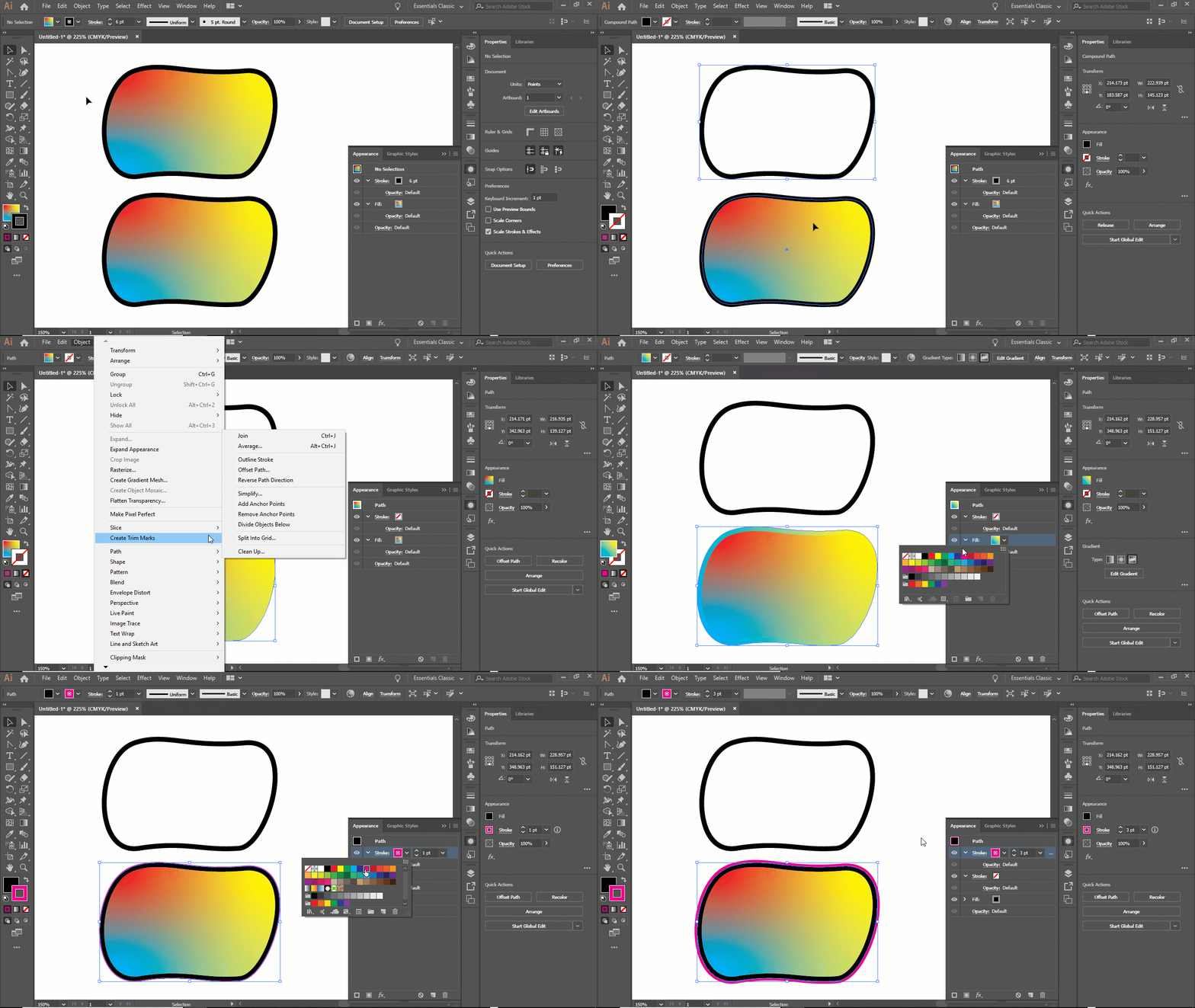
    There does seem to be an issue if you have a freeform gradient fill with a stroke and you try to outline the stroke that makes the gradient fill disappear.

    One scenario where you might want to convert the stroke to an outline would be so that you can apply an additional stroke. Here is what you could do:

    1. Remove the stroke

    2. Go to Object > Path > Offset Path

    3. The new path inherits the original shape's fill, so change the fill

    4. In the Appearance Panel, add a stroke and adjust as desired

    4 replies

    Participating Frequently
    May 16, 2019

    Interesting, duplicated your steps had no issue.

    Myra Ferguson
    Community Expert
    Myra FergusonCommunity ExpertCorrect answer
    Community Expert
    May 16, 2019

    There does seem to be an issue if you have a freeform gradient fill with a stroke and you try to outline the stroke that makes the gradient fill disappear.

    One scenario where you might want to convert the stroke to an outline would be so that you can apply an additional stroke. Here is what you could do:

    1. Remove the stroke

    2. Go to Object > Path > Offset Path

    3. The new path inherits the original shape's fill, so change the fill

    4. In the Appearance Panel, add a stroke and adjust as desired

    emc3346Author
    Participating Frequently
    May 16, 2019

    This looks perfect! I will try this as soon as I get home

    emc3346Author
    Participating Frequently
    May 16, 2019

    emc3346  schrieb

    This looks perfect! I will try this as soon as I get home

    Don't expect that every file you buy is done well.

    So can we finally please see that thing?


    Some parts made myself some parts bought, its for a t shirt for my committee of recovering addicts who throw a bonfire every year

    emc3346Author
    Participating Frequently
    May 16, 2019

    Thanks guys I’ll give this stuff a try tonight. I think it’s got to do with object corruption since I’m editing a file I bought.

    Jacob Bugge
    Community Expert
    Community Expert
    May 16, 2019

    You are welcome, emc.

    I hope you will share your findings.

    Jacob Bugge
    Community Expert
    Community Expert
    May 15, 2019

    emc,

    Are you starting out with one path that has a gradient fill and a solid stroke, then using Object>Path>Outline Stroke, or what happens if you do?

    emc3346Author
    Participating Frequently
    May 15, 2019

    It is one closed path that has a fill of a custom gradient and when I outline stroke the whole gradient inside disappears

    Monika Gause
    Community Expert
    Community Expert
    May 15, 2019

    Please show this.