Exit
  • Global community
    • Language:
      • Deutsch
      • English
      • Español
      • Français
      • Português
  • 日本語コミュニティ
  • 한국 커뮤니티
0

Overlap parts of the same object

Contributor ,
Apr 13, 2018 Apr 13, 2018

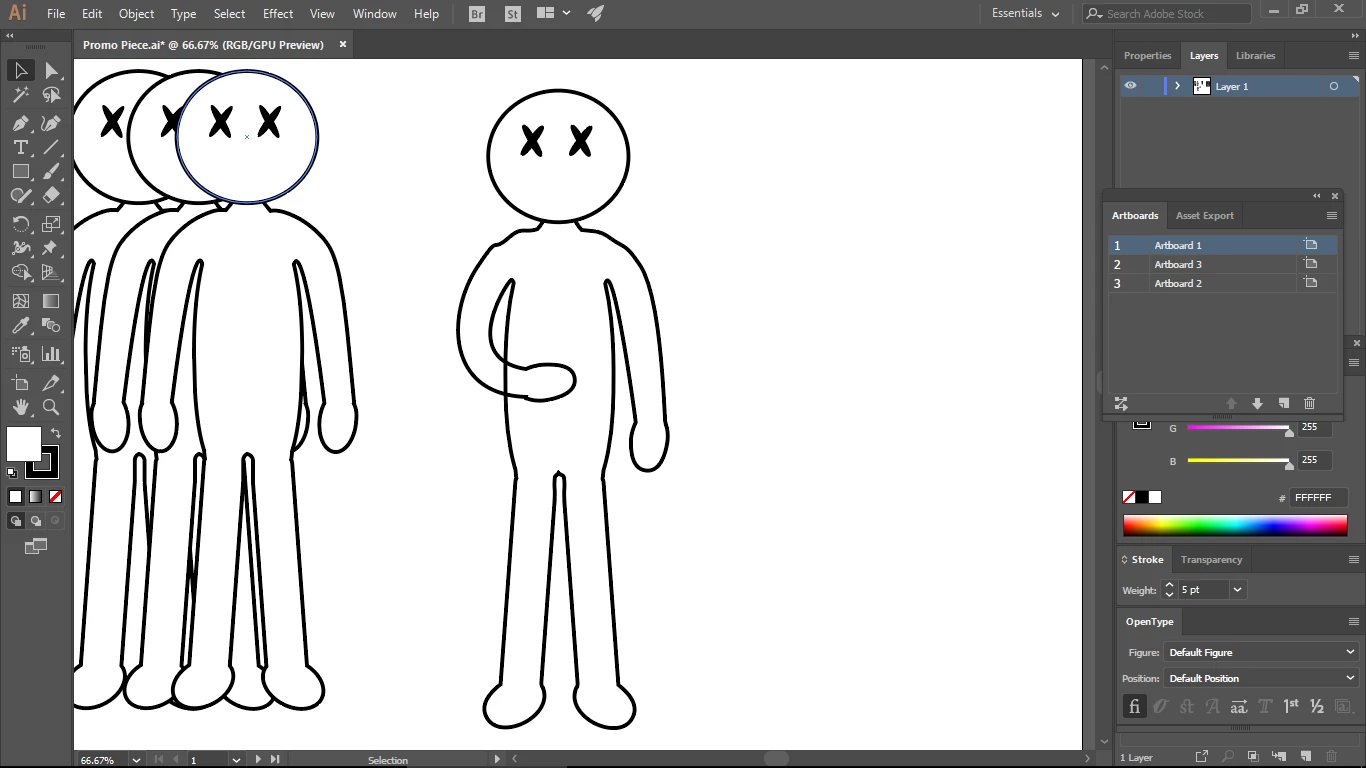
I've created a character in illustrator, I want his arm to be folded across his torso. But the body is made of one object so when i rotate the arm across the torso, you can see through it. Any ideas?

sfg.PNG

1.4K
Translate
Report
Community guidelines
Be kind and respectful, give credit to the original source of content, and search for duplicates before posting. Learn more
community guidelines

correct answers 1 Correct answer

Community Expert , Apr 13, 2018 Apr 13, 2018

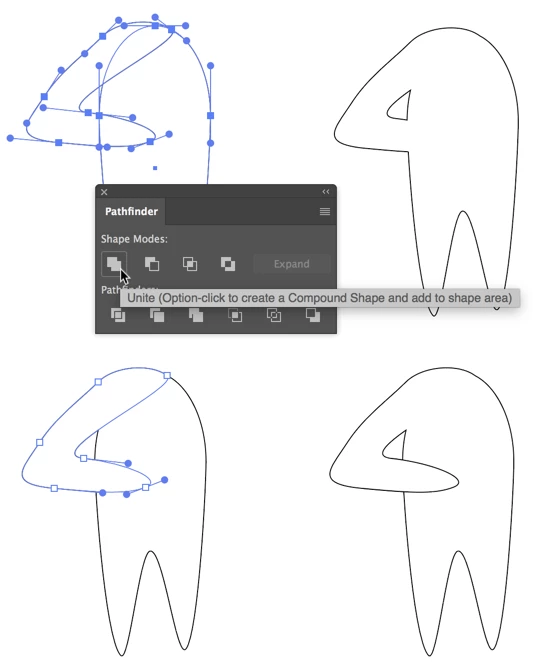
Or you could make the arm and body as separate paths, select both, and in the Pathfinder panel option/alt-click Unite, then with the Direct Selection Tool select the arm segments that overlap the body, Copy. Deselect. Paste in Front. there are always choices.
Translate
Adobe
Community Expert ,
Apr 13, 2018 Apr 13, 2018

You will need to either cover it with a white object. Or cut your artwork. Or use the live paint tool to assign a stroke of none to that part of the line you want to hide.

Translate
Report
Community guidelines
Be kind and respectful, give credit to the original source of content, and search for duplicates before posting. Learn more
community guidelines
Community Expert ,
Apr 13, 2018 Apr 13, 2018

Or you could make the arm and body as separate paths, select both, and in the Pathfinder panel option/alt-click Unite, then with the Direct Selection Tool select the arm segments that overlap the body, Copy. Deselect. Paste in Front. there are always choices.

Translate
Report
Community guidelines
Be kind and respectful, give credit to the original source of content, and search for duplicates before posting. Learn more
community guidelines
Contributor ,
Apr 19, 2018 Apr 19, 2018

Thank you for the reply but can you explain how to select only a segment of the arm if possible? I can't figure that part out

Translate
Report
Community guidelines
Be kind and respectful, give credit to the original source of content, and search for duplicates before posting. Learn more
community guidelines
Community Expert ,
Apr 19, 2018 Apr 19, 2018

The first part of this method, using opt/alt-click on Pathfinder Unite, creates a Compound shape, which causes the stroke around the overlapping portions shapes to disappear. If you have Smart Guides active (View > Smart Guides or cmd/ctrl+U) the path of the invisible portion of the arm becomes visible if you hover or pass over it with the Direct Selection Tool (white pointer), which makes it easy to find. Shift-click on all the segments, between Anchor Points, of the arm, avoiding the body segments, and copy. Deselect everything by clicking on the Artboard away from any objects: This will prevent the copied part from becoming part of the Compound Shape when you paste, and therefore disappearing. Paste in Front. You should see the stroke of the overlapping portion of the arm. If you wish, with these parts still selected, press cmd/ctrl+J (or Object  > Path > Join) to join the segments into a single open path. You may also group it with the body-arm Compound Shape.

Translate
Report
Community guidelines
Be kind and respectful, give credit to the original source of content, and search for duplicates before posting. Learn more
community guidelines
Community Expert ,
Apr 19, 2018 Apr 19, 2018

Your artwork is a perfect fit for live paint. It would even be editable and you could still move the arm around afterwards:

How to create and work with Live Paint groups in Illustrator

Translate
Report
Community guidelines
Be kind and respectful, give credit to the original source of content, and search for duplicates before posting. Learn more
community guidelines
Community Expert ,
Apr 19, 2018 Apr 19, 2018
LATEST

You are, of course, absolutely right, Monika. For some reason Live Paint rarely enters my thought process. Changes need to be made!

Peter

Translate
Report
Community guidelines
Be kind and respectful, give credit to the original source of content, and search for duplicates before posting. Learn more
community guidelines