
Participating Frequently
June 6, 2017
Respondido

Overlapping Opacity - need help!

  • June 6, 2017
  • 1 resposta
  • 5499 Visualizações

I'm following tutorial and im stuck on one thing.

It never happened to me before, basically im making long shadows and there is this little line overlapping - I just can't get rid of it... How to solve this? I tried everything... It's so frustrating.

it shows when I save to PNG, JPG so its not a rendering issue...

I did take a look at outline mode, everything matching perfectly

I tried redoing the steps - still the same. There's no such thing happening in the tutorial....
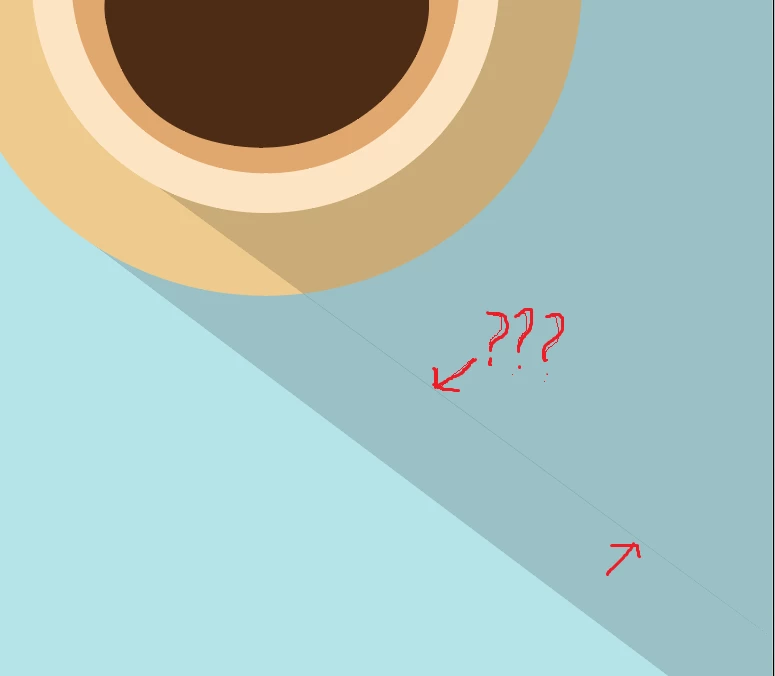
Este tópico foi fechado para respostas.
Melhor resposta por Myra Ferguson

Combining them doesn't resolve the issue - they need to be separated!

One shadow has to go under dish and another is a shadow of a cup.


You can also use the Shapebuilder Tool to remove the part that would be obscured by the dish. To remove a shape, select the dish and the shadow that overlaps it. Select the Shapebuilder Tool (Shift + M). Then Alt + drag (or click) to remove the overlapping shadow.

1 Resposta

The Print Craftsman
Inspiring
June 6, 2017

So I've got to ask.  Do you have strokes assigned to your objects?  I'm guess the tutorial does not.  I'm just guessing here but it's what would make sense to me given to problem you are having.  Objects perfectly aligned BUT if they have a stroke on them it would cause a slight overlapping.

damycoAutor
Participating Frequently
June 6, 2017

There are no strokes on the shapes, just plain black fill with opacity set to 15%

Monika Gause
Community Expert
Community Expert
June 6, 2017

How exactly has that been built?