
Inspiring
September 17, 2021
Question

Overlapping Vector Shapes Measurement

  • September 17, 2021
  • 4 replies
  • 557 views

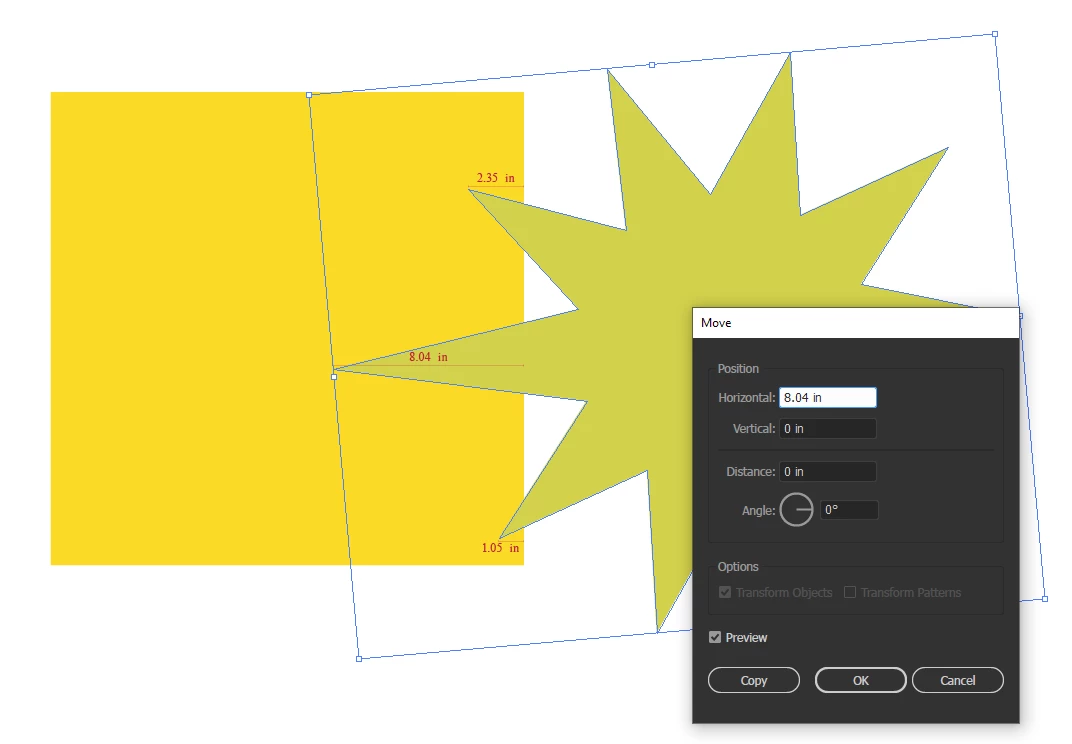
Is there anyway to get the measurement of overlap between 2 vector shapes?
In my example I have a Star shape that overlaps at 3 points, 1 is 1.05", 2 is 2.35", the 3rd is at 8.04"
I would love to be able to capture the 8.04" value and have it readily available.

Thoughts and Ideas Appreciated!  Thank you!  🙂
This topic has been closed for replies.

4 replies

CarlosCanto
Community Expert
Community Expert
September 17, 2021

Hi Bryan, 


rectBounds[2] - starBounds[0] should give you the distance you're looking for

Inspiring
September 17, 2021

I have a piece from an existing Script we have used in the past that think could be a good jumping off point
The original script was written by @adamdehaven 


// Spec object
  // ===========================
  function specSingle(bound, where) {

    // width and height
    var w = bound[2] - bound[0];

    // a & b are the horizontal or vertical positions that change
    // c is the horizontal or vertical position that doesn't change
    var a = bound[0];
    var b = bound[2];
    var c = bound[1];

    // xy='x' (horizontal measurement), xy='y' (vertical measurement)
    var xy = "x";

    // a direction flag for placing the measurement lines.
    var dir = 1;

    switch (where) {
      case "Top":
        a = bound[0];
        b = bound[2];
        c = bound[1];
        xy = "x";
        dir = 1;
        break;
    }
  }
Adam DeHaven
Participating Frequently
September 17, 2021

Hey, I wrote that code! lol


Shameless plug, but if you're interested, the full extension is now available via Adobe Exchange: 


https://exchange.adobe.com/creativecloud.details.106345.specify-dimensions-and-measurements.html

Ton Frederiks
Community Expert
Community Expert
September 17, 2021

Or use Smart Guides and drag a line with the Line Segement Tool over the distance and watch the transform panel for the length

marliton
Community Expert
Community Expert
September 17, 2021

Hi. ¿What about create a separate shape (and measure that shape) from the overlaping area using the Pathfinder panel? Also you can suggest that feature to Adobe: https://illustrator.uservoice.com


Marlon Ceballos
lambiloon
Community Expert
Community Expert
September 17, 2021

Hi there is no such option present you can use rulers or measure to check it...regards

Ali Sajjad / Graphic Design Trainer / Freelancer / Adobe Certified Professional