Exit
  • Global community
    • Language:
      • Deutsch
      • English
      • Español
      • Français
      • Português
  • 日本語コミュニティ
  • 한국 커뮤니티
0

Packaging Layout

Community Beginner ,
Jul 25, 2019 Jul 25, 2019

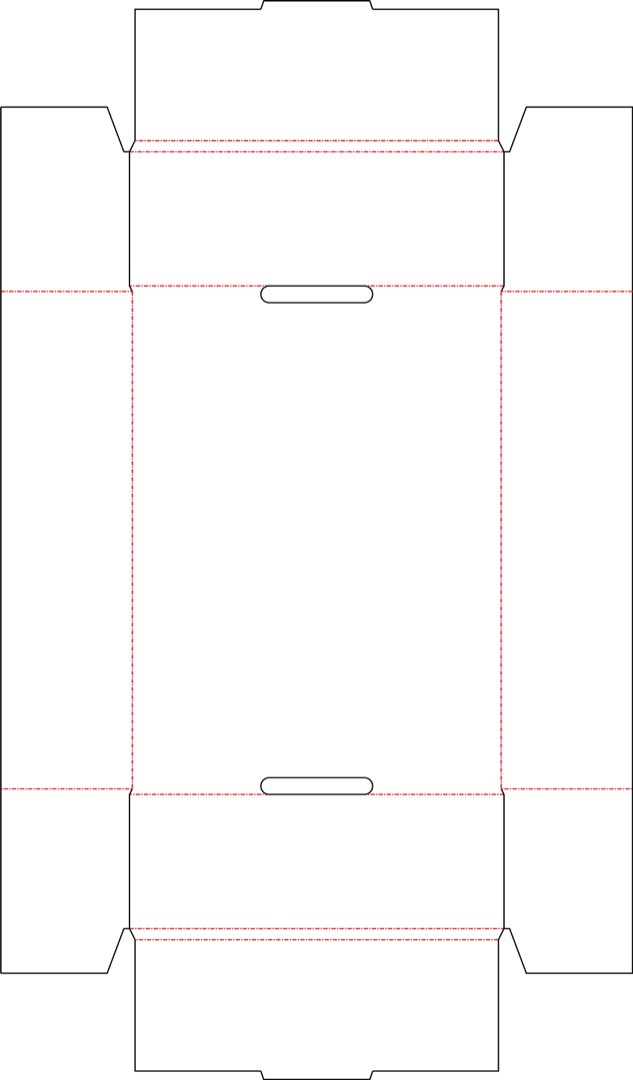
I was asked to use this 12pk can tray layout to design. However, I can't seem to figure out where is the front, sides, etc.

Can someone please help?

layout.jpg

1.1K
Translate
Report
Community guidelines
Be kind and respectful, give credit to the original source of content, and search for duplicates before posting. Learn more
community guidelines

correct answers 1 Correct answer

Community Expert , Jul 25, 2019 Jul 25, 2019

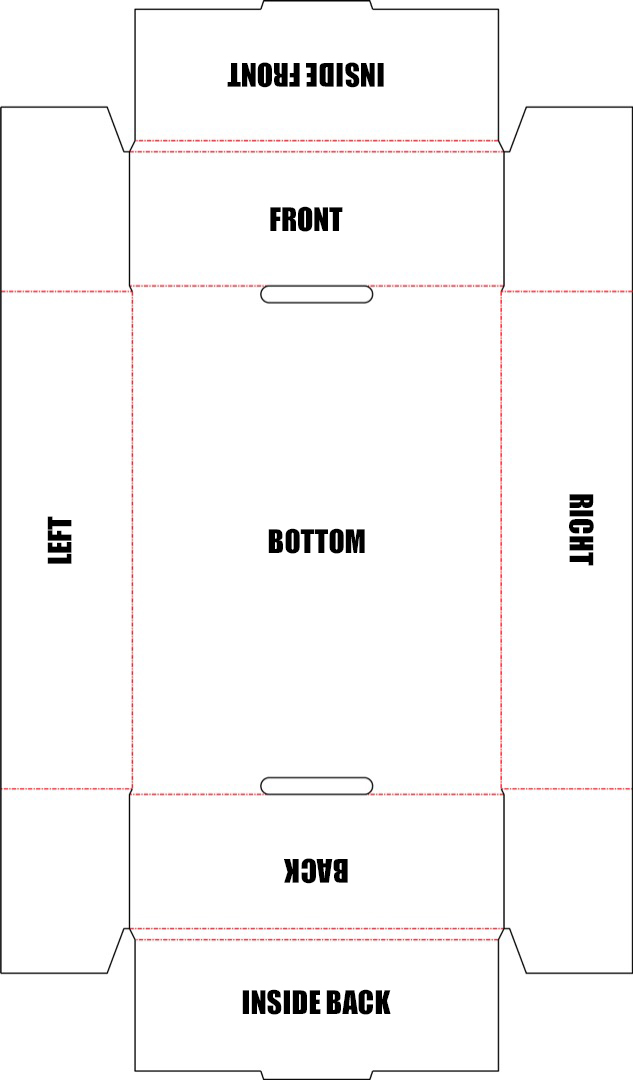
I work with these pretty frequently, typically this is how they're printed (type orientation is the art orientation)...

bottom.jpg

...aside from bleeds, the 4 small rectangular corner shapes are not printed on, since they're hidden by the wrapping ends of the packaging.

Translate
Adobe
Community Expert ,
Jul 25, 2019 Jul 25, 2019

Print it cut it and fold it along the dotted lines to get an idea of the box.

Translate
Report
Community guidelines
Be kind and respectful, give credit to the original source of content, and search for duplicates before posting. Learn more
community guidelines
Community Expert ,
Jul 25, 2019 Jul 25, 2019

I work with these pretty frequently, typically this is how they're printed (type orientation is the art orientation)...

bottom.jpg

...aside from bleeds, the 4 small rectangular corner shapes are not printed on, since they're hidden by the wrapping ends of the packaging.

Translate
Report
Community guidelines
Be kind and respectful, give credit to the original source of content, and search for duplicates before posting. Learn more
community guidelines
Community Beginner ,
Jul 26, 2019 Jul 26, 2019

Very helpful Jon thank you so much!

Translate
Report
Community guidelines
Be kind and respectful, give credit to the original source of content, and search for duplicates before posting. Learn more
community guidelines
New Here ,
Oct 21, 2019 Oct 21, 2019
LATEST

Hello,


if you want to learn this box intital packaging and its dimensions then I recommend you to do some online research and as per my research I found a blog who can help you to sort out your future issues about box packing ideas and so on, btw I'm sharing with you here a blog which will help you about templates of box packaging. https://packagingbee.com/templates/


Thanks me later. 🙂 

Translate
Report
Community guidelines
Be kind and respectful, give credit to the original source of content, and search for duplicates before posting. Learn more
community guidelines
Advocate ,
Jul 25, 2019 Jul 25, 2019

Do as mentioned above by @Jon Fritz II or @Ton Frederiks.

The red dotted lines are the crease areas of the package. Once you cut out the outer black line edges, you can use a ruler to run a paper clip or burnishing tool along the ruler edge to add the crease and then fold by hand.

The black lines are the cut areas. You'll need to use an exacto knife to cut on the left and right of the front and back panels that are noted in the post above.

Alternately, you can ask whoever provided the die line to you to send a formed mockup sample or provide a 3D image of the final formed container as a visual reference.

Translate
Report
Community guidelines
Be kind and respectful, give credit to the original source of content, and search for duplicates before posting. Learn more
community guidelines