Exit
  • Global community
    • Language:
      • Deutsch
      • English
      • Español
      • Français
      • Português
  • 日本語コミュニティ
  • 한국 커뮤니티
0

page setup?

Community Beginner ,
Feb 27, 2017 Feb 27, 2017

where do i find page setup in illustrator cc. i see document setup but not page setup????

1.7K
Translate
Report
Community guidelines
Be kind and respectful, give credit to the original source of content, and search for duplicates before posting. Learn more
community guidelines

correct answers 1 Correct answer

Community Expert , Feb 27, 2017 Feb 27, 2017

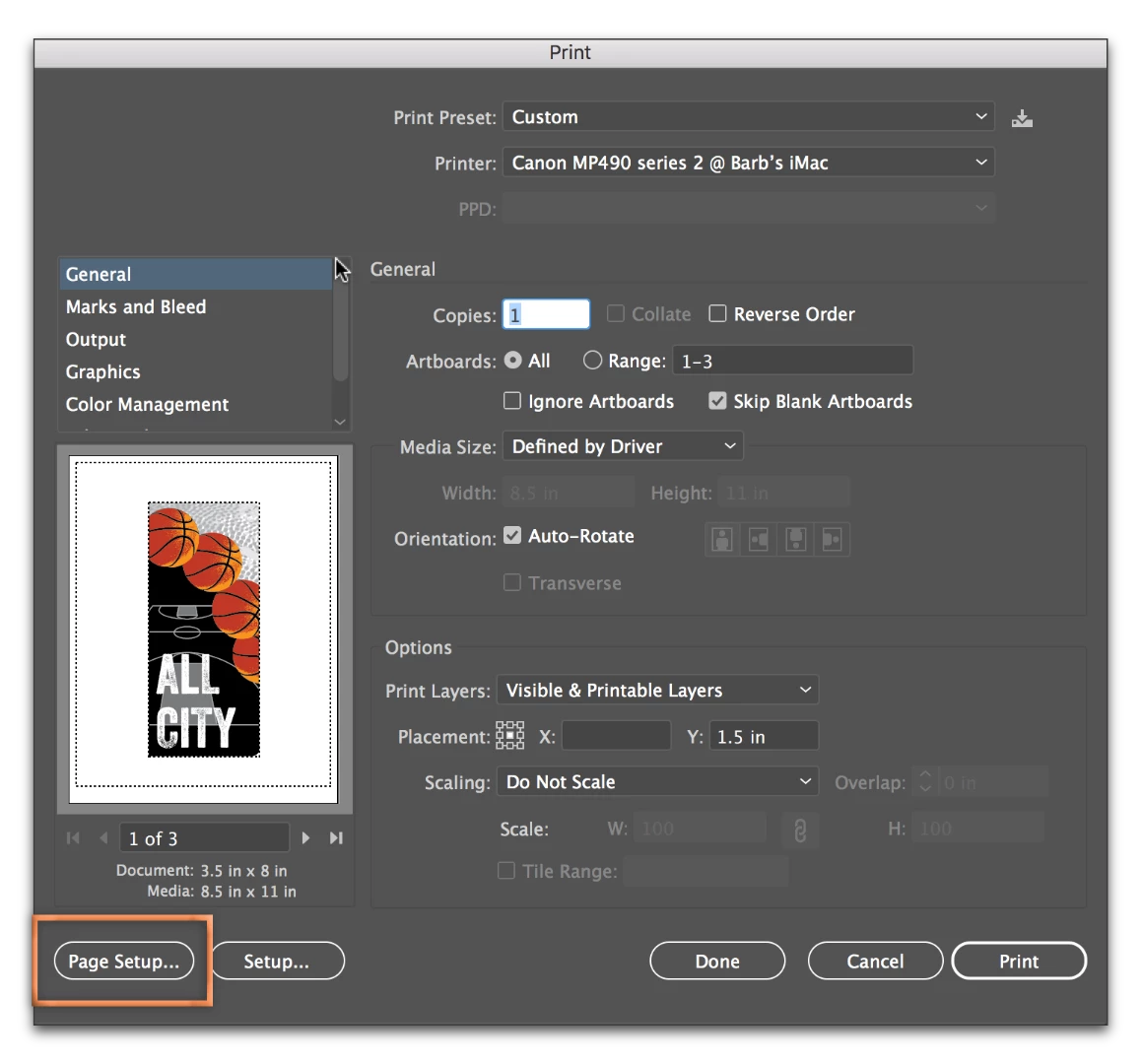
Aha! File > Print:

Adobe Illustrator CC 2017ss_005.png

Translate
Adobe
Community Expert ,
Feb 27, 2017 Feb 27, 2017

What feature are you trying to update? Are you trying to change the artboard size?

Translate
Report
Community guidelines
Be kind and respectful, give credit to the original source of content, and search for duplicates before posting. Learn more
community guidelines
Community Expert ,
Feb 27, 2017 Feb 27, 2017

Thinking that you are trying to change the page size... you can go to File > Document Setup and click on Edit Artboards in the top right corner. Alternatively, you can get to the same place by selecting the Artboard tool in the Toolbox.

Once in Artboard editing mode, you have options on the Control Panel at the top. You can see which artboard you are editing by glancing at the status bar in the lower left. You have addition options via the Artboard Options button outlined in magenta.
Adobe Illustrator CC 2017ss_003.png

Additional resources:

How to use Artboards in Illustrator | Adobe Illustrator CC tutorials

How to set up artboards in Illustrator

Translate
Report
Community guidelines
Be kind and respectful, give credit to the original source of content, and search for duplicates before posting. Learn more
community guidelines
Community Beginner ,
Feb 27, 2017 Feb 27, 2017

thank you so much for your reply.

what i am actually trying to do is locate "page setup"...it used to be right above document setup under file in illustrator.

i need page setup in order to select the proper paper, sheet or rool, so i can print to our new large format printer.

Translate
Report
Community guidelines
Be kind and respectful, give credit to the original source of content, and search for duplicates before posting. Learn more
community guidelines
Community Expert ,
Feb 27, 2017 Feb 27, 2017

Aha! File > Print:

Adobe Illustrator CC 2017ss_005.png

Translate
Report
Community guidelines
Be kind and respectful, give credit to the original source of content, and search for duplicates before posting. Learn more
community guidelines
Community Beginner ,
Feb 27, 2017 Feb 27, 2017

perfect thank you so much. can't believe i didn't see that.

thanks

tom

Translate
Report
Community guidelines
Be kind and respectful, give credit to the original source of content, and search for duplicates before posting. Learn more
community guidelines
Community Expert ,
Feb 27, 2017 Feb 27, 2017
LATEST

You are welcome. I didn't think of it either, even with your correctly-worded question.

Translate
Report
Community guidelines
Be kind and respectful, give credit to the original source of content, and search for duplicates before posting. Learn more
community guidelines