Inspiring
March 31, 2023
Question

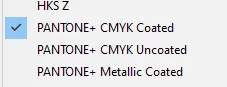
[Pantone color book] seems like it has only these three pantone books?
  • March 31, 2023
  • 2 replies
  • 1533 views

where i can find the pantone solid color coated/uncoated option in illustrator?

This topic has been closed for replies.

2 replies

Bill Silbert
Community Expert
Community Expert
March 31, 2023

Most PANTONE colors are no longer included for free with Creative Cloud programs. This is because PANTONE has now made their colors available only by subscription so Adobe was not able to work out an agreement with them to continue supplying the colors. Please see this articl https://9to5mac.com/2022/11/01/pantone-colors/ for more information.

Inspiring
April 3, 2023

thank you so much Bill!

Ton Frederiks
Community Expert
Community Expert
March 31, 2023
Inspiring
March 31, 2023

thank you so much, and do you know how to download adobe 2022? the website only shows only the most updated version

Ton Frederiks
Community Expert
Community Expert
March 31, 2023

It is easy to just install the 2022 version (while it is still available).  You don't even have to open it to copy the color books. After that you can deinstall that version.

In the Creative Cloud app select Apps > All Apps > Illustrator > click the 3 dots …  next to the Open button >  click Other Versions and select 26.5.2

Go the Illustrator 2022 Application folder > Presets > (your language folder) > Swatches > Color Books > and make a copy of PANTONE+ Solid Coated.acb and PANTONE+ Solid Uncoated.acb 


Keep them in a safe place and copy them to the same location in the Illustrator 2023 application folder.