Participant
August 1, 2025
Question

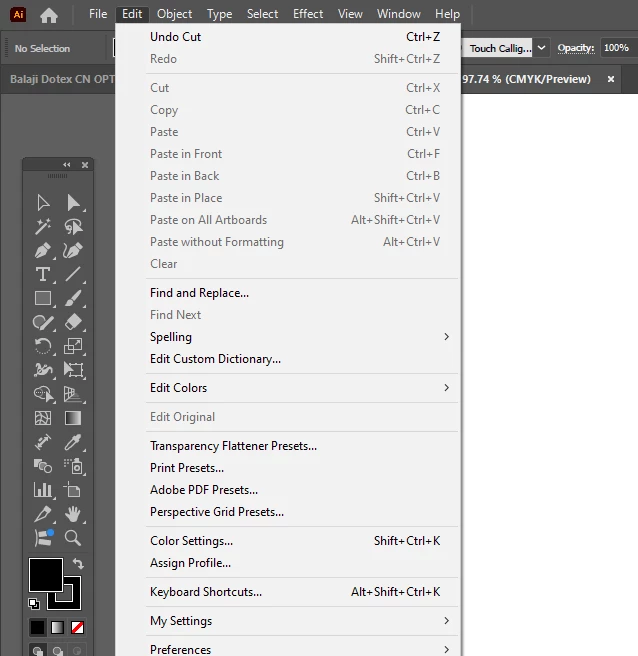
PASTE OPTION NOT ACTIVE WHEN I CUT AN ITEM
  • August 1, 2025
  • 5 replies
  • 507 views

HERE IS A SCREENSHOT, PLEASE SEE, HERE IS SHOWING IN UNDO SECTION I HAVE DONE "CUT" BUT PASTE OPTION NOT ACTIVE AFTER CUT AN ITEM. WHY???

5 replies

HARSHIKA_VERMA
Community Manager
Community Manager
August 29, 2025

Hi Vivek36864849w87a,


Hope you're doing well!

We would like to follow up on your issue. Are you able to resolve the issue? Please feel free to update the discussion if you need further assistance from us.


We would be happy to help.


Thanks,

Harshika

Abhishek Rao
Community Manager
Community Manager
August 1, 2025

Hi @Vivek36864849w87a,


Thanks again for your update. Could you please confirm which version of Illustrator you're currently using, along with the details of your Windows OS? Also, does this issue occur only with specific types of objects or files, or does it seem to happen randomly?

When you get a chance, try clearing your Windows clipboard by pressing Windows + V and clicking 'Clear all,' or disabling clipboard history via Windows Settings > System > Clipboard. If you have any clipboard-related apps or plugins running in the background, try closing them temporarily and see if the issue still happens.

You can also isolate if any background process is interfering by testing the same steps in safe mode using this link: https://adobe.ly/4oifMpd


Let me know how it goes!

Abhishek


Monika Gause
Community Expert
Community Expert
August 1, 2025
Participant
August 1, 2025

CarlosCanto
Community Expert
Community Expert
August 1, 2025

what did you cut?

how did you select it? I don't see the Selection Tool active

did you select another tool?

Participant
August 1, 2025
*I just cut 5-6 rectangles which I created in Illustrator. Selection tool
is active, I just drag with the selection tool and select the items and
press Ctrl+X but Ctrl+V not working and in menu bar PASTE option is not
active also. This problem does not happen every time but frequently it
happens. I didn't select any other tool.*


[image: image.png]