Exit
  • Global community
    • Language:
      • Deutsch
      • English
      • Español
      • Français
      • Português
  • 日本語コミュニティ
  • 한국 커뮤니티
0

Path rendering problems

Community Beginner ,
Jul 09, 2021 Jul 09, 2021

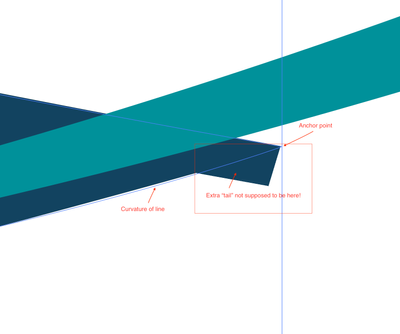
I have created a closed curved path, but the area at the anchor point does not render correctly. There is a section of blue color the sticks out beyond the curve. I have noticed this happening many times when I divide object with pathfinder. The curves have extended areas that I can not seem to get rid of unless I change the anchor point curvature.  How do I get rid of this extra "tail" of color???? This has never happened to me until recently and I have used these features frequently in the past.

 

karenb2_1-1625864424288.png


TOPICS
Draw and design
244
Translate
Report
Community guidelines
Be kind and respectful, give credit to the original source of content, and search for duplicates before posting. Learn more
community guidelines
Adobe
Community Expert ,
Jul 09, 2021 Jul 09, 2021

You are not alone.

It is a preview problem caused by the fast but often not so accurate GPU rendering.

Try switching between GPU/CPU Preview Cmd or Ctrl E.

Translate
Report
Community guidelines
Be kind and respectful, give credit to the original source of content, and search for duplicates before posting. Learn more
community guidelines
Community Expert ,
Jul 09, 2021 Jul 09, 2021

Does View > Preview on CPU help?

Translate
Report
Community guidelines
Be kind and respectful, give credit to the original source of content, and search for duplicates before posting. Learn more
community guidelines
Community Beginner ,
Jul 09, 2021 Jul 09, 2021
LATEST

thanks...that helps...it was driving me nuts!

Translate
Report
Community guidelines
Be kind and respectful, give credit to the original source of content, and search for duplicates before posting. Learn more
community guidelines

