
Participating Frequently
November 21, 2024
Answered

Pathfinder's UNITE tool not working

  • November 21, 2024
  • 2 replies
  • 2138 views
  • Hello,
    I am on a new laptop without my old preferences. I am attempting to unite two shapes via Pathfinder as shown in the attached image. The ONLY way I can unite these two closed shapes is to place one ontop of the other. On my old laptop, I could drag one shape via one anchor to the other shape's anchor and they would unite, but that is not working here. All unite does is group the two objects in the layer panel. Working file not attached because the error on the forum is telling me it can't be attached. I cannot get the yellow paths to unite and I cannot unite the red paths.

  • I have restarted AI.
  • I have set the tolerance in the Pathfinder flyout panel to the smallest allowable number .001
  • The paths are both closed
  • I have copied and pasted the two objects into another document with no success.
  • The paths are NOT compound (though that should make no difference.)


I can't for the life of me figure out what I am missing? I am on MacOS, ai 29.0.1


Any suggestions? Thank you!
This topic has been closed for replies.
Correct answer Ton Frederiks

That's odd; the pdf on my end, reverted is not within a clipping mask. But either way, I tried shape builder on the original .ai file.


I don't see a clipping mask, but could not get it to work yesterday (yes, shape builder works).

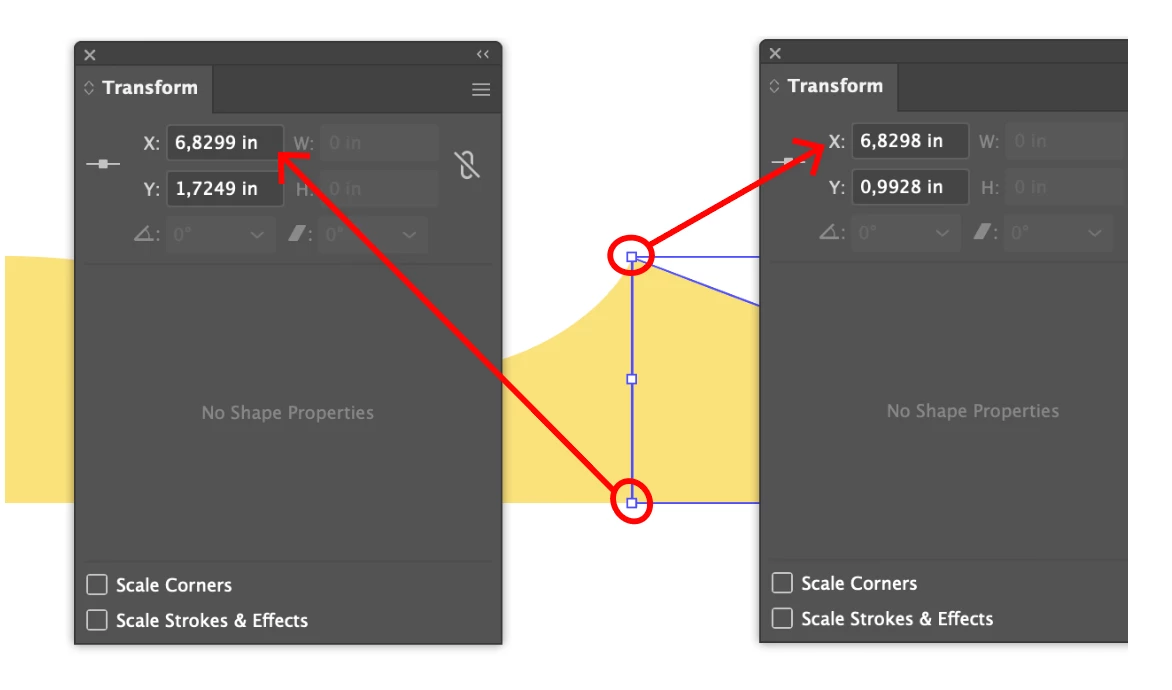
Looked at it again today and found that the line from the right object is not  straight.

If I make both points the same X position (here 6,8299 ), Unite works.

2 replies

Doug A Roberts
Community Expert
Community Expert
November 22, 2024

Not sure why Pathfinder doesn't see the shapes as contiguous. Shape builder does even with gap detection off. Give that a try.

Participating Frequently
November 22, 2024

So this is odd, I selected both yellow objects and only the two yellow objects (verified in the layers panel) and shape builder gave the error "3 of 3 objects not converted" when only two objects were selected. And then, the option to "undo convert to shape (cmd+z) is available even though no shape it built. Any thoughts on that?

Doug A Roberts
Community Expert
Community Expert
November 22, 2024

In the file you shared the whole construct is in a clipping mask, though I wasn't sure if it was an artefact of saving to PDF or me opening it in an older version. If it's not, try releasing that first.

Monika Gause
Community Expert
Community Expert
November 21, 2024

Please rename the file extension to PDF

Then you can upload the file.

Participating Frequently
November 21, 2024

That's awesome, THANKS! Working file is attached.