Known Participant
April 27, 2023
Answered

Patterns: overlap option

  • April 27, 2023
  • 2 replies
  • 2238 views

Dear Community,

I am trying to understand how Illustrator determines the left/right/top/bottom sides of a pattern when using the Overlap option.

In fact, check this example
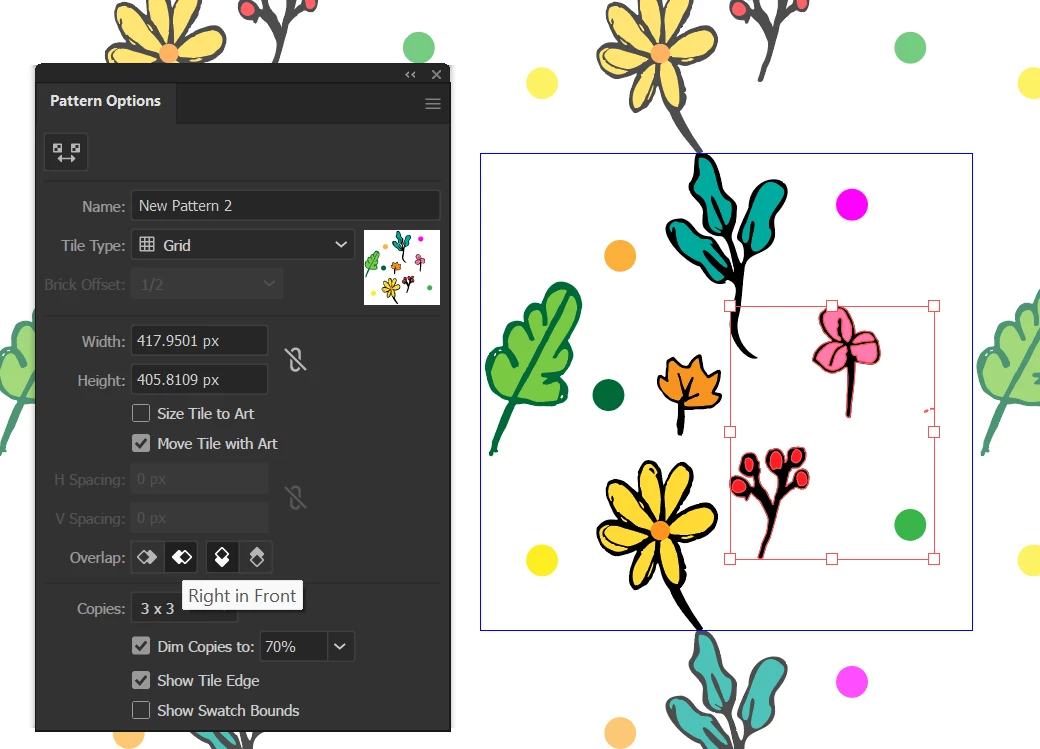
The right side should be on top, but it is not.

How come?

Same happens for the other options.

Latest version of Illustrator installed and updated.

Thanks for your attention.

Alberto

This topic has been closed for replies.
Correct answer Monika Gause

Hi Monika,

Thanks for your reply.

I am not quite sure whether I understood what you mean. To start with: can you please define what a pattern bound is, exactly?

Thanks,

Alberto


Pattern bound is the rectangle in blue. The repeat you define.

2 replies

Ton Frederiks
Community Expert
Community Expert
April 27, 2023

The stacking order can be seen (and changed) in the Layers panel. 

The Overlap repetition can be changed in the Pattern maker.

Known Participant
April 28, 2023

Hi Ton,


Understood. But the Overlap function is intended to make it easier to do that but it is simply not working as expected in my copy of Illustrator.

Ares Hovhannesyan
Community Expert
Community Expert
April 29, 2023

Not sure .. but you can reset preferences. May be some settings are mixed?

Monika Gause
Community Expert
Community Expert
April 27, 2023

Can you please create a demo file that shows your issue with some simple shapes and upload that to Creative Cloud or the like?

Known Participant
April 27, 2023

I have attached Pattern 01.ai file. The pattern is saved in the swatches.

Thanks.

Edit: I cannot see the attached file. Can you see it?

Met1
Legend
April 27, 2023

Even though this is the Illustrator forum, we cannot upload .ai files!

You need to upload (CreativeCloud, DropBox, Google, etc) and provide a link...