Exit
  • Global community
    • Language:
      • Deutsch
      • English
      • Español
      • Français
      • Português
  • 日本語コミュニティ
  • 한국 커뮤니티
1

Patterns: overlap option

Explorer ,
Apr 27, 2023 Apr 27, 2023

Dear Community,

I am trying to understand how Illustrator determines the left/right/top/bottom sides of a pattern when using the Overlap option.

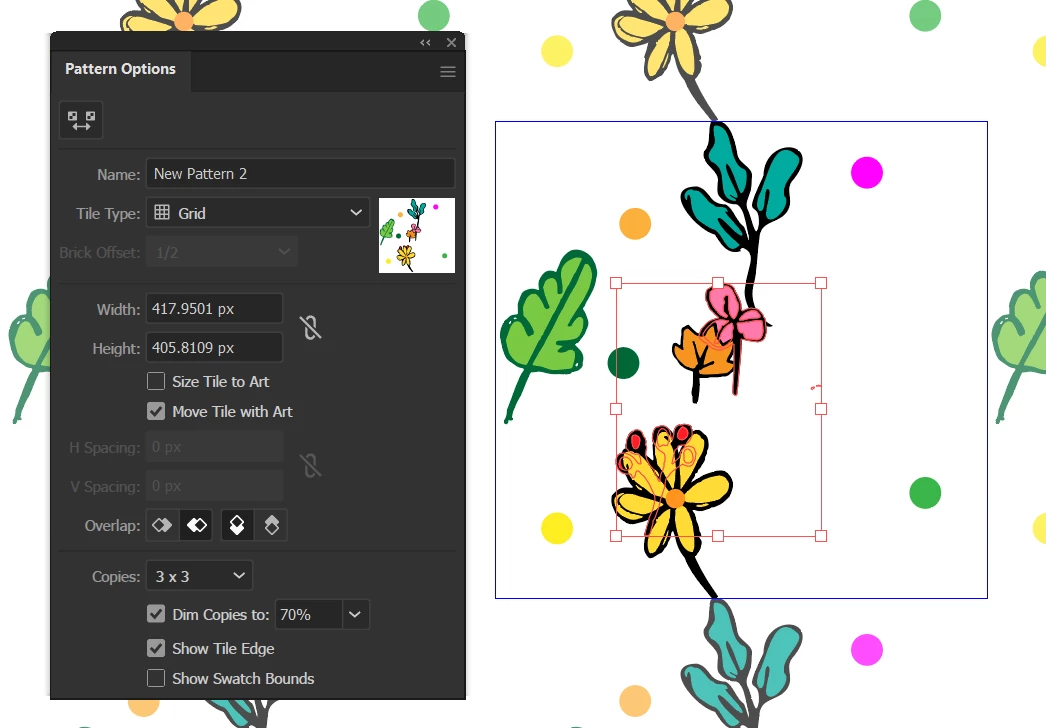
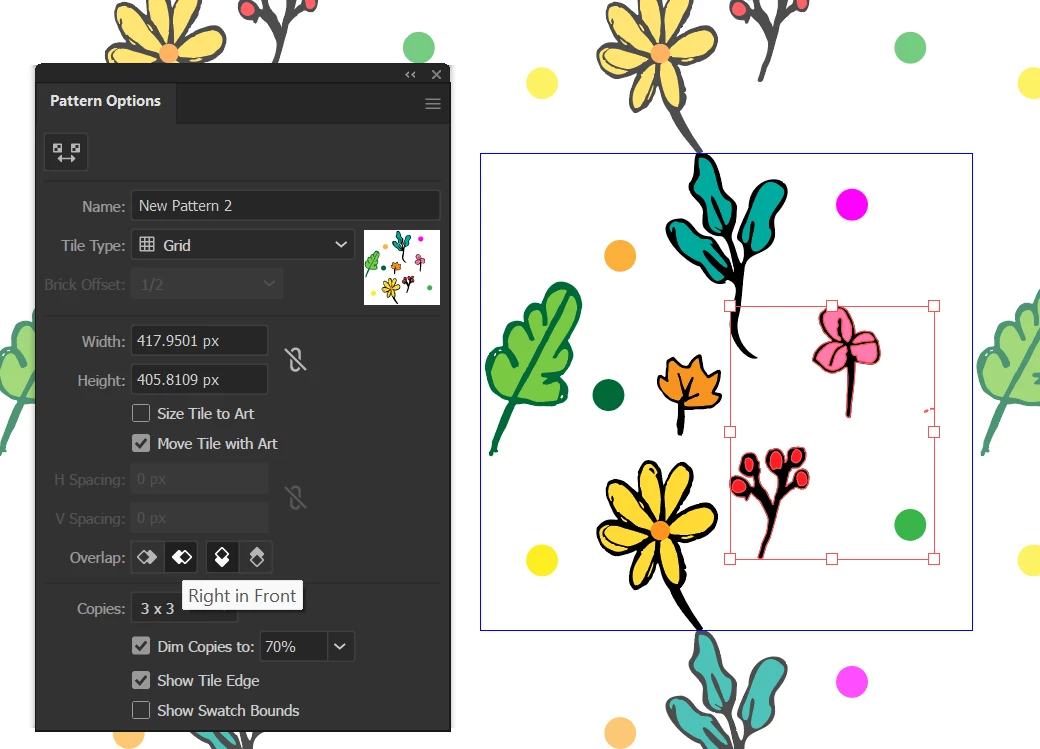
In fact, check this example
AlbertoAndreuzzi_0-1682589955129.pngAlbertoAndreuzzi_1-1682589977050.png

The right side should be on top, but it is not.

How come?

Same happens for the other options.

Latest version of Illustrator installed and updated.

Thanks for your attention.

Alberto

TOPICS
Draw and design , Tools
2.4K
Translate
Report
Community guidelines
Be kind and respectful, give credit to the original source of content, and search for duplicates before posting. Learn more
community guidelines

correct answers 1 Correct answer

Community Expert , Apr 29, 2023 Apr 29, 2023

Pattern bound is the rectangle in blue. The repeat you define.

Translate
Adobe
Community Expert ,
Apr 27, 2023 Apr 27, 2023

Can you please create a demo file that shows your issue with some simple shapes and upload that to Creative Cloud or the like?

Translate
Report
Community guidelines
Be kind and respectful, give credit to the original source of content, and search for duplicates before posting. Learn more
community guidelines
Explorer ,
Apr 27, 2023 Apr 27, 2023

I have attached Pattern 01.ai file. The pattern is saved in the swatches.

Thanks.

Edit: I cannot see the attached file. Can you see it?

Translate
Report
Community guidelines
Be kind and respectful, give credit to the original source of content, and search for duplicates before posting. Learn more
community guidelines
Mentor ,
Apr 27, 2023 Apr 27, 2023

Even though this is the Illustrator forum, we cannot upload .ai files!

You need to upload (CreativeCloud, DropBox, Google, etc) and provide a link...

Translate
Report
Community guidelines
Be kind and respectful, give credit to the original source of content, and search for duplicates before posting. Learn more
community guidelines
Explorer ,
Apr 27, 2023 Apr 27, 2023
Translate
Report
Community guidelines
Be kind and respectful, give credit to the original source of content, and search for duplicates before posting. Learn more
community guidelines
Community Expert ,
Apr 28, 2023 Apr 28, 2023

Can you make it available for download?


Also: In the file please make different patterns that show the issue you want to solve (wrong overlapping)

You don't need to give us your original design. Some boxes would be sufficient. 

Translate
Report
Community guidelines
Be kind and respectful, give credit to the original source of content, and search for duplicates before posting. Learn more
community guidelines
Explorer ,
Apr 28, 2023 Apr 28, 2023

Hi Monika,

Sure, here is the link from Onedrive

https://1drv.ms/u/s!ApfFDrQRSxcojJVN8Apym1Q-MgZ-Cg?e=7oaSzZ

Thanks.

Translate
Report
Community guidelines
Be kind and respectful, give credit to the original source of content, and search for duplicates before posting. Learn more
community guidelines
Community Expert ,
Apr 28, 2023 Apr 28, 2023

In your example there's nothing overlapping.

The way this works: The pattern bounds are smaller than the actual objects that are repeating.

Now how should Illustrator treats the parts of the objects outside the pattern rectangle? 

That's what you define with those overlap options.

Screenshot 2023-04-28 at 23.39.29.png

Translate
Report
Community guidelines
Be kind and respectful, give credit to the original source of content, and search for duplicates before posting. Learn more
community guidelines
Explorer ,
Apr 29, 2023 Apr 29, 2023

Hi Monika,

Thanks for your reply.

I am not quite sure whether I understood what you mean. To start with: can you please define what a pattern bound is, exactly?

Thanks,

Alberto

Translate
Report
Community guidelines
Be kind and respectful, give credit to the original source of content, and search for duplicates before posting. Learn more
community guidelines
Community Expert ,
Apr 29, 2023 Apr 29, 2023

Pattern bound is the rectangle in blue. The repeat you define.

Translate
Report
Community guidelines
Be kind and respectful, give credit to the original source of content, and search for duplicates before posting. Learn more
community guidelines
Explorer ,
May 05, 2023 May 05, 2023

Hi Monika,

Thanks for your answer. I am not sure whether I properly understood the subject though.

Best regards,

Alberto

Translate
Report
Community guidelines
Be kind and respectful, give credit to the original source of content, and search for duplicates before posting. Learn more
community guidelines
Community Expert ,
Apr 27, 2023 Apr 27, 2023

The stacking order can be seen (and changed) in the Layers panel. 

The Overlap repetition can be changed in the Pattern maker.

Translate
Report
Community guidelines
Be kind and respectful, give credit to the original source of content, and search for duplicates before posting. Learn more
community guidelines
Explorer ,
Apr 27, 2023 Apr 27, 2023

Hi Ton,


Understood. But the Overlap function is intended to make it easier to do that but it is simply not working as expected in my copy of Illustrator.

Translate
Report
Community guidelines
Be kind and respectful, give credit to the original source of content, and search for duplicates before posting. Learn more
community guidelines
Community Expert ,
Apr 29, 2023 Apr 29, 2023

Not sure .. but you can reset preferences. May be some settings are mixed?

Translate
Report
Community guidelines
Be kind and respectful, give credit to the original source of content, and search for duplicates before posting. Learn more
community guidelines
Explorer ,
May 05, 2023 May 05, 2023
LATEST

I do not know, I do not think so however.

Translate
Report
Community guidelines
Be kind and respectful, give credit to the original source of content, and search for duplicates before posting. Learn more
community guidelines