
felipefmartins
Participating Frequently
November 6, 2018
Beantwortet

pen pressure not working in Illustrator

  • November 6, 2018
  • 1 Antwort
  • 5710 Ansichten

Hi,

I already had this problem before: Since instalment of Mac OS Mojave, Wacom pen pressure doesn't work in Illustrator (only in Illustrator, it is perfect elsewhere). I've got an answer for this in another forum, so I did what was recommended: Uninstall Wacom, uninstall Illustrator, clean up many files and then reinstall everything. It sure worked, but a week later Illustrator updated itself to CC 2019 and the problem came back. Is there any solution? I can't keep uninstalling and reinstalling everything at every update.

Help!
Dieses Thema wurde für Antworten geschlossen.
Beste Antwort von federico platon

Solved !

After carefully reading the notes of this driver version and following the instructions:

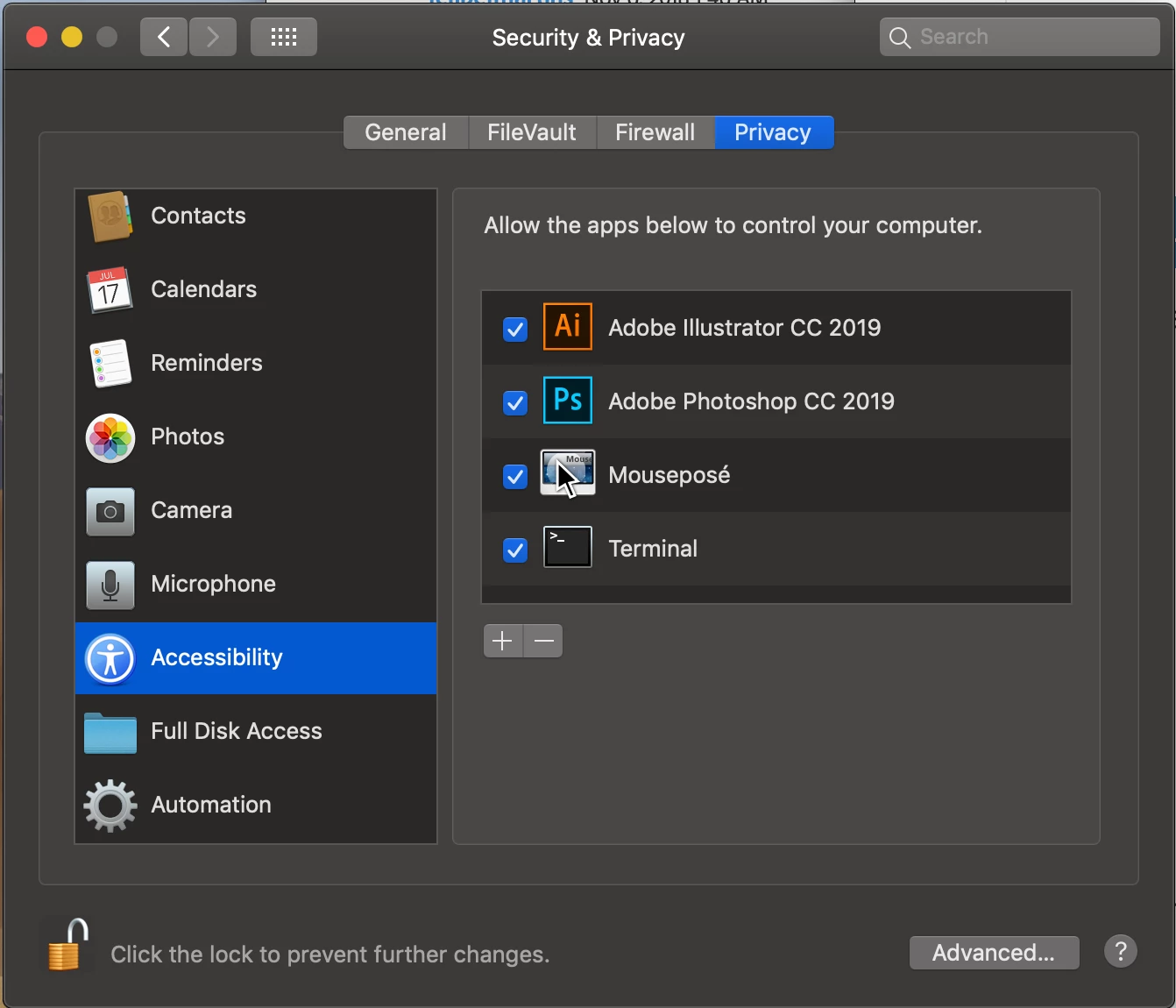
This driver supports macOS 10.14. For complete and accurate functionality of your Wacom products, macOS 10.14 requires options in the Security and Privacy section of System Preferences to be selected. Be sure to check the WacomTouchDriver option in the Accessibility tab, and the Wacom Desktop Center and WacomTabletDriver options in the Automation tab.

When in Accessibility tab, click the lock icon to unlock and then at right click the + to add Ai and other apps.

1 Antwort

Monika Gause
Community Expert
Community Expert
November 6, 2018

Is the Wacom driver compatible with Mojave and Illustrator CC 2019?

Can you check that with Wacom?

Legend
November 8, 2018

Hi Monika,

I have the same problem.

On Mojave, just installed Wacom driver 6.3.31-5 from late September 2018, I use now Ai 23.01 and on Brush Options there are no options but Fixed. Wacom Intuos Pro M (2017).

Could you please confirm if you are on this version of Ai and Mojave if your Wacom tablet is working?

Monika Gause
Community Expert
Community Expert
November 8, 2018

I'm not on Mojave.