

marcoe1065748
Inspiring
October 19, 2017
Answered

pen pressure sensitivity greyed out

  • October 19, 2017
  • 5 replies
  • 33838 views

version Adobe Illustrator CC 22.0.0

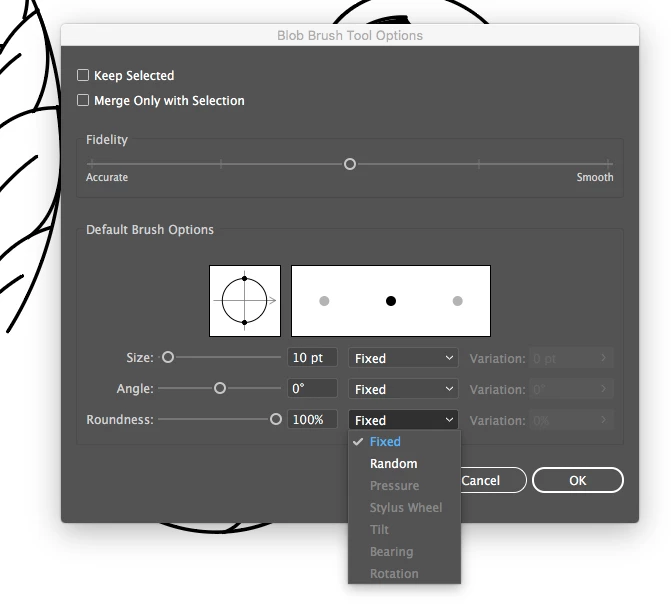
Ever since the new update, every time I'm trying to change my paintbrush to pressure sensitive option from the drop down list box, the 'pressure ' option is greyed out and can't be selected. 'Fixed' and 'random' are the only ones that aren't greyed out.

How can I set the pressure sensitivity option on?

Please help,

Marco
This topic has been closed for replies.
Correct answer Monika Gause

Hi Ms. Monika,

I am not using wacom but ugee 1910b as my pen tablet. I just updated my pen tablet driver to the latest and restarted my Macbook awhile ago, but the pressure sensitivity is still greyed out.

I'm not exactly sure what is going on here but before the update, I was able to create brush strokes with varying degrees of thickness with the pressure sensitivity option on (both on paintbrush and blob brush tool). But now, I don't seem to figure out why the pressure sensitivity is greyed out.

Regards,

Marco


I got that.

Installing a Wacom driver is a hack.

It worked for most people, so you should at least try it.

5 replies

Participant
February 13, 2021

After trying all these, remember to go to

Edit--> Preferences--->Devices---> then check Enable Wacom

I missed this step and could not get it going, once I did that I got all my brush preferences back 

Participant
July 17, 2021

Hi there,


I have tried all of the steps above I am using a Wacom Intuos BT S with the latest version of Illustrator (2021) and apart from the Wacom 6D Art Pens, "Pressure" is greyed out completely. 


HOW CAN THIS BE FIXED PLEASE? 


Thanks

Monika Gause
Community Expert
Community Expert
July 17, 2021

PLease contact Wacom about how to install that tablet and driver and how to set it up in your system.Ask them to tell you if it is guaranteed to run with Illustrator.

Known Participant
October 8, 2020

Hi


I have tried all solutions out there (uninstalling, reinstalling, accessibilty creating new admin and resetting all preferences).... but still have the same problem with it being greyed out. (Illustrator 2020, Mojave 10.14.6 and back to Wacom 6.3.39-1)

Yes, the pressure is available in the Wacom 6D brushes up to a point. Prior to most recent illustrator and wacom updates I could create dots for shading, whose size was relative to pressure. Now they are either the smallest or greatest of the parameters with nothing in between. Any solutions?

Participant
December 19, 2019

Hey Adobe Support Community

I see these comments are from 2017... I've updated my Illustrator to 24.01 and my Wacom drivers and I can't what ever I try get the pressure sensitive function to work on my brushes?

Fixed and random are the only options avalible.


Have re allocated the drivers in the program

And allocated the plugins & scratch dis to my wacon folder in preferences


And still no dice ;-( 


Greatly appreciate any advice if anyone has overcome the same problem?

Monika Gause
Community Expert
Community Expert
December 19, 2019
simonl64689283
Participant
August 18, 2019

HELP S.O.S
I am having the same issue, i have read multiple threads and still its greyed out.
Im using mac book air mojav
Wacom intuos.

I have reinstalled my driver and rebooted multiple times, its works fine in photo shop
but in illustrator its greyed out. Any other suggestions?
I read somewhere to pick a plug in, but all my wacom files are also grey!

(Also no updates available)

Monika Gause
Community Expert
Community Expert
August 18, 2019

Have you read the Wacom installation instructions carefully and set it all up in the system?

Wacom Customer Support | Wacom

Monika Gause
Community Expert
Community Expert
October 19, 2017

Which system?

Which pressure sensitive device are you using?

marcoe1065748
Inspiring
October 19, 2017

macbook air

OS X El Capitan 10.11.6

pen tablet is ugee 1910b

marcoe1065748
Inspiring
October 20, 2017

Thank you Ms. Monika, it worked!

Although it only works on 'paintbrush' tool not the 'blob brush' tool.

I just downloaded and installed the latest wacom driver for mac OS and then restarted my computer and voila!

I opened illustrator and the pressure senstiivity seems to work only on 'paintbrush' under 'calligraphic brush' but not on blob brush tool. I hope adobe can do something about this A.S.A.P.