Participant
January 18, 2016
Answered

Pencil brush missing

  • January 18, 2016
  • 4 replies
  • 14069 views

Hello all,

I'm just getting started with illustrator and have no prior experience so I apologize if my question sounds banal.

I was watching along a video tutorial that was explaining how to get started with Illustrator CC and how to use different brushes, and 10 minutes into the video when the instructor was featuring the pencil tool,  I realized I do not have this pencil tool or it just doesn't appear for some reason in the menu on the left.

So is this pencil brush a separate add-on or do I have to play with settings to "activate" it so it would appear along with other tools. If it's an add on, how to I go about getting it.

I would very much appreciate your help.

I'm using the latest version Adobe Illustrator CC, 2015.2.0 release.

This topic has been closed for replies.
Correct answer sishamIAGD

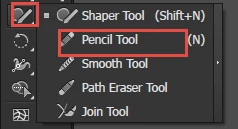
If you click and hold down the shaper tool you'll see other tool options

it appears there

4 replies

Participant
February 3, 2021

For me it doesnt show the more options for the shaper tool thing. I keep on clicking over and over and holding on the button and nothing pops up. 

Doug A Roberts
Community Expert
Community Expert
February 3, 2021

If you click on the three dots at the bottom of the tool palette, do you see the pencil tool in the list that appears? If so, you can drag it to the toolbar, or select 'Reset' in the options for the list.

ruthw35710170
Participant
February 15, 2019

hi, can you help, my pencil tool has dissappeared, even in the place you showed.

Jacob Bugge
Community Expert
Community Expert
February 15, 2019

Ruth,

You may click the three dots and get the default arrangement back, or customize.

ruthw35710170
Participant
February 15, 2019

omg, thanks. didnt know about the 3 dots!

suzzannaAuthor
Participant
January 18, 2016

Thank you shishamDSS and Jacob,

I guess if I finished watching my tutorial, this feature of revealing hidden tools would have come up, but I went into a panic mode instead.

Thanks again for your help.

Cheers,

Suzana

sishamIAGD
Community Expert
Community Expert
January 18, 2016

No problem, glad to help.

If you have further questions in your quest to learn Illustrator there are always people here willing to help.

Good luck!

Jacob Bugge
Community Expert
Community Expert
January 18, 2016

The same from me, Suzana.

Hi Sam.

suzzannaAuthor
Participant
January 18, 2016

Here is the screen shot of my Illustrator, and notice in the left vertical menu that the pencil tool is missing

sishamIAGD
Community Expert
sishamIAGDCommunity ExpertCorrect answer
Community Expert
January 18, 2016

If you click and hold down the shaper tool you'll see other tool options

it appears there

Participant
February 13, 2016

omg thank you