

Pink Smart Guides Missing on Artboards with All Snaps On
I'm new to Illustrator, but fairly tech-savvy. According to the instructor in the LinkedIn Learning course Illustrator for Web Design I should be seeing pink lines when dragging artboards around, but I'm not. I followed the instructor's setup exactly and turned on:
- Smart Guides
- Snap to Grid
- Snap to Pixel
- Snap to Point
- Snap to Glyph
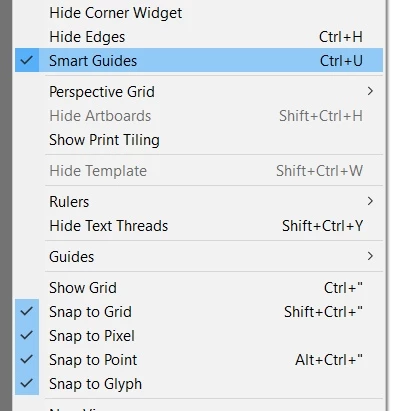
After much digging, I finally found a "solution" on this post:
which recommended, "make sure to only check the snap to point." This was the only thing that worked for me, but that doesn't seem very intuitive.
I'm not trying to lodge a complaint -- I'm sure there must be a good rationale why this is the case. I am just asking for clarification on why this makes sense to someone. And if anyone can give insight -- perhaps a historical commentary like "Well up until 2019 they did it FOO way, but sometime in 2021 they radically changed the system and now -- as EVERYONE knows who uses Illustrator on a daily basis -- they changed it so it works this way. Some of the forums explained the reasoning for this was (fill in the blank)"
That is just a hypothetical example of the type of answer I'm looking for. I know this is not a forum of Adobe engineers. But, I also know there are some very intelligent, talented, and helpful illustrators here so I'm seeing if anyone can offer any insight.
Finally, if this seems like more of a workaround and you think you have a better solution, I welcome your solutions.
Thank you.
 AdChoices