
Participating Frequently
January 24, 2021
Answered

placing svg file created in illustrator into indesign turns out wrong

  • January 24, 2021
  • 1 reply
  • 864 views

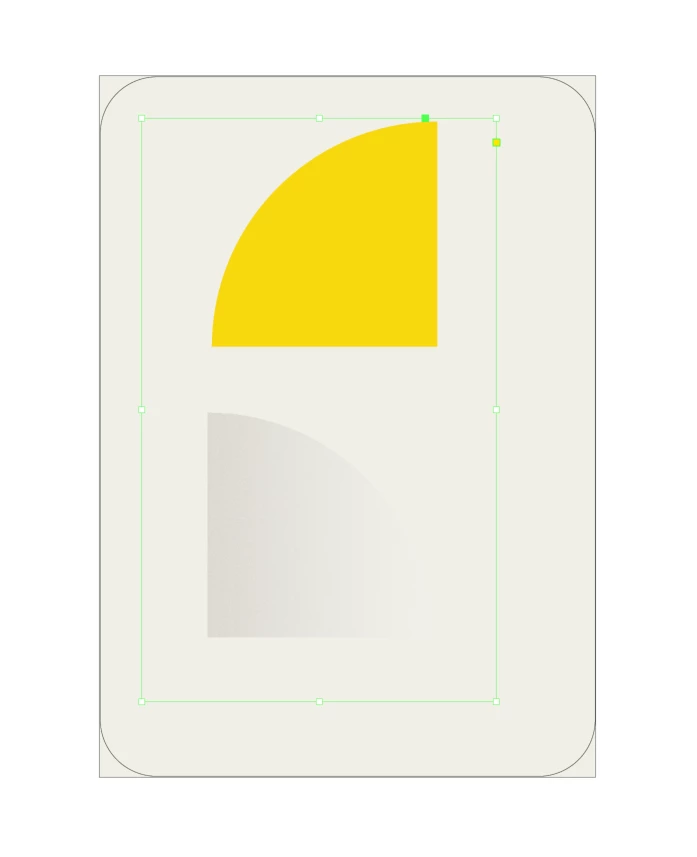
I created an object in illustrator, copied it and placed it on top of the original object and added some effects onto that top object (grain and gradient and transparency). Then saving it as an svg file and trying to place it in indesign it keeps looking like in the pic (it should just be the yellow objects with some effects on top of it-what is going wrong? I am about to go crazy about this...

the original yellow object was cut out from a solid circle using pathfinder-can it have something to do with that?
This topic has been closed for replies.
Correct answer Monika Gause

..i managed to somehow get the svg files right looking by using asset export(i think it was) so it look right in my indesign document now. And i have to send it for print now. Is there a problem having svg files in an indesign doc that shall be printed(cmyk of course)?  The color mode for the illustrator document where the icons are created are in CMYK mode

I rather not take the time to figure out how to transform them to ai files-can I just go along the way I have it now do you think?


SVG will always be RGB. So when you have a CMK document and save/export that as SVG then it gets converted to RGB automatically. WHenyou then place it into InDesign and then export a PDF in CMYK it gets converted again (important: it doesn't get converted back, but just again). So youwill have ruined your color thoroughly when doing that.


And yes: that might be an issue for you when printing.

1 reply

Monika Gause
Community Expert
Community Expert
January 24, 2021

Why do you save an SVG for placing in InDesign?

Save it as an AI file  (with PDF compatibility).

krto1001Author
Participating Frequently
January 24, 2021

oh, havent done this in a while, was thinking i should save as a vector format...AI format is better for what reason?

Monika Gause
Community Expert
Community Expert
January 24, 2021

AI is a vector format that doesn't convert this thing into pixels that you created there.


Actually in InDesign the embedded PDF gets placed. In it at least the original path is still a vector path and creates a crisp clipping mask. So it's actually Adobe's recommended workflow with InDesign.


On top of that: SVG is RGB based and the workflow in InDesign with SVGs is still quite new and might cause issues.