
Participant
November 10, 2023
Question

PLEASE HELP Line weight change when saved to PDF?

  • November 10, 2023
  • 2 replies
  • 663 views

When I exported these files to PDF the line weight of just a few boxes got messed up.

Before (in Illustrator and exported as PNG):

After (saved to PDF), note the 3 center boxes:

 

The line weight used throughout all boxes (including 1 and 5) is 3pt

Here are my export settings:
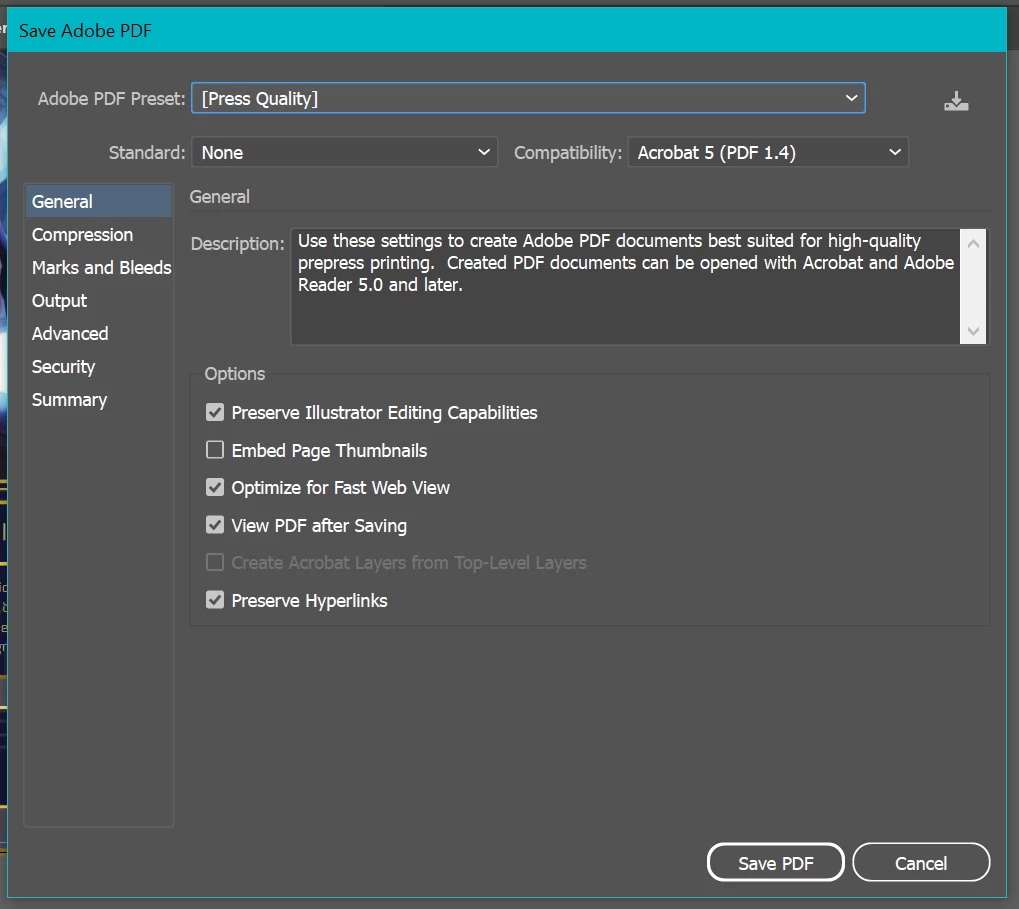
When I removed "Optimize for fast Web View", nothing changed. I have opened the PDF in multiple places to see if it was the viewing program (it was not). The paths are closed, and other rectangles within the image are completely fine. 


This topic has been closed for replies.

2 replies

Ton Frederiks
Community Expert
Community Expert
November 10, 2023

Line weight changes in a PDF can sometimes be caused by a preferences setting in Acrobat.

Try if turning off "Enhance thin lines" in Preferences > Page Display helps.

Monika Gause
Community Expert
Community Expert
November 10, 2023

Can you select the path that has the line that is OK and the line that is not OK and then open the Appearance panel with each of them and take a screenshot of each of them?


Participant
November 10, 2023

So sorry I am mostly self-taught, if this isn't the panel you're talking about let me know. They appear exactly the same. The only thing that changes in the properties panel is the x-value.

Good line:

Bad line:


Larry G. Schneider
Community Expert
Community Expert
November 10, 2023

Thank you for the suggestion, yes it does! Do you have any suggestions for how to fix it so I could still have the gradient?


My own opinion the lines are too narrow to effectively use a gradient. You could try using Outline stroke but I don't think it will help much.