Participant
May 19, 2017
Answered

Please help! Lines attaching to curves smoothly?

  • May 19, 2017
  • 2 replies
  • 484 views

Hi there,

I'm a relative noob to Illustrator so please be patient with me... I'm trying to draw a raindrop / flame with the strokes coming out at opposite ends like a loop de loop How do I join the lines up to the sides? I've tried using the curvature tool and downloaded the Subscribe plug ins, but I think I need a dummy's guide as I can't seem to get it to work! Please help, I'm completely lost!

.


This topic has been closed for replies.
Correct answer Ton Frederiks

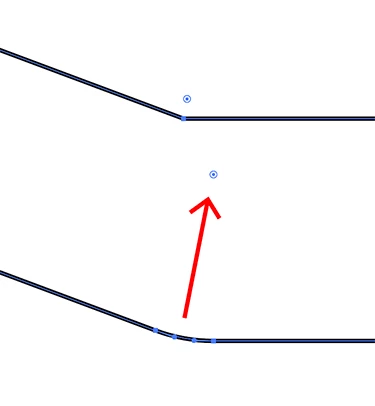
Or use the Direct Selection tool and drag the Corner widget up to smooth the angle.

2 replies

melissapiccone
Community Expert
Community Expert
May 19, 2017

These answers are all correct. Working with curves and points can be daunting. A simple way to make it curvier is use the pencil tool. Double click on your pencil tool and move the slider all the way to the right. Select your line you want to be curved and simply draw over it with the pencil tool to adjust it. You can then go over it again with the smooth tool...

Melissa Piccone | Adobe Trainer | Online Courses Author | Fine Artist
Monika Gause
Community Expert
Community Expert
May 19, 2017

So this should be curved? In that case SubScribe won't help too much.

You can just draw that with the pen tool.

You can't connect these paths, since you cannot create Y-connections. You can just snap the path to the closed drop shape.

Participant
May 19, 2017

Hi, thanks so much for your reply.

How do I make the transition from the curve to the straight line without it being an angle? So smoothing off the corner where the two lines meet?

Monika Gause
Community Expert
Community Expert
May 19, 2017

You need to drag the left handle out horizontally and then adjust to your need.

Also drag out the handle at the drop shape.

Like so