Participant
April 2, 2022
Question

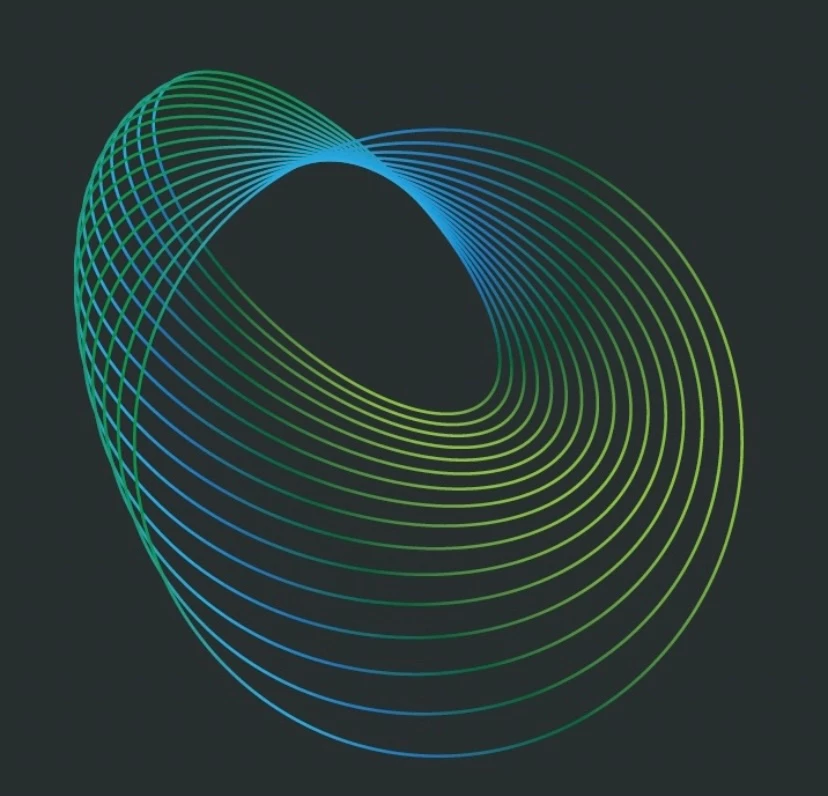
Please help me to understand how to make this design. I have been trying various things…

  • April 2, 2022
  • 3 replies
  • 209 views

This topic has been closed for replies.

3 replies

kphotopage
Legend
April 6, 2022

Annabelle, Hi.


Here I recreated similar using Effects>Transform.


Draw two Circles, align. Group.

(The larger circle, fill with None. I showed in green so you could see.)


On the Group, Effects> Transform, apply these settings.

Expand.

Flip and Rotate.

Add a gradient along your Strokes.


K  

Monika Gause
Community Expert
Community Expert
April 3, 2022

It's a blend between an ellipse and a circle.

They both have different gradients and are maybe rotated.

To rotate something inside a belnd properly, you have to use the transform effect, so you apply transform effects to both elements and then blend.


The effects can be edited afterwards to adjust everything.

Mylenium
Legend
April 3, 2022

You could re-create it using a blend in AI, but it's still a lot of manual work. You'd have to expand the blend to adjust the individual gradients and merge lines.


Mylenium