


Participant
May 20, 2022
Answered

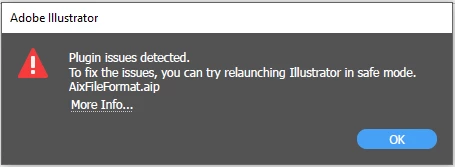
Plugin issues detected. AixFileFOrmat.aip
  • May 20, 2022
  • 4 replies
  • 5301 views

Running latest version of Illustrator 26.3.1. When I press OK the app launches fine. But after deleting preferences, uninstalling, and reinstalling, I'm still getting this error message as well as other members of my company's creative team. I cannot find any solution that works.


System:

Microsoft Windows 10 Enterprise

32GB memory

1TB hard drive

Intel Core i7-10850H CPU @ 2.70GHz, 2712 Mhz, 6 Cores, 12 Logical Processors


This topic has been closed for replies.
Correct answer Xingdong - Esri

Sorry for the broken link in the post above. The correct link to the announcement is here https://community.esri.com/t5/arcgis-maps-for-adobe-creative-cloud-blog/maps-for-adobe-v3-1-1-update-to-support-adobe/ba-p/1179289

4 replies

Xingdong - Esri
Inspiring
June 3, 2022

 @Totoro Hugs @Annie Kitchen @Dead Taco @Sarah Bell Map A new update (v3.1.1) of ArcGIS Maps for Adobe Creative Cloud with a fix to the Illustrator 26.3.1 compatibility issue is now available. Please find more detail here 

Xingdong - Esri
Xingdong - EsriCorrect answer
Inspiring
June 3, 2022

Sorry for the broken link in the post above. The correct link to the announcement is here https://community.esri.com/t5/arcgis-maps-for-adobe-creative-cloud-blog/maps-for-adobe-v3-1-1-update-to-support-adobe/ba-p/1179289

Participant
June 4, 2022

Thanks for the help!

Mark

Participating Frequently
May 23, 2022

Revert to Illustrator 2021 or 26.0. This will fix it. The ArcGIS Maps for Adobe update to be compatible with 26.1 will be released soon.

Dead Taco
Known Participant
May 23, 2022

Same problem here on all systems with the ArcGIS for Creative Cloud plugin installed.  Illustrator is unable to use the AIX file format and tosses the error on startup.  This all started happening after the last Illustrator update, and it's affecting everyone in our company.


Uninstalling/Reinstalling/Updating the plugin doesn't make any difference.

Anubhav M
Community Manager
Community Manager
May 23, 2022

Hello @Totoro Hugs @Annie Kitchen @Dead Taco,


Kindly try reverting back to Illustrator version 26.0 from the Creative Cloud Desktop app and check if it helps.

If not kindly reach out to the plug-in manufacturer for assistance.


Looking forward to your response.


Regards.

Xingdong - Esri
Inspiring
May 24, 2022

Thank you @Anubhav M for helping out.


Hello @Totoro Hugs @Annie Kitchen @Dead TacoSorry for the inconvenience. The ArcGIS Maps for Adobe team at Esri is working on a solution to address the plug-in's compatibility issue with the latest Illustrator v26.3.1. Please refer to the post https://community.esri.com/t5/arcgis-maps-for-adobe-creative-cloud-blog/illustrator-26-3-1-compatibility-issue-with-maps/ba-p/1174826 for detail and workaround.


Xingdong

ArcGIS Maps for Adobe

Anubhav M
Community Manager
Community Manager
May 20, 2022

Hello @Annie Kitchen,


Sorry to hear about this experience. Can you see the AixFileFormat.aip file if you navigate to here?


C:\Program Files\Adobe\Adobe Illustrator 2021\Plug-ins\Illustrator Formats


Are you using the ArcGIS Maps for Adobe Creative Cloud? If yes, kindly uninstall and re-install the software from here: https://doc.arcgis.com/en/maps-for-adobecc/latest/install/install.htm


Kindly update this thread if the issue persists or if you need further assistance.


Thanks,

Anubhav

Participant
May 22, 2022

Hi I'm having this exact problem. I've reinstalled everything several times (both Illustrator and ArcGIS Maps for Adobe Creative Cloud).

The AIP file in question is on my system but the installer places it here:
C:\Program Files\Adobe\Adobe Illustrator 2022\Plug-ins\ArcGIS Maps

Illustrator launches gives the same warning as the person above got. The Extension seems to function but I'm unable to open an AIX file which is all I want to do.

Mark