
Participant
August 5, 2019
Answered

PNG file is wrong size in AI

  • August 5, 2019
  • 3 replies
  • 3335 views

I have a 64px x 64px PNG created in Fireworks, and when I open or place that image in AI, it's only 16px.  I have searched online for a solution, but all I can find are tons of problems with PNG EXPORT from AI being too small.  Not "import".  The image has a resolution of 300px/inch.  If all I do is open in AI, then export back to PNG, the resulting image is 1/4 the size of the original.  Thoughts?
    This topic has been closed for replies.
    Correct answer Ton Frederiks

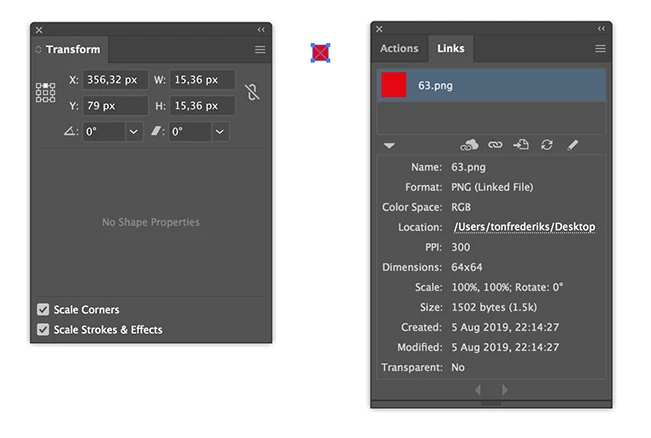
    That is because you image has a resolution of 300PPi, Illustrator shows that resolution.

    If the same pixel image had a resolution of 72 ppi it would show it larger at 64 pix.

    3 replies

    Monika Gause
    Community Expert
    Community Expert
    August 5, 2019

    Additionally since Fireworks used PNG as its native file format by adding private data to it, your files might have had vector content in it, but Illustrator can't read that.

    Participant
    August 5, 2019

    Thanks Ton and Monika, for the fast, accurate response.  I thought it might have something to do with the pixel density, but didn't think it through clearly, and was worried that changing that value in FW would degrade the quality of the image.  Tried it, and I can't tell the difference, and the PNG now loads into AI at the correct size.

    Thanks again!

    Ton Frederiks
    Community Expert
    Community Expert
    August 5, 2019

    Good to hear that helped.

    Ton Frederiks
    Community Expert
    Community Expert
    August 5, 2019

    If the imgage was embedded you would see the scale: 24%

    Ton Frederiks
    Community Expert
    Ton FrederiksCommunity ExpertCorrect answer
    Community Expert
    August 5, 2019

    That is because you image has a resolution of 300PPi, Illustrator shows that resolution.

    If the same pixel image had a resolution of 72 ppi it would show it larger at 64 pix.

    Participant
    December 13, 2022

    Okay, if that is the problem. So what can I DO?

    Ton Frederiks
    Community Expert
    Community Expert
    December 13, 2022

    Change the ppi (without resampling) in an app like Photoshop or Preview.

    Or in Illustrator:

    Select the image and in the Links panel note the dimensions.

    Go to the Transform panel and enter those w/h dimensions in pixels (you can type the number followed by px even if that is not your current measuring unit) and make sure the constrain is checked.