MahaB82A
September 21, 2025
Answered

Pop-up Window doesn't appear

  • September 21, 2025
  • 2 replies
  • 813 views

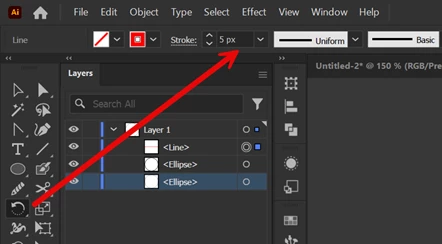
Red line is tangent to big circle. Small circle is there to identify center point easily. Two circles and red line are not in a group. I want red tangent line around the big circle. Therefore I activated the Rotate tool and Alt+Click at center of the circle but Pop-up Window doesn't appear. How to fix it? File & Video also uploaded.
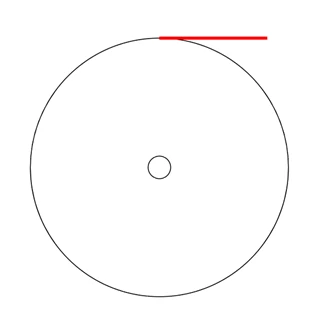
Pop-up Window doesn't appear


Correct answer CarlosCanto

It is now working, only change is when I went to night sleep almost for 7 hours I put my computer at hibernate state. In morning I found it was working. I do not know what happned.


Yes I use Windows 11. Please tell me how did you move the Rotate Tool to another location.


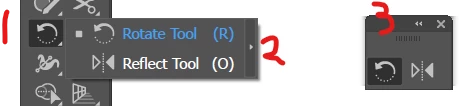
to move the Rotate Tool you could make a "Floating" tool bar


1. click and hold the Rotate Tool for a couple of seconds until the Tool menu shows up

2. click on small arrow to the right of the menu to make a floating menu

3. move the Tool Bar anywhere you want


2 replies

Monika Gause
Community Expert
Community Expert
September 23, 2025

When was the last time you rebooted the computer?

Rebooting can fix a lot of things.

MahaB82A
MahaB82AAuthor
September 23, 2025

Windows update comes  only I reboot my computer. I assume if update to take effect you have reboot the computer. It was rebooted long before the above glitch.

Monika Gause
Community Expert
Community Expert
September 23, 2025

Desktop computer systems are not made to run 24/7.


You want to reboot them regularly.

CarlosCanto
Community Expert
Community Expert
September 21, 2025

in the video it seems you're doing Ctrl+Click instead of Alt+Click

MahaB82A
MahaB82AAuthor
September 21, 2025

Never, I tried many times with Alt+Click. 

MahaB82A
MahaB82AAuthor
September 22, 2025

you're on Windows right?


ok, then I think something is interfering with your keyboard. When you press Alt, the cursor should not change to a black pointer. 

When you press Ctrl key while you have the Rotation Tool active, the cursor should change to the last Selection Tool used, that's a feature.


when you press Alt, does the Message below change to "Selection"? 


What was the reason above glitch occurred?