
Exit
  • Global community
    • Language:
      • Deutsch
      • English
      • Español
      • Français
      • Português
  • 日本語コミュニティ
  • 한국 커뮤니티
2

PostScript Printer PPD Issue

Explorer ,
Nov 23, 2021 Nov 23, 2021

An issue selecting a printer PPD in Illustrator is preventing PostScript printing. The printer is a Ricoh IM C4500 with PostScript Level 3 RIP built-in. macOS Monterey with Ricoh drivers install and print correctly except from within Illustrator (26.0.1).

PPD is not selectable and Print as Bitmap is selected and deselecting does not change the setting.
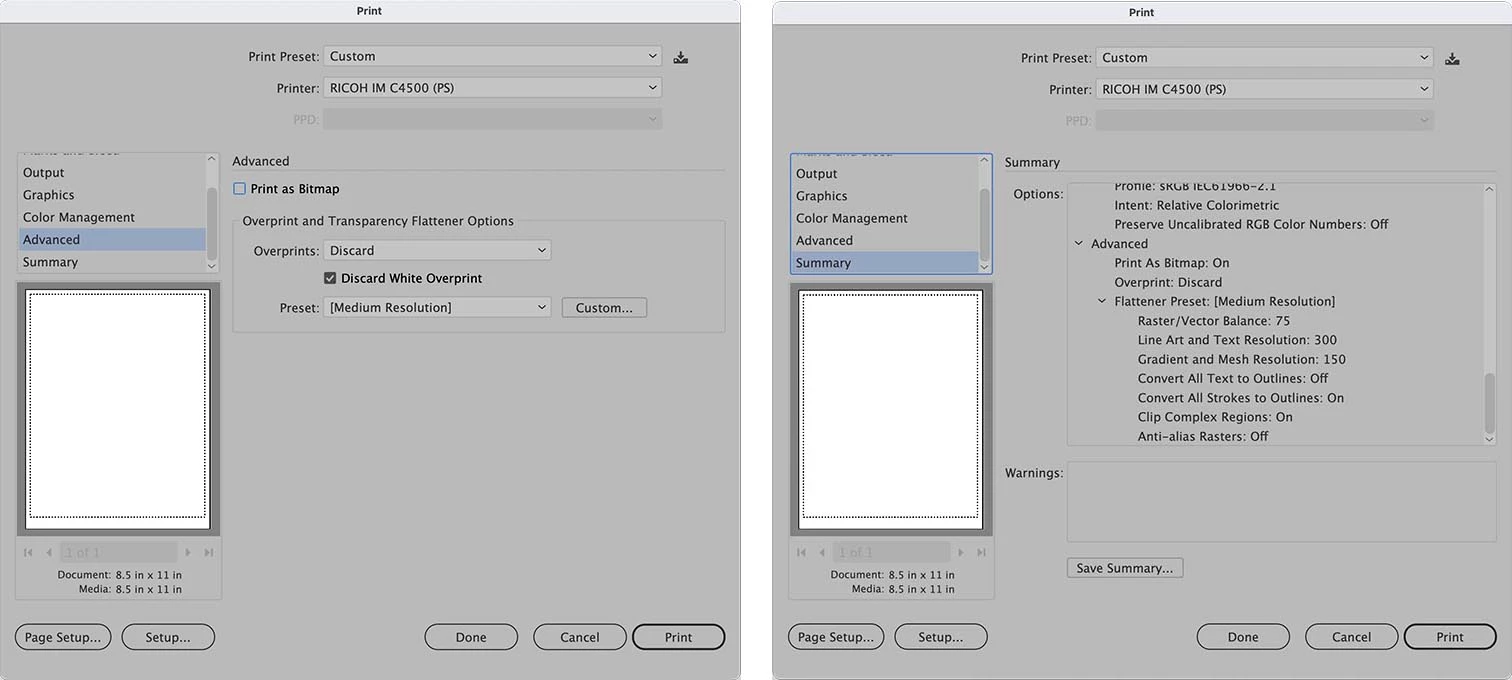
AI-Print.jpg

Choosing Adobe PostScript file activates the PPD
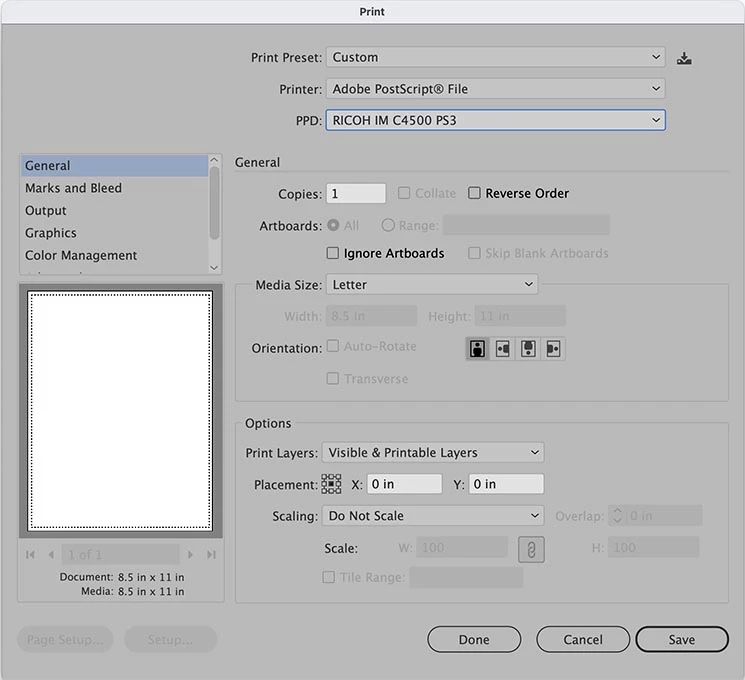
PS-file.jpg

Illustrator is not seeing the Ricoh as a PostScript printer and I haven't figured out a workaround.

I know this is most likely a Ricoh/Monterey issue but I appreciate any suggestions.

TOPICS
Bug
5.9K
Translate
Report
Community guidelines
Be kind and respectful, give credit to the original source of content, and search for duplicates before posting. Learn more
community guidelines

correct answers 1 Correct answer

Explorer , Dec 01, 2021 Dec 01, 2021

Solving my own problem. Did a little reworking of the CUPS driver in order to activate Adobe PostScript and set it to the default. The bug is actually in the way Apple installs the CUPS driver ro the Ricoh.

Translate
Adobe
Explorer ,
Nov 23, 2021 Nov 23, 2021

Update -

An office MacBook Pro with macOS 11.6 has both old (1.2) and new (3.0) versions of the Ricoh driver. Illustrator can see the PPD with 1.2 and can not see the PPD with 3.0. I think this isolates the issue to the latest Ricoh driver.

Translate
Report
Community guidelines
Be kind and respectful, give credit to the original source of content, and search for duplicates before posting. Learn more
community guidelines
Explorer ,
Dec 01, 2021 Dec 01, 2021

Solving my own problem. Did a little reworking of the CUPS driver in order to activate Adobe PostScript and set it to the default. The bug is actually in the way Apple installs the CUPS driver ro the Ricoh.

Translate
Report
Community guidelines
Be kind and respectful, give credit to the original source of content, and search for duplicates before posting. Learn more
community guidelines
Explorer ,
Dec 02, 2021 Dec 02, 2021

Tsaronian,


Could you please share your solution in a bit more detail? I am having the exact same problem with a Ricoh M3002 and Illustrator.

Translate
Report
Community guidelines
Be kind and respectful, give credit to the original source of content, and search for duplicates before posting. Learn more
community guidelines
Explorer ,
Dec 02, 2021 Dec 02, 2021

Here are the steps:


Use Terminal command to enable CUPS web interface
cupsctl WebInterface=yes

Go to CUPS URL for local installed printers and select Printers tab
http://localhost:631/
Username & Password are those for the computer

Choose Ricoh printer
RICOH_IM_C4500__PS_

Select Modify Printer - Then Continue
Then click on Continue again
Select RICOH IM C4500 PS (en,...)

Click on Modify Printer

Set Default Options
Change PostScript to Adobe PostScript

Click on Set Default Options

Translate
Report
Community guidelines
Be kind and respectful, give credit to the original source of content, and search for duplicates before posting. Learn more
community guidelines
Explorer ,
Dec 02, 2021 Dec 02, 2021

You are a lifesaver. I have been having to create PDFs and print from Acrobat. Thanks 🙂


Translate
Report
Community guidelines
Be kind and respectful, give credit to the original source of content, and search for duplicates before posting. Learn more
community guidelines
Explorer ,
Dec 02, 2021 Dec 02, 2021

Again, thank you. I would not have even know to enable the CUPS GUI. It works like a charm!

Translate
Report
Community guidelines
Be kind and respectful, give credit to the original source of content, and search for duplicates before posting. Learn more
community guidelines
New Here ,
Aug 03, 2022 Aug 03, 2022

This is great, thank you

Translate
Report
Community guidelines
Be kind and respectful, give credit to the original source of content, and search for duplicates before posting. Learn more
community guidelines
Explorer ,
Aug 03, 2022 Aug 03, 2022

Glad I was able to create a searchable solution for a bug which, although simple, is 100% immobilizing to our PostScript printing. We have three large corporations to point the finger at for leaving us this issue. They should be asshamed at their lack of response.

Translate
Report
Community guidelines
Be kind and respectful, give credit to the original source of content, and search for duplicates before posting. Learn more
community guidelines
New Here ,
Aug 25, 2024 Aug 25, 2024

I am having the same problem - what did you do to the cups file to get out to work?

Translate
Report
Community guidelines
Be kind and respectful, give credit to the original source of content, and search for duplicates before posting. Learn more
community guidelines
Explorer ,
Aug 25, 2024 Aug 25, 2024

The solution is listed above in this thread. Be aware that some items may have changed over the last 3 years, but you should be able to work your way through any variations.

Good luck!


Here are the steps:


Use Terminal command to enable CUPS web interface
cupsctl WebInterface=yes

Go to CUPS URL for local installed printers and select Printers tab
http://localhost:631/
Username & Password are those for the computer

Choose Ricoh printer
RICOH_IM_C4500__PS_

Select Modify Printer - Then Continue
Then click on Continue again
Select RICOH IM C4500 PS (en,...)

Click on Modify Printer

Set Default Options
Change PostScript to Adobe PostScript

Click on Set Default Options

Translate
Report
Community guidelines
Be kind and respectful, give credit to the original source of content, and search for duplicates before posting. Learn more
community guidelines
Community Beginner ,
Sep 16, 2025 Sep 16, 2025
LATEST

I had a similar issue with a Ricoh IM C2500 on my M2 Max MBP running macOS Sequioa (15.6). The cups options where slightly different.


1. Use Terminal command to enable CUPS web interface

cupsctl WebInterface=yes


2. Go to CUPS URL for local installed printers and select Printers tab

http://localhost:631/

SCR-20250916-lqwk-2.png


3. Choose Ricoh printer

SCR-20250916-lrfr.png


4. Select "Modify Printer" from the Dropdown from the "Administration" dropdown

SCR-20250916-lsaf.png

5. Enter your computer admin username & password

SCR-20250916-ltok.png

6. Click "Continue" on the first 2 "Modify Printer" Pages. No changes needed

SCR-20250916-lugo.pngSCR-20250916-luoo.png

7. Select the matching PPD file for your printer and then click "Modify Printer"

- For myself it was "RICOH IM C2500 PS…"

SCR-20250916-luyi.png

8. Quit and re-open Illustrator. You should now see a PPD option.

SCR-20250916-lvyb.png

Translate
Report
Community guidelines
Be kind and respectful, give credit to the original source of content, and search for duplicates before posting. Learn more
community guidelines