
Participating Frequently
June 24, 2015
Answered

Preferences file corrupt - Illustrator CC 2015

  • June 24, 2015
  • 58 replies
  • 52199 views

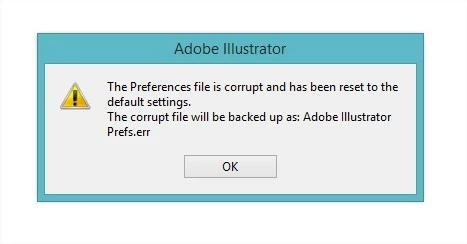
every time i boot up illustrator i get this error, and all my setting are restored (including my actions which in a previous post i mentioned i cant restore from a save i have). what is wrong with illustrator CC 2015!
This topic has been closed for replies.
Correct answer AshutoshChaturvedi

Hi,

We have released a WINDOWS ONLY hot fix today that fixes the issue of corrupt preferences. Please go to Creative Cloud application and download the patch CC 20151.1 (19.1.1)

If you do not see the patch in the Creative Cloud application wait for the refresh cycle to be over or you can sign out and sign in to force refresh the list of available patches.

Regards,

Ashutosh

On behalf of Illustrator Engineering Team

58 replies

Participant
September 15, 2015

So, i figured out where the problem is, which produces the corrupted preference file and the problem with the decimal numbers. All problems only occur when i use the "Save for Web" Option.

Instead, i use the option "Export", no problems scince then! Can someone please try this workflow?

Participating Frequently
September 15, 2015

@mohammada56761127: yep - it's exactly the way to reproduce the bug. See my post: Re: Preferences file corrupt - Illustrator CC 2015

"Export" works fine for me too - w/o bug. But it's not the solution.

New findings: You don't need to really save a file with "Save for Web". It will also appear if you just open the "Save file dialog" and cancel.

1. File > "Save for Web..."

2. "Save for Web..." windows opens

3. Click on "Save" button

4. "Save files as..." dialog opens

5. Click on "Cancel" ("Save files as..." dialog)

6. Click on "Cancel" ("Save for Web..." windows)

7. TADA.....there it is....big/decimal number bug including corrupted pref file after next restart.

100% reproducable (with German OS & system settings)

I don't know why the wise guys at adobe are not able to fix this bug? There are precice descriptions to reproduce the bug. Ai CC 2014 and before are not affected, it's new to Ai20015, so there must be some changes in this part of the app. It can't be so hard to find the problem.

MAYBE!? It seems the bug only occurs on system with NON-US settings - so => no US user is affected => no problem at all => no need to fix this bug - as usual :-(

Participant
September 15, 2015

Just had this bug again - everything as you described.

I wonder will they delete my swearing in Russian here - because they really don't care about that "non-us" bug, as I see.

chife1980
Inspiring
September 11, 2015

The last adobe update is the worst in recent times...
Photoshop is crushing, Illustrator is unfit for work...
and that the saddest thing - a very long time we do not see patch.

Known Participant
September 11, 2015

Unfortunately I have to agree with it,

CC 2015 Update offended by what I experienced crossing

CS6 to 64bit. Which also they were also enough errors that persist to the present day ...

For us paying customers become new betatesters ...

Participating Frequently
September 11, 2015

No, it is not an old bug! This came with the latest update. I have been using Illustrator since CS4 and always on Windows (XP, Win7, Win10) with Swedish locale without this bug. (Of course with a lot of other quirks and bugs on the way, but never anything as annoying as this.)

Participating Frequently
September 11, 2015

Well, it seems like the bug and the cause is found, but Adobe is making no effort to rush a fix.

@Sanjay: Changing system wide settings is no solution, you might get away with calling it a workaround, even if it one of the worst I have seen. Doing this might lead to a bunch of other problems and in an enterprise environment it is not even an option.

Participant
September 10, 2015

I can also report this same bug. Nothing was wrong for weeks, not until I started doing some web design and used Save for Web feature. After that, I constantly got measure unit corruptions and after restart a notice that the preferences are corrupt. And also the workaround worked; after setting the decimal separator to period, Save for Web works again. Hopefully the real bugfix will be released soon, so that I can switch back to using comma as the decimal separator.

Participating Frequently
September 9, 2015

Hey all,

Regarding the preferences issue, the suggested workaround in some other post in this thread worked fine for me:

Basically uninstalling Illustrator, then setting your O.S. (windows in my case) to English (downloading the language package if needed) an re-installing Illus (in English, of course) and it will fix decimal issue (as long as you input "." and not "," in your values), and preferences save correctly...

All this if you don't mind working in an English environment, which I don't

Good Luck!

Known Participant
September 9, 2015

Just fix it will decimal issue (as long as you input "." And not "" in your values), others are not needed, and all my work in the Czech windows


Ales.

September 3, 2015

Please Adobe, do finally something. I can not work withnout Illustrator.

I have problem with corupt preference file. But But what's more important, action problem. If i make and export action, i can´t open it after restart Ai. (All actions disappear after Ai restart).

I use Czech version.

Please help me.

Known Participant
September 3, 2015

Ahoj,

sice to je otrava, ale použij trik, který jsem popsal výše. Změň desetinný oddělovač z čárky na tečku. Jak to popisuju zde: Re: Adobe Illustrator 2015 - Units-Bug Pak už bude Illustrator fungovat. Kdy to ale opraví, je ve hvězdách.

Aleš

September 3, 2015

Ahoj,

díky zkusím. A to pomůže i na problém s akcemi?... Zkusím.

birgit f
Participant
September 1, 2015

Win 8.1, native antivirus (Windows Defender), locale: Norwegian.

Same bug here, Illustrator only. Seems related to print/postscript, which probably triggered it, but once it's appeared it won't go away. I am also getting a "graphics drivers not updated" prompt on startup - but they are. I am not changing my locale settings over this; too many applications that may potentially suffer from that.

(Sad thing is, I am using Illustrator for this project only because InDesign is buggy too - in that it won't let me use the CC Library colour palettes... They are there, but nothing happens when I click on them.)

DiogoSantos
Participant
August 26, 2015

I have the same issue, everything always worked perfectly before CC 2015 (Only illustrator has this problem)

OS Windows 10 64bit (Language Brazilian Portuguese) *the same problem happens with W8.1 before upgrade*

I use all ACC softwares in english.

With Illustrator CC 2014 i never had this problem.

I saw the decimal separator thing to "fix" it, but doing that i may fix illustrator but it creates problems with other software.

This is not an ideal or acceptable solution.

Every day i open the Adobe Creative Cloud hoping to have a small patch to fix this problem.

is it too hard patch the software to fix this?  already going to 3 months it was reported and no fix.....  this is not a feature, should be treated as top priority bug.


Participant
August 29, 2015

The problem persists and yet no response from Adobe... I don't even create actions anymore, because they get deleted everytime I close Illustrator. This makes my work at least twice as long as it used to be. It's really getting on my nerves, because we don't even get any kind of official solution from Adobe. Maybe when we stop payment on our CC suite, they'll work harder to figure it out...

Larry G. Schneider
Community Expert
Community Expert
August 29, 2015

From your description of the Actions, it appears as though the permissions on your profile folders are not set properly. What OS and version are you running?

Participant
August 25, 2015

Ok, so it work only if I do the property modification every time…

Today I have opened a japan ai file, and the units bug occurred…