
Participating Frequently
June 24, 2015
Answered

Preferences file corrupt - Illustrator CC 2015

  • June 24, 2015
  • 58 replies
  • 52202 views

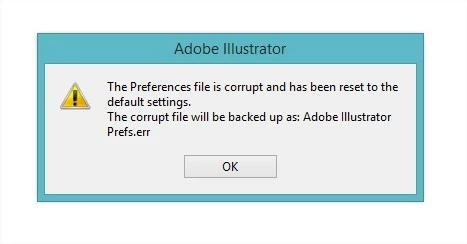
every time i boot up illustrator i get this error, and all my setting are restored (including my actions which in a previous post i mentioned i cant restore from a save i have). what is wrong with illustrator CC 2015!
This topic has been closed for replies.
Correct answer AshutoshChaturvedi

Hi,

We have released a WINDOWS ONLY hot fix today that fixes the issue of corrupt preferences. Please go to Creative Cloud application and download the patch CC 20151.1 (19.1.1)

If you do not see the patch in the Creative Cloud application wait for the refresh cycle to be over or you can sign out and sign in to force refresh the list of available patches.

Regards,

Ashutosh

On behalf of Illustrator Engineering Team

58 replies

Participant
September 28, 2016

Thank you very much! Its working now

Alliepham
Participant
April 23, 2016

Yeah, I had same problem with preferences and decimal number (like 123.4567 px)
And here is my solution:

1. Download this tool: http://download.macromedia.com/SupportTools/Cleaner/win/AdobeCreativeCloudCleanerTool.exe

and run as admin... to clean up all Adobe product (maybe just Illsutrator, I haven't try, I removed all)

2. Uninstall all Microsoft visual C++ library (but carefully, if u know what library was installed when adobe product installed, just uninstall them cause some programs need difference libraries to run correctly)

3. Restart computer.
4. Reinstall Adobe products that u removed at step 1.

5. Done! enjoy "no error" time.

Participant
September 28, 2016

I have a problem with illustrator brush size. I cant change the preferences.

Monika Gause
Community Expert
Community Expert
September 28, 2016

Melgor schrieb:

I have a problem with illustrator brush size. I cant change the preferences.

Is there Avast Antivirus running on your machine?

Participant
January 12, 2016

Hi,

If you are using Windows 10, change the region settings to USA. That thing alone fixed the problem with the corrupted file and with the decimal values changing.

Good luck.

Participant
October 27, 2015

Working. Need reinstall AI...

AshutoshChaturvedi
AshutoshChaturvediCorrect answer
Legend
October 20, 2015

Hi,

We have released a WINDOWS ONLY hot fix today that fixes the issue of corrupt preferences. Please go to Creative Cloud application and download the patch CC 20151.1 (19.1.1)

If you do not see the patch in the Creative Cloud application wait for the refresh cycle to be over or you can sign out and sign in to force refresh the list of available patches.

Regards,

Ashutosh

On behalf of Illustrator Engineering Team

Participant
October 20, 2015

Oh my God!!! Thank you sooo much!!! So many emotions now! Good job guys, thanks for help! Awesome)

* it is awailable atm. Works fine. Thanks!

AshutoshChaturvedi
Legend
October 15, 2015

We are currently baking a hot fix for the issue and will be ready with the patch in next few days.

-- Ashutosh

Inspiring
October 15, 2015

Well, it has certainly been in the oven for a bit.

Bean.Here
Participating Frequently
October 15, 2015

Well said =)

Participating Frequently
October 12, 2015

Exactly the same bug

Participant
October 6, 2015

Same issue in french version... When does adobe will do something ?

Participant
October 9, 2015

It seams Adobe ignores this, cause the bug is probably only shown in not english versions (I guess in all versions where the decimal delimiter is , and not .)

This bug makes me crazy.

I did the following:

1. Delete old/broken preferences Files from AI - can be found under: %USERPROFILE%\AppData\Roaming\Adobe\Adobe Illustrator 19 Settings\de_DE\x64\

Delete the following files in this directory:

   Adobe Illustrator Prefs.err = Error File 64k

   Adobe Illustrator Prefs = Preferences File 64k also broken

   Adobe Illustrator Cloud Prefs

(Sometimes only 1 or 2 files are there - delete as much of the 3 files you can find)

2. Start AI - and adjust in AI all the things you need or you want to have - BUT DON'T CALL "File > Save for Web"

3. Quit AI (new correct pref. files are in the settings path)

4. Copy the 2 new correct setting files to a safe location

   Adobe Illustrator Prefs

   Adobe Illustrator Cloud Prefs

I copied it to %USERPROFILE%\Documents\Adobe

5. Write a small CMD batch file. This file should delete the 3 files from step (1) and copy the 2 files from step (4) to the AI directory from step (1)

This is the only way for me how I can use AI now.


And every time after you have used the function "File > Save for Web > Save" (you need to call the save dialog to bring up the bug)

Quit AI and call the batch-command

Maybe this helps anybody.


P.S. OS=Win10, lang=german, AI 19.1 bug is there ...


If anybody has an other idea please tell me - but I need the "Save to Web" function


Bean.Here
Participating Frequently
October 2, 2015

I have used the program compatibility troubleshooter on Illustrator. As I thought, it confirmed that Illustrator does not have correct permissions to access the folder. I am using Windows 10 and it's a known issue for the system.

So I've changed the compatibility settings for Illustrator to always run as an Administrator and after that loaded the program with Ctrl+Alt+Shift. Then I went to settings and changed some things there. Pressed save, restarted the app normally and now I don't see this corrupt notification anymore. Not sure if it really solved the problem. Will give an update if I will see it again.

Participant
October 12, 2015

@Jelena.Iden

For me it was already running on 'Administration' rights, it still occurs for me. If you want to test it, use 'Save for Web' and save a file, then restart Illustrator.

Adobe what is taking so long? This bug is around for quite some time now...

J_Gronkvist
Participant
October 12, 2015

Hi!

I have been trying everything above and still Adobe Illustrator CC 2015 behaves really weird.

1. First the 1000000000000000000 number bug appears (see screenshot)

2. The prefs file is broken next time I start illustrator.

Seriously, this is really annoying and costs me a lot of time... working as a full time designer at a major world brand company. This bug is so serious that we might go back to previous version. And no I'm not talking about 1 license... I talk about 1000 users...

I have admin rights, system locale English US

Numeric setup /Keyboard setup: Swedish

Windows 8, 64bit

Is this ever going to be fixed? I can understand why people leaving Adobe for using Sketch instead, they at least listen to their customers.

koenluis
Participant
September 24, 2015

How come Adobe takes ages to come up with a FIX not a WORKAROUND???
I also miss them replying in this forum that they understand the problem, the bug is very annoying!!!

It has worked flawless for years, this can't be too hard to fix i would think.

Monika Gause
Community Expert
Community Expert
September 24, 2015

koenluis schrieb:


I also miss them replying in this forum

I counted 10 answers by Adobe Staff people in this thread alone. And this thread is not the only one on the subject.

Participant
September 24, 2015

Please point us to the solution (not workaround) from the Adobe staff in those 10 posts + other threads. Looking and searching at them did not give me a solution. In the while I'm still paying for a subscription.

It's 2015 and CC does not accept localized OSs.

Thanks.