
RenataFMH
Participating Frequently
November 22, 2022
Answered

problem to drag a seamless pattern Illustrator to Swatches panel

  • November 22, 2022
  • 3 replies
  • 1489 views

I already did this pattern and see layers panel in order to find the mistake. But I still can not drag the seamless pattern to swatches panel . Which is the mistake... I do not know where more to see a mistake...

This topic has been closed for replies.
Correct answer Ton Frederiks

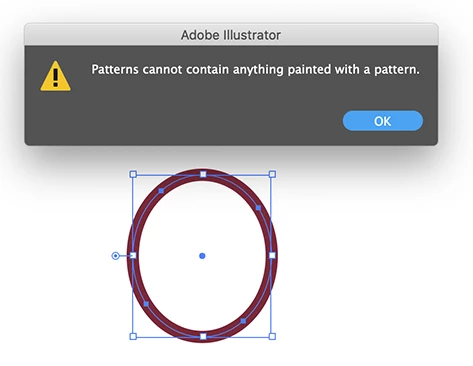
If you select your objects and choose: Object > Pattern > Make,  you will get a warning about objects containing patterns. But there are no (visible) patterns in your file.

It looks like the stroke in your red ovals contains the mystery pattern.

Select one of them and go Select > Same > Stroke color and replace it with the color used for the background. 

It should work after that.
3 replies

Ton Frederiks
Community Expert
Ton FrederiksCommunity ExpertCorrect answer
Community Expert
November 24, 2022

If you select your objects and choose: Object > Pattern > Make,  you will get a warning about objects containing patterns. But there are no (visible) patterns in your file.

It looks like the stroke in your red ovals contains the mystery pattern.

Select one of them and go Select > Same > Stroke color and replace it with the color used for the background. 

It should work after that.

RenataFMH
RenataFMHAuthor
Participating Frequently
November 25, 2022

Thank you for the help. When I go to Select - Same - Stroke color, it makes a boundary box smaller as the all pattern. What does it mean this mistake? Patterns cannot contain anything painted with a pattern. I only put color inside.

Ton Frederiks
Community Expert
Community Expert
November 25, 2022

Did you select one of those ovals and go Select > Same > Stroke color and replace it with the color used for the background?

RenataFMH
RenataFMHAuthor
Participating Frequently
November 22, 2022

No error warning, just is not possible to drag it.. it comes back to the artboard back. When I go to Object - Clipping Mask ... this option I can not do click it doesnt allow me to click in Clipping Mask.. So I do not think it has. I put in Swatches Release Clipping Mask , and the pattern put himself in Outline and, now i can not get back to my pattern

RenataFMH
RenataFMHAuthor
Participating Frequently
November 22, 2022

I look Object - Clipping Mask _ Make is possible to do click but for release not possible to do click. I do not see any clipping mask. thank you

Monika Gause
Community Expert
Community Expert
November 23, 2022

Please upload the actual AI file to Dropbox or Creative Cloud and post a link to it.

Monika Gause
Community Expert
Community Expert
November 22, 2022

Is there any error warning?

Maybe there is a clipping mask somewhere in it?