
Exit
  • Global community
    • Language:
      • Deutsch
      • English
      • Español
      • Français
      • Português
  • 日本語コミュニティ
  • 한국 커뮤니티
0

Problem with colors on Illustrator

New Here ,
Jan 14, 2021 Jan 14, 2021

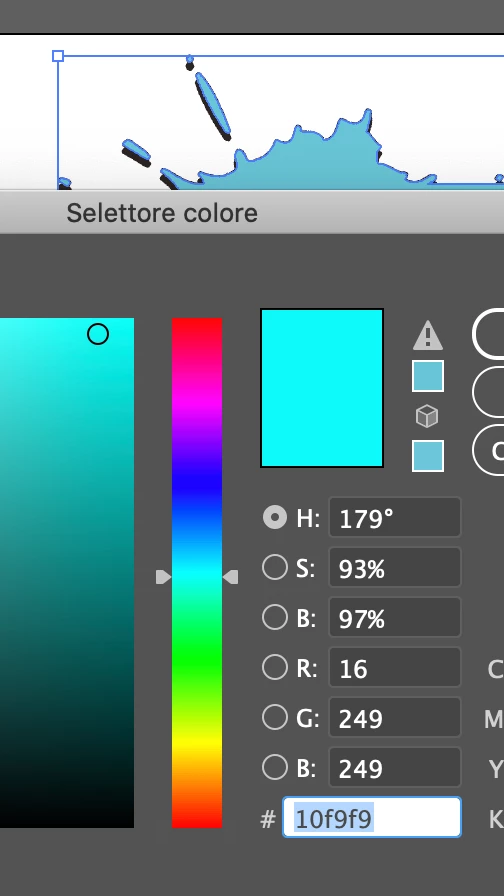
Hi! I have an issue with colors (I'm new at illustrator..).
When I choose one color the result it's different from what I expected. I chose bright colors but in output they're not. Funny thing is that if I put in there a code and then I reopen the same level, the color code it's different from what I chose.
I'm sorry I can't explain better 😕

Do anyone knows which one is the problem and how to fix it?

Thank you in advance
 

Screenshot 2021-01-14 at 09.47.46.png

TOPICS
Draw and design
596
Translate
Report
Community guidelines
Be kind and respectful, give credit to the original source of content, and search for duplicates before posting. Learn more
community guidelines

correct answers 1 Correct answer

Guide , Jan 14, 2021 Jan 14, 2021

Check your document color mode. If it's set as CMYK, you see a closest printable color (the sample is under "Attention!" sign next to the color sample rectangle)
To have colors in artwork matched to the picked color, change the Document mode to RGB.
NB! If you print the artwork, the colors brughtness will decrease like you see now.

Translate
Adobe
Community Expert ,
Jan 14, 2021 Jan 14, 2021

What is your document colour mode?

Translate
Report
Community guidelines
Be kind and respectful, give credit to the original source of content, and search for duplicates before posting. Learn more
community guidelines
New Here ,
Jan 14, 2021 Jan 14, 2021
LATEST

Was CMYK.. I changed the colour mode of the image but not of the document. Thanks!

Translate
Report
Community guidelines
Be kind and respectful, give credit to the original source of content, and search for duplicates before posting. Learn more
community guidelines
Guide ,
Jan 14, 2021 Jan 14, 2021

Check your document color mode. If it's set as CMYK, you see a closest printable color (the sample is under "Attention!" sign next to the color sample rectangle)
To have colors in artwork matched to the picked color, change the Document mode to RGB.
NB! If you print the artwork, the colors brughtness will decrease like you see now.

Translate
Report
Community guidelines
Be kind and respectful, give credit to the original source of content, and search for duplicates before posting. Learn more
community guidelines