Exit
  • Global community
    • Language:
      • Deutsch
      • English
      • Español
      • Français
      • Português
  • 日本語コミュニティ
  • 한국 커뮤니티
0

Problem with dxf centering

New Here ,
Apr 19, 2021 Apr 19, 2021

I have a problem with the export of my .dxf files.
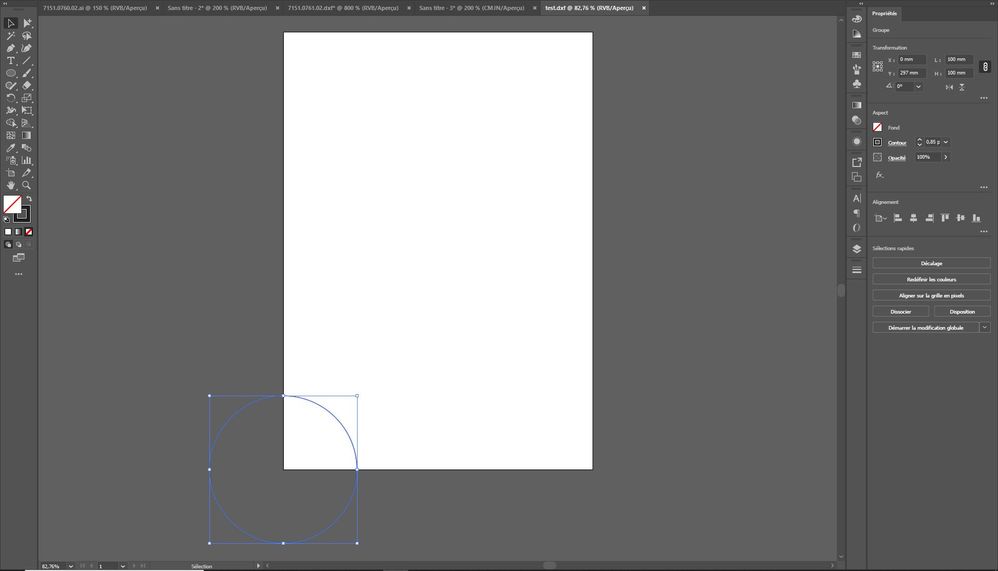
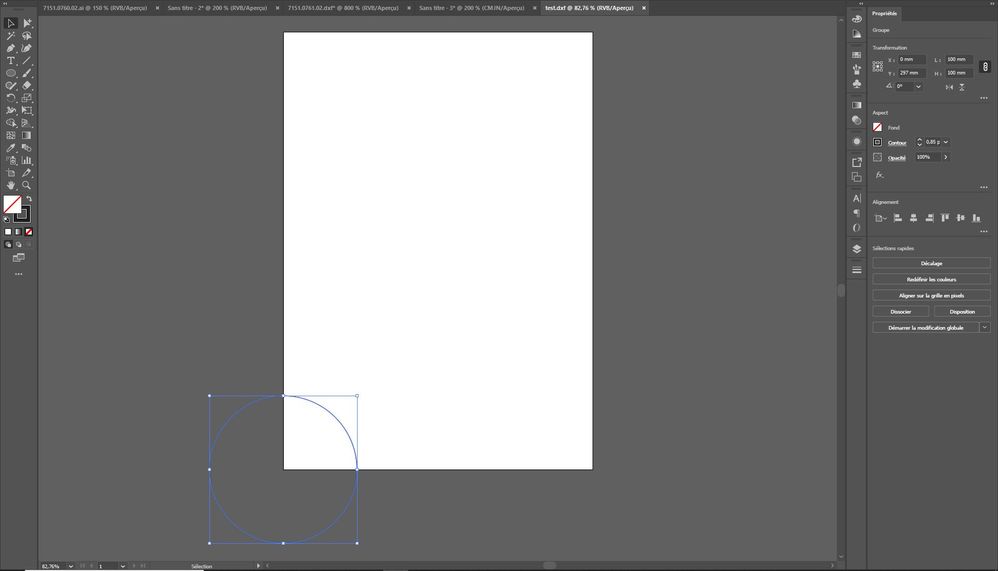
I put the drawing centered on the x and y axis but when I export it and open it again it is not centered anymore. Only one axis remains centered.

I have tried everything but nothing works.

Has anyone encountered this problem before?


Thank you in advance for your help!

TOPICS
Bug , Draw and design , Feature request , Import and export
816
Translate
Report
Community guidelines
Be kind and respectful, give credit to the original source of content, and search for duplicates before posting. Learn more
community guidelines
Adobe
LEGEND ,
Apr 19, 2021 Apr 19, 2021

What exact options do you use? Screenshots? have you verified the export in other programs?


Mylenium

Translate
Report
Community guidelines
Be kind and respectful, give credit to the original source of content, and search for duplicates before posting. Learn more
community guidelines
New Here ,
Apr 19, 2021 Apr 19, 2021

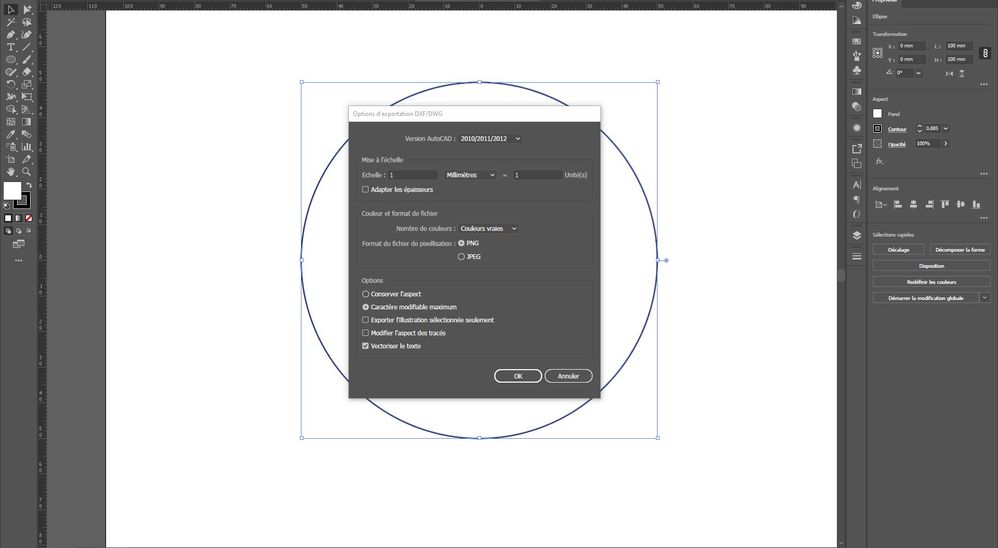
Capture 1.JPGCapture2.JPG

Translate
Report
Community guidelines
Be kind and respectful, give credit to the original source of content, and search for duplicates before posting. Learn more
community guidelines
New Here ,
Apr 19, 2021 Apr 19, 2021

Here is a screenshot of the file export and one of the dxf created. One axis is correct but not both.

Translate
Report
Community guidelines
Be kind and respectful, give credit to the original source of content, and search for duplicates before posting. Learn more
community guidelines
Community Expert ,
Apr 19, 2021 Apr 19, 2021

CAD designs exist "in space," and the formats are not paper-oriented until a given file is setup expressly for print output by associating a sheet size. The naked exchange format, .dxf, doesn't explicitly account for relative page or artboard coordinates (at least not in a way that makes sense in Illustrator). Reopening an Illustrator DXF export in Illustrator exposes this, as you've found.

Translate
Report
Community guidelines
Be kind and respectful, give credit to the original source of content, and search for duplicates before posting. Learn more
community guidelines
New Here ,
Apr 19, 2021 Apr 19, 2021

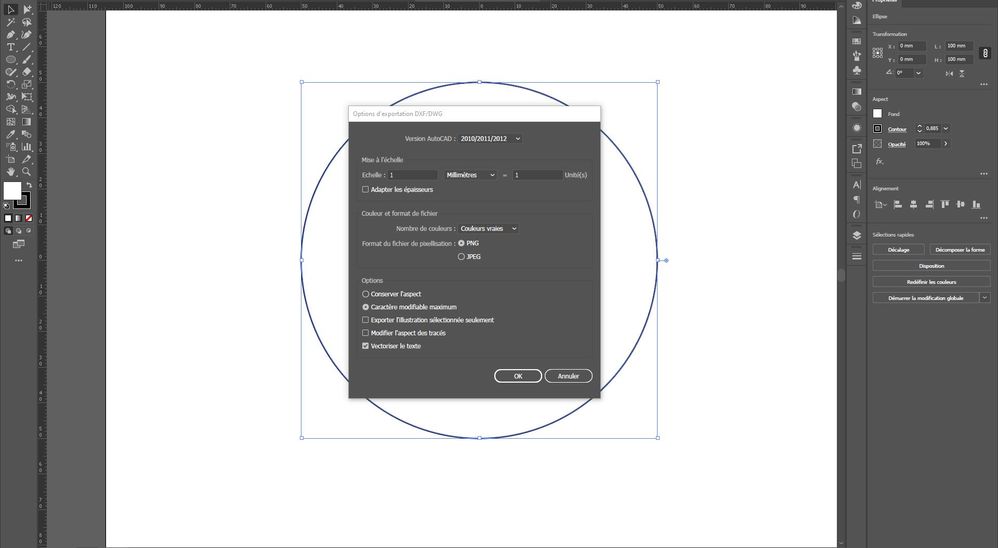
Capture2.JPGCapture 1.JPG

Translate
Report
Community guidelines
Be kind and respectful, give credit to the original source of content, and search for duplicates before posting. Learn more
community guidelines
New Here ,
Apr 19, 2021 Apr 19, 2021

Here is a screenshot of the file export and one of the dxf created. One axis is correct but not both.

Translate
Report
Community guidelines
Be kind and respectful, give credit to the original source of content, and search for duplicates before posting. Learn more
community guidelines
Community Expert ,
Apr 19, 2021 Apr 19, 2021

Maybe you can explain your objectives. If the goal is to reopen in Illustrator, DXF export is a wrong move.

Translate
Report
Community guidelines
Be kind and respectful, give credit to the original source of content, and search for duplicates before posting. Learn more
community guidelines
New Here ,
Apr 19, 2021 Apr 19, 2021
LATEST

No it is to open it in autodesk inventor.
The problem is that I have to send centered .dxf to my clients. Whether it's in illustrator or inventor, the offset is the same.
I had no problems before.

Translate
Report
Community guidelines
Be kind and respectful, give credit to the original source of content, and search for duplicates before posting. Learn more
community guidelines