Michiel NL
Participating Frequently
March 13, 2020
Question

Problem with scatter brush on curved paths
  • March 13, 2020
  • 6 replies
  • 4152 views


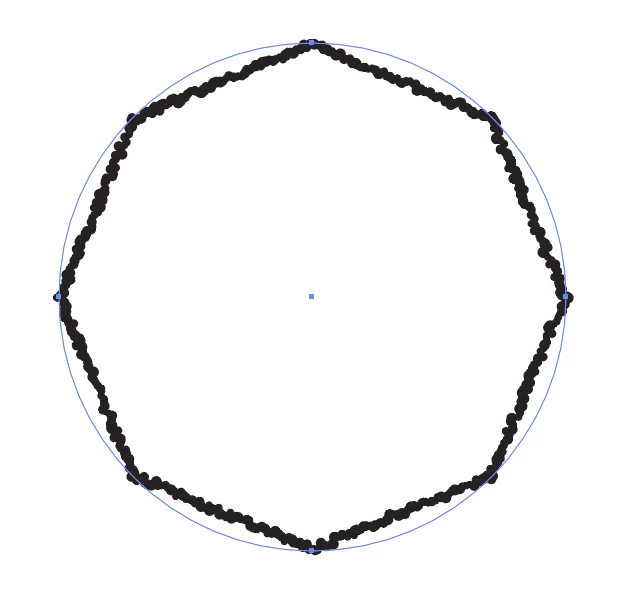
I made some different scatter brushes, but they all have the same problem. The bush doesn't follow the object paths, see image. No idea how to make them go along the blue line. Anyone any ideas?

 

    6 replies

    Participant
    March 14, 2023

    Hello, I'm having a similar problem. Did you find a solution?

    Monika Gause
    Community Expert
    Community Expert
    March 14, 2023

    Literally the post above yours fixes the issue.

    Participant
    March 15, 2023

    I think the computer will be overloaded, but the problem has been solved. Thank you very much.

    rcraighead
    Legend
    March 18, 2020

    Can we see your Appearance Panel? It's as if you had a "Transform Effect" assigned to the stroke:

    Michiel NL
    Participating Frequently
    March 18, 2020

    There are no effects in the appearance panel, BUT if i add the Zig Zag effect, and increase the number of ridges per segment, the problem is fixed.


    Thank you very much!!

    Michiel NL
    Participating Frequently
    March 18, 2020

    Ton Frederiks
    Community Expert
    Community Expert
    March 13, 2020

    Can you show the Appearance panel with the object selected?

    Michiel NL
    Participating Frequently
    March 17, 2020

    Sure


    Ton Frederiks
    Community Expert
    Community Expert
    March 17, 2020

    I caneasily reproduce it without an effect


    Now I can too 🙂

    Make a very very tiny brush.

    meganchi
    Legend
    March 13, 2020

    Have you tried making a "pattern" brush instead of a scatter brush?

    Michiel NL
    Participating Frequently
    March 17, 2020

    Yes, but that gives not the right options to create this kind of brush. It should just follow the line which it doesn't.

    Monika Gause
    Community Expert
    Community Expert
    March 13, 2020

    That circle is very small, right?

    Michiel NL
    Participating Frequently
    March 17, 2020

    It also happens with large circles or shapes

    Doug A Roberts
    Community Expert
    Community Expert
    March 13, 2020

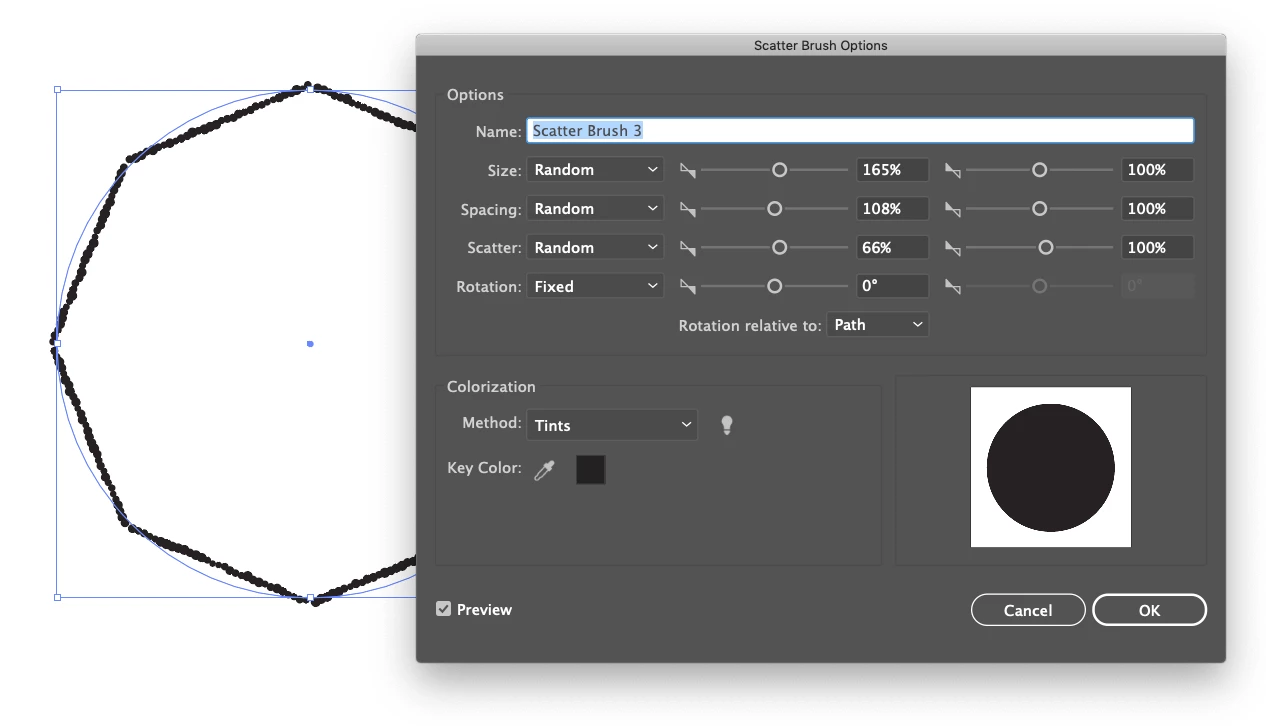
    Can you post a screenshot of your brush settings?

    Michiel NL
    Participating Frequently
    March 13, 2020

    yes, i added it to the original message

    rcraighead
    Legend
    March 18, 2020

    Long shot: Is "GPU" turned on?