
Participant
January 15, 2020
Answered

Problem with typography unicodes in Illustrator CC

  • January 15, 2020
  • 1 reply
  • 4144 views

Hi,
I have the same problem on both Photoshop and Illustrator.
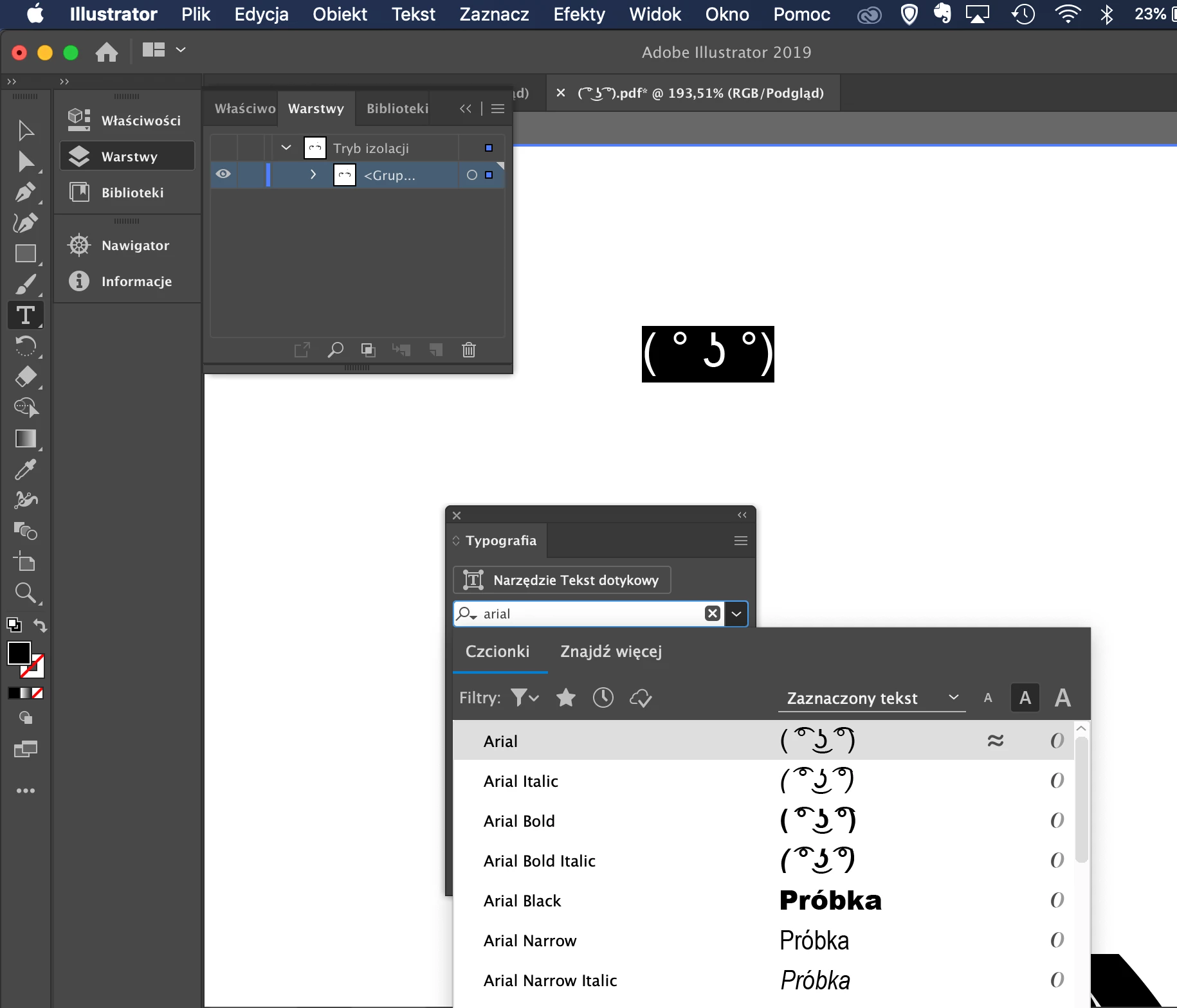
I try to paste copied characters on this example it's "lenny face".
It seems like Arial has lacking characters in Adobe programs, text editing software like Pages on Mac works fine. What is interesting, as you can see on the screenshot font preview looks good but the text field in the project does not... I spent many hours looking for the solution... nothing works. 

Arial Unicode MS also does not display these character.

Do you have any ideas?


This topic has been closed for replies.
Correct answer p4ttt

There is no universal font. Arial Unicode was a brave effort, but Microsoft eventually gave up the battle. 


Ok. I found the solution. This problem appears when you try to paste copied characters from the internet. Arial font includes this characters but does not display them when pasted. I had to do it manually. Opened the glyph tab and search Arial font and find missing characters. The only thing I do not understand is why it is not pasting correctly itself.

1 reply

Legend
January 16, 2020

Most apps will substitute a different font if the Unicode point is missing. Adobe apps do not do this, because it is the enemy of good typography. So you need to find a font containing the glyphs and use it; you cannot use other apps to check the font. 

p4tttAuthor
Participant
January 16, 2020

Thank you for your reply.
There is one thing kinda intersting for me - why font previewer displays it correctly and actual text field has missing characters? It looks like that fonts has these glyphs and there is any issue with program itself.

On the other hand, is there any universal font that will include the most of glyphs?


Thanks.

p4tttAuthorCorrect answer
Participant
January 16, 2020

There is no universal font. Arial Unicode was a brave effort, but Microsoft eventually gave up the battle. 


Ok. I found the solution. This problem appears when you try to paste copied characters from the internet. Arial font includes this characters but does not display them when pasted. I had to do it manually. Opened the glyph tab and search Arial font and find missing characters. The only thing I do not understand is why it is not pasting correctly itself.