

Karl Fabian5F97
Inspiring
October 20, 2021
Question

Problems recording an action that executes a menu command

  • October 20, 2021
  • 3 replies
  • 537 views

Hello community,


I am trying to record an action that executes a command in the menu under "File". This command comes from a plug-in which I have installed. Here is how I do that, please excuse the fact that Illustraor is in Spanish here:
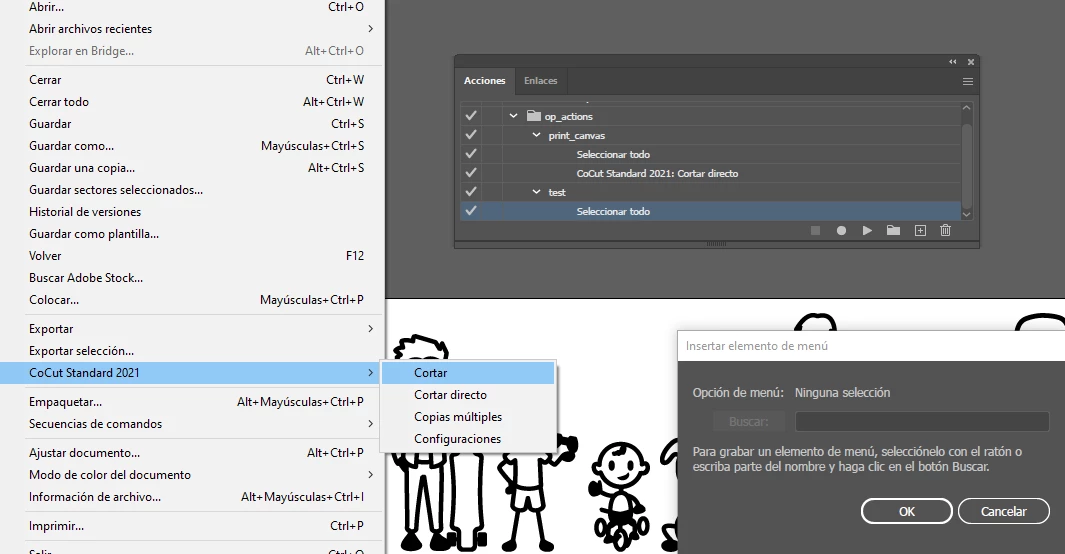
Everything up until this point is fine, however, when I then execute the action, the wrong menu action is executed! Specifically, rather than executing "Cortar" which translates to "Cut", the action executes the last item in the submenu, "Configuraciones". This is true regardless of which entry in the submenu I choose. Not sure if this could perhaps be a bug? Could anyone think of a work-around in this case?


In any case, the actual goal I have here is to execute this menu command from a script, so if there is another way of doing so without using a recorded action, please let me know.


Thank you!

This topic has been closed for replies.

3 replies

Mike_Gondek10189183
Community Expert
Community Expert
October 20, 2021

Did you get the word Cortar to get inside the field here?  If not try typing "Cor" to see if it will appear for you.

Try recording another menu items to confirm if maybe just the plug in menu items will not get added.


Also try edit >> keyboard Shortcuts

To see if you can assign one


Karl Fabian5F97
Inspiring
October 21, 2021

Hello,


Yes I do indeed get the action to seemingly be added correctly. In the following image you can see one action that has already been recorded named "print_canvas" which contains the CoCut Standard 2021: Cortar menu command.When adding the menu command I directly select it from the menu and Illustrator adds it, so it seems to be recognising the command properly. You can see in the image that I am adding a new menu command, in this case "Cortar Directo". So so far so good:

This is what I get when I run the action:

As you can see the "Configuraciones" menu, which translates to "Configurations" (I suppose that one is quite obvious), is opened. This is what should happen when executing the menu command "CoCut Standard 2021: Configuraciones"


HOWEVER, very interestingly I was able to add a keyboard shortcut that works:

When I run this shortcut the desired functionality is executed! So that works, thank you very much. I will try to see if I can use the keyboard shortcut in a script to somehow still achieve the full automation that I require.


But in any case. Any ideas what might cuase the action to act up this way?


Kurt Gold
Community Expert
Community Expert
October 20, 2021

Just to clarify: About what action are we talking?


Is it the "print_canvas" action? If so, there you are trying to execute the "Cortar directo" command by using the Insert Menu Item command in the Actions flyout menu. Is that right?


And if you run the action, this command does not get executed? Instead just the bottommost item in the "CoCut Standard 2021" submenu?


Karl Fabian5F97
Inspiring
October 21, 2021

That is correct. I am trying to execute either "Cortar" or "Cortar Directo". They get added properly to the action but when the action is run the configurations menu pops up, which is the last item in the submenu as you correctly pointed out.


What usually happens when I click on "Cortar" is that Illustrator prompts another software to open up and sends it the selected design. It does not do this, however, when I add this menu command to a recorded action. All it does, as previously mentioned, is open the configurations which is a different menu command.

Kurt Gold
Community Expert
Community Expert
October 20, 2021

Are you referring to the "Seleccionar todo" entry inside the "test" action?


I cannot see this command in the submenu of the plugin you are showing ...


Met1
Legend
October 20, 2021

That's "select all"...